AI Automation
AI Workflow Automation for Contractors: Practical Jobs to Automate First
Use ai workflow automation for contractors to capture leads, prep estimates, schedule crews, and keep risky approvals human.

ai workflow automation for contractors works best when it removes office drag without letting software make promises your crew cannot keep. Used carefully, it gives the office a cleaner handoff from the first inquiry to the final invoice. The goal is not to replace judgment.
Contractors have a different automation problem than a desk-only business. Work happens in the field, customers change their minds, photos matter, crew capacity shifts, and one bad handoff can turn into a callback or a disputed invoice.
Think of automation as a dependable coordinator for repeated admin. It should make sure leads, estimates, schedules, job notes, invoices, and follow-ups stop falling between the cracks.
| What you see | Likely cause | First move |
|---|---|---|
| Leads arrive from calls, forms, ads, and texts | No single intake record | Create one request form and route every channel into it |
| Estimates take days to send | Photos, notes, and scope details are scattered | Automate a draft packet, then approve pricing manually |
| Crew schedules change by lunchtime | Calendar, job status, and customer updates do not sync | Automate reminders and change alerts, not final dispatch decisions |
| Invoices are late or vague | Job notes are not turned into billing details | Generate invoice drafts from approved work notes |
| Customers ask the same status questions | No standard update path | Send milestone messages after booking, arrival, completion, and payment |
Where AI Workflow Automation for Contractors Actually Helps
Start with repeatable admin, not the hardest operational decision in the company. A good first workflow has a clear trigger, predictable inputs, low risk if reviewed, and a measurable result.
Lead intake is usually the cleanest place to begin. AI can summarize a call or form submission, classify the job type, ask for missing details, and create a request in your field-service system before anyone in the office retypes the same information.
Estimate preparation is another strong candidate. The automation can collect photos, property notes, service area checks, customer preferences, and prior job history into a draft packet. A person should still approve the scope, price, exclusions, tax treatment, and timeline.
Contractor Workflows Worth Automating First
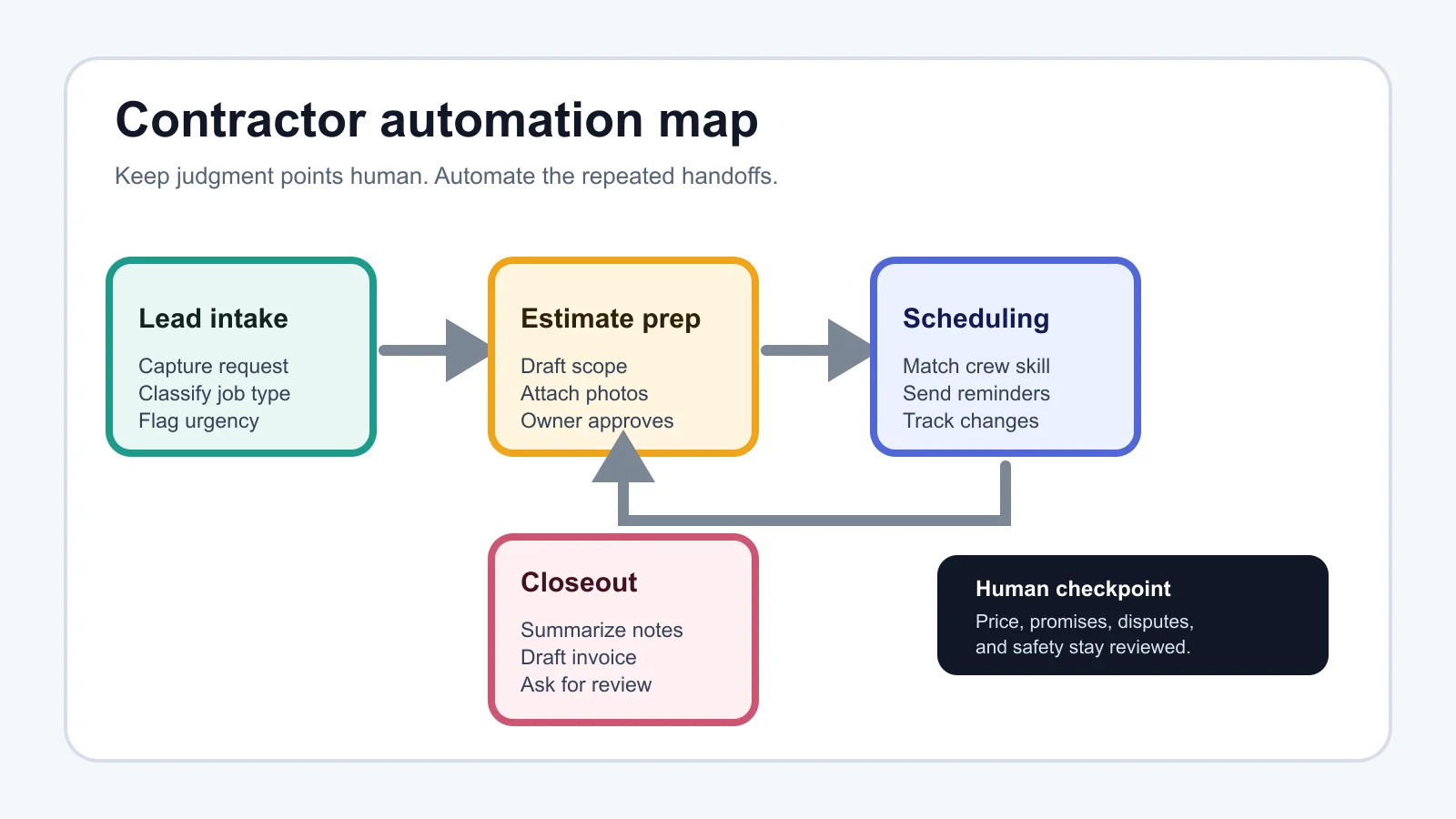
Pick one workflow from this list and run it for two weeks before adding another. Owners often get into trouble when they connect every app at once, then cannot tell which rule caused the wrong message or duplicate job.
Missed-call and inquiry capture
Use AI to answer basic questions, capture the caller's need, collect contact details, and create a work request. Jobber's own AI Receptionist documentation says it can handle new client inquiries, answer business questions, create work requests, and schedule appointments through phone calls and texts, which makes this a useful category to study before buying another front-desk tool.
Estimate follow-up
Automate reminders after a quote is sent, but stop the sequence when a customer replies. Add a human review step before offering discounts, promising start dates, or changing the scope.
Schedule reminders and change alerts
Let automation send appointment reminders, crew notifications, and customer updates. Keep final authority with dispatch when weather, job overruns, travel time, or specialty skills matter.
Job note summaries
Field notes, photos, and completion comments can be summarized into a closeout record. This helps the office prepare invoices and gives the next technician context if the customer calls again.
Invoice and review requests
After a job is marked complete, AI can draft invoice line descriptions, payment reminders, and review requests. That pairs naturally with deeper billing controls from AI invoice automation for small business.
Build the Workflow Before You Pick the Tool
Draw the handoff first. Write down the trigger, the data you need, the app that owns the record, the AI step, the approval step, and the message the customer sees.
Most contractor automations touch several systems: website forms, call tracking, email, calendar, field-service software, accounting, payments, CRM, and sometimes ads. Platforms like Zapier can connect Jobber with thousands of apps, and the official Jobber integration page lists triggers and actions such as new requests, new quotes, quote approvals, job updates, invoice events, client creation, and job creation.
For no-code setup decisions, compare this with No-Code AI Automation for Small Business and Make vs Zapier for Small Business. Those guides help when the question becomes platform fit rather than contractor process design.
Guardrails That Prevent Expensive Mistakes
Contractor workflows need stronger guardrails than a generic inbox automation. Money, property access, safety, permits, warranties, and scheduling commitments can all create real consequences.
- Never auto-approve quotes. AI can draft the scope, but a person should check pricing, exclusions, materials, and assumptions.
- Do not let AI promise emergency availability. Route urgent language to a person or a clearly defined emergency path.
- Keep customer-facing messages short. A helpful two-sentence update beats a long robotic explanation.
- Log every automated action. You need to know who or what created the request, edited the job, sent the message, or changed a status.
- Review failures weekly. Bad categories, missing fields, duplicate clients, and awkward replies are setup problems, not mysteries.
Customer support workflows need the same discipline. If complaints, refunds, warranty disputes, or account changes are common, read AI customer service automation for small business before you automate replies.
A Simple Stack for Contractor AI Automation
A practical contractor stack usually has five layers. Keep each layer boring and clear.
- Intake: phone, web form, email, ad lead, chatbot, or receptionist workflow.
- System of record: field-service platform, CRM, spreadsheet, or job board where the request lives.
- AI step: summarize, classify, draft, extract fields, or suggest the next step.
- Automation builder: Zapier, Make, n8n, native app automation, or a custom integration.
- Review and reporting: approval queue, failure log, owner dashboard, and weekly cleanup.
Local businesses with website inquiries may also need AI chatbot rules for a local business website. If your first problem is phone coverage, pair this guide with AI Receptionist for Small Business and AI Voice Agents for Small Business.
How to Measure Whether It Is Working
Use a scorecard that the owner and office manager can read in five minutes. Track response time, booked estimate rate, estimate send time, no-show rate, invoice delay, manual corrections, duplicate records, and customer complaints tied to automation.
Good ai workflow automation for contractors should reduce admin time and make the customer experience more predictable. If staff spend more time fixing the automation than doing the work, pause it and simplify the trigger.
Lead follow-up deserves special attention because it is close to revenue. The rules in AI lead follow up automation apply well to contractors: fast response helps, but spammy sequences hurt trust.
Related Playbooks for the Next Workflow
Once the contractor workflow is stable, branch into the next operational pain. Scheduling-heavy teams should read AI appointment scheduling for small business. Teams buried in admin emails should use AI email automation for small business. Sales teams with messy pipelines should start with AI CRM automation for small business.
For broader platform choices, compare best AI automation tools for small business and the pillar guide AI workflow automation for small business. The contractor version should stay more concrete because field work has tighter handoffs.
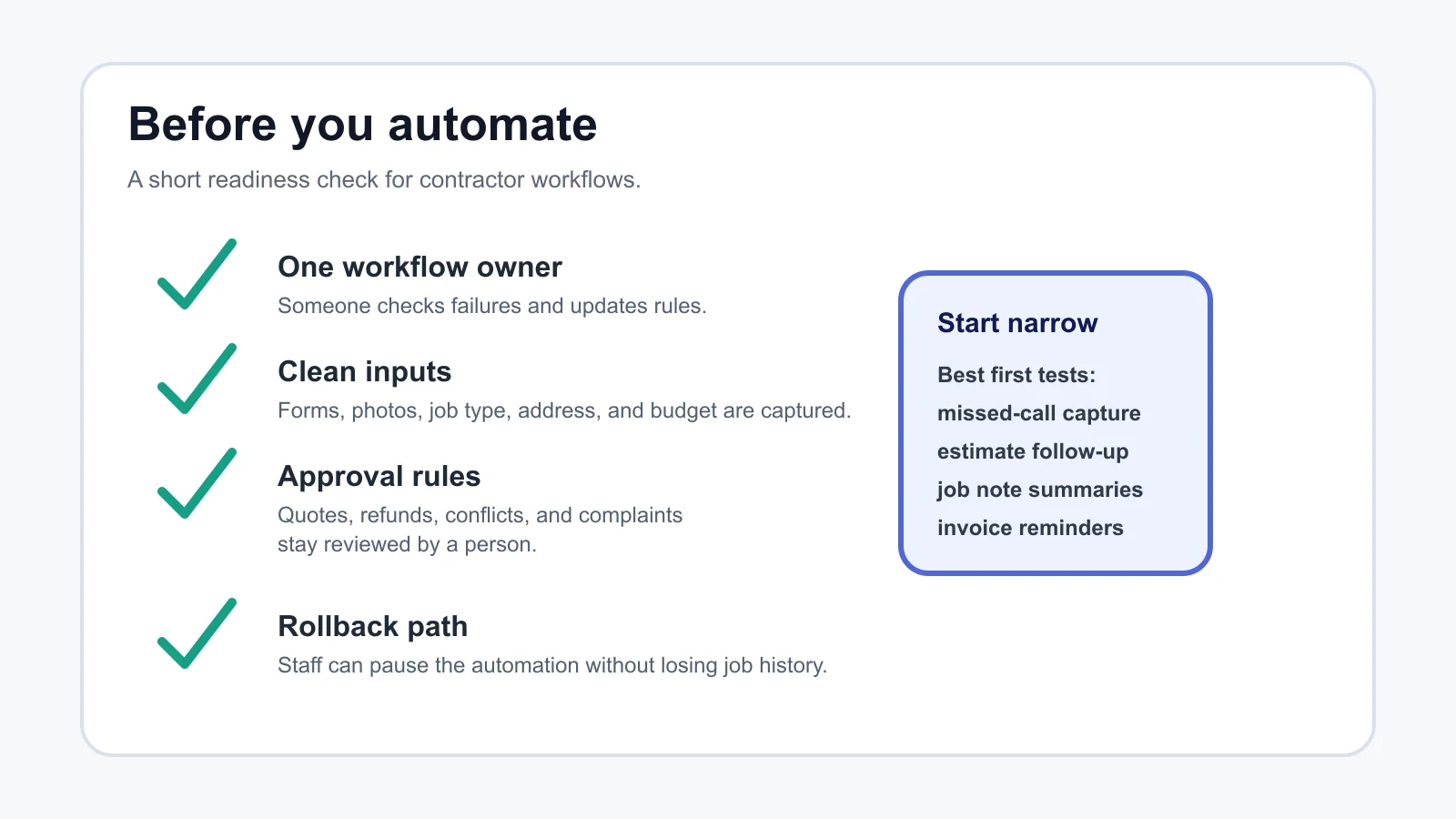
Quick Checklist
- Choose one job type, such as service calls, estimates, maintenance visits, or warranty requests.
- Write the intake fields before choosing the automation tool.
- Keep quote approval, discounts, refunds, and safety issues human-reviewed.
- Connect only the apps needed for the first workflow.
- Test with real examples, including messy calls, missing photos, and schedule changes.
- Track time saved, booked jobs, corrections, and customer complaints.
- Assign one person to own the automation rules and weekly cleanup.
Frequently Asked Questions
what is ai workflow automation for contractors?
It is the use of AI and automation rules to move contractor admin work between systems. Common examples include lead capture, job classification, estimate drafts, schedule reminders, closeout summaries, invoice drafts, and customer follow-up.
what should contractors automate first with AI?
Start with missed-call capture, website inquiry routing, estimate follow-up, or job note summaries. These workflows are frequent, measurable, and easier to review than pricing, dispatch, or complaint handling.
can AI create estimates for contractors?
AI can help draft an estimate packet from notes, photos, customer requests, and prior templates. A person should still approve price, scope, exclusions, materials, taxes, and timing before anything goes to the customer.
is Zapier good for contractor workflow automation?
Zapier can be useful when your contractor software and lead sources have supported triggers and actions. It is less useful when the workflow needs complex judgment, unusual data cleanup, or a custom field that the integration cannot access.
how much does contractor AI automation cost?
Cost depends on the tools, call volume, number of tasks, setup help, and whether you need custom integrations. Compare the monthly cost against recovered leads, faster estimates, fewer missed reminders, and less office admin.
Bottom Line
Contractors should treat automation like a crew process, not a magic layer on top of messy operations. Map the handoff, automate the repeated steps, keep judgment points reviewed, and expand only after the first workflow proves it can survive real jobs.
Official sources: Zapier Jobber integrations · Jobber AI Receptionist help.