Operations
AI Customer Intake Form Automation: A Practical Workflow for Small Teams
Use ai customer intake form automation to capture requests, route work, and keep human review before a customer waits too long.

The point of ai customer intake form automation is not to make customers talk to a machine for no reason. It is to collect the right details the first time, summarize the request cleanly, and send it to the person who can actually solve it.
Small teams usually feel this pain before they have a formal operations department. One owner is reading emails, one admin is copying notes into a spreadsheet, and someone is still asking the customer for the same missing detail two days later.
| What you see | Likely cause | First move |
|---|---|---|
| Customers leave half-empty forms | The form asks too much before trust is built | Split required fields from nice-to-have fields |
| Requests sit in one inbox | No category or owner is assigned automatically | Create routing rules before adding AI |
| AI summaries sound confident but wrong | The model has no validation step | Require source fields and human review |
| Team members ignore the automation | The handoff does not match real work | Map the current process with the people using it |
Start with the intake problem, not the tool
Good intake automation begins with a boring question: what keeps getting missed? For many small businesses, the answer is not a lack of software. It is unclear ownership, vague form fields, and too many places where requests can arrive.
Write down the five most common request types. A home service company might list quote requests, reschedules, warranty questions, complaints, and invoice issues. An agency might list lead inquiries, onboarding details, asset requests, revisions, and billing questions.
Once the categories are clear, AI has a useful job. It can read the free-text answer, classify the request, and suggest the next step. Without categories, ai customer intake form automation just creates polished confusion.
Build the form around routing fields
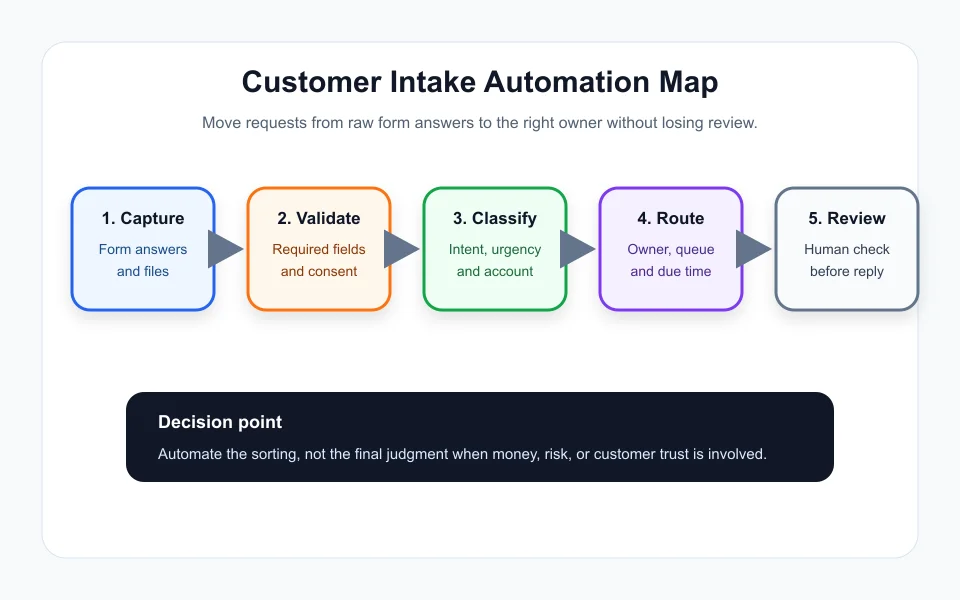
Every field should earn its place. Ask for name, email, phone, request type, preferred contact method, deadline, account number if needed, and a short description. Add file upload only when your team truly uses the files.
Use conditional fields when the next question depends on the first answer. If a customer chooses billing, ask for invoice number. If they choose support, ask for device, order, or service details. Shorter forms get completed more often.
A helpful companion to this setup is AI document automation for small business, because intake often feeds contracts, estimates, or support notes later in the process.
Use AI for summaries, categories, and missing-field checks
The safest early win is summarization. AI can turn a long customer message into a short internal note with request type, urgency, promised deadline, and missing information. That note should point back to the original form response.
Next, add classification. A model can label requests as sales, support, scheduling, billing, or complaint. Keep the labels simple. If a request could fit two categories, send it to a review queue instead of pretending the answer is obvious.
Finally, add a missing-field check. If the customer forgot the address, order number, or budget range, the workflow can draft a polite follow-up. That is where AI CRM automation starts to pay off.
Route work with rules before you add agents
Rules still matter. If the request type is billing, send it to finance. If the urgency is high and the customer is active, notify support. If a new lead asks for pricing, send it to sales and create a follow-up task.
Only after those rules work should you add a more advanced agent. An AI agent can draft replies, prepare internal notes, and suggest next steps, but the workflow should make clear who approves the action.
For customer-facing responses, borrow the same safety thinking used in customer service automation guardrails. Fast is useful. Wrong and fast is expensive.
Test the workflow with real old requests
Before turning anything on, run twenty old intake requests through the workflow. Check whether the category is right, whether the summary is fair, and whether the next action would have helped the team.
Look for awkward failures. Maybe complaints are being treated as support tickets. Maybe quote requests with urgent language are going to the wrong queue. Maybe AI is writing too much when the team only needs three bullets.
A simple review set gives you a baseline. If the workflow gets fewer than seventeen of twenty requests mostly right, tighten the form and rules before putting it in front of new customers.
Measure the boring numbers
Track time to first response, percent of forms missing required information, number of manual copy-paste steps, and requests routed to the wrong owner. Those numbers tell you whether ai customer intake form automation is actually reducing work.
Tie intake to downstream tools only when the first version is stable. A good next step might be an AI receptionist for phone requests, but the form workflow should be clean first.
Quick Checklist
- List the five request types that arrive most often.
- Remove form fields that nobody uses.
- Separate routing fields from optional context fields.
- Require AI to return confidence and missing-field notes.
- Send low-confidence or sensitive requests to human review.
- Test with at least twenty old requests before launch.
- Track wrong-route rate and time to first response.
Bottom Line
AI customer intake form automation works best when it feels like an operations helper, not a customer obstacle. Keep the form short, make the routing rules visible, and let people approve the decisions that carry real customer risk.
Frequently Asked Questions
what is ai customer intake form automation
It is a workflow that collects customer details, checks required fields, summarizes the request, assigns the right category, and routes the work to the correct person or system.
can ai fill out intake forms for customers
AI can help suggest answers, summarize long messages, and turn messy notes into structured fields, but customers should still confirm the information before it is used.
what should a customer intake form include
A useful form includes contact details, request type, urgency, budget or account context, files, consent language, and one open-ended field for the customer to explain the situation.
does ai intake automation replace customer support
No. It reduces triage work and speeds up handoff, but a person should review sensitive requests, complaints, refunds, legal issues, and anything that affects customer trust.
which businesses need intake automation first
Service businesses, agencies, clinics, contractors, consultants, and support teams usually feel the benefit first because they deal with repeated requests that arrive through many channels.
Official sources: OpenAI tools documentation · Microsoft Power Automate approvals documentation. Check current program pages before applying.