Operations
AI Document Automation for Small Business: What to Automate First
Use ai document automation for small business to extract fields, route files, control risk, and cut admin work without overbuying.

ai document automation for small business is not about replacing every admin task with a giant system. It is about picking the documents that eat time, extracting the same fields every week, and adding review gates so bad data does not quietly move through the business.
Start small. One document type done well is more valuable than a flashy workflow that nobody trusts after the first mistake.
| What you see | Likely cause | First move |
|---|---|---|
| Invoices wait in an inbox for days | No intake owner or routing rule | Create one shared intake folder and a daily review step |
| Staff retype totals into spreadsheets | Data is trapped in PDFs or scans | Extract only the fields needed for the next decision |
| Approvals are inconsistent | No confidence threshold or exception rule | Send low-confidence results to a human before action |
| Documents are hard to find later | File names and folders vary by person | Use a naming rule and archive metadata automatically |
What document automation should do first
Estimated time: 30 to 60 minutes. Choose one document family before choosing software. Good first targets are vendor invoices, customer intake forms, signed quotes, service agreements, receipts, purchase orders, onboarding forms, or refund requests.
Pick a workflow where the decision is repeated and the fields are predictable. If every document needs a manager to interpret unusual context, keep the first version semi-manual.
How AI document automation for small business works
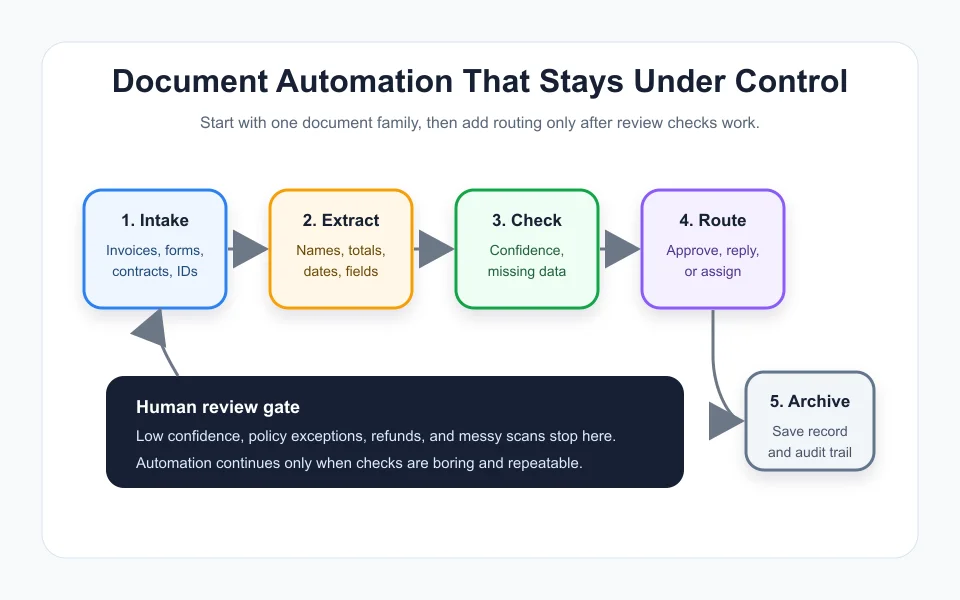
Estimated time: 20 minutes to map. Most small-business setups follow the same basic path: capture the document, extract fields, check confidence, route the result, and archive the record. The exact app matters less than the review design.
For example, an invoice workflow might capture PDFs from a shared inbox, extract supplier name, invoice number, date, subtotal, tax, and total, then flag anything missing or unusual. Clean results go to the bookkeeping queue. Risky results go to a human.
That review gate is the part people skip. Do not skip it. Small errors in documents can become payment mistakes, customer confusion, or messy records at tax time.
Best first use cases for lean teams
Estimated time: 45 minutes to score. Rank possible workflows by frequency, field consistency, value, and risk. The best first project is boring, repetitive, and easy to verify.
- Invoice intake: extract vendor, due date, total, tax, purchase order, and approval owner.
- Lead forms: classify service type, urgency, location, budget, and required follow-up.
- Service agreements: capture client name, start date, renewal date, terms, and missing signatures.
- Receipts: pull date, merchant, category, total, and employee name for bookkeeping review.
- Customer support attachments: identify order number, issue type, photos, and escalation trigger.
- Hiring or onboarding forms: check whether required fields and files are complete before the next step.
If you are already automating admin workflows, connect document handling to your broader AI workflow automation for small business plan. Documents are often the input layer for invoices, CRM cleanup, support, and scheduling.
Build the workflow in five steps
1. Define the trigger
Estimated time: 10 minutes. Decide where documents enter the business. That might be an email address, upload form, shared drive folder, CRM attachment, or phone photo. Do not let every employee invent their own intake path.
2. Name the fields that matter
Estimated time: 20 minutes. Pull only the fields needed for the next action. Invoice number and total may matter. A paragraph of legal boilerplate probably does not, at least not in version one.
Write each field with a clear format. Dates, totals, tax, order numbers, client names, and approval owners should not be free-form guesses.
3. Set confidence and exception rules
Estimated time: 20 minutes. Decide what happens when extraction is uncertain. A simple rule might be: any missing total, duplicate invoice number, unreadable scan, refund request, legal language, or new vendor goes to manual review.
4. Route the clean result
Estimated time: 30 minutes. Clean results can create a task, update a spreadsheet, attach a file to a CRM record, notify a manager, or send a draft reply. Keep the first route simple and observable.
Billing-heavy teams should compare this with an invoice automation process. Sales teams may connect extracted lead details to CRM cleanup or lead follow-up.
5. Archive the original and the decision
Estimated time: 15 minutes. Keep the original file, extracted fields, review status, owner, and timestamp together. If the business later asks why something was paid, rejected, escalated, or updated, the answer should be visible.
Tool choices without overbuying
Estimated time: 45 minutes to shortlist. Small businesses usually do not need an enterprise document platform on day one. Start with the tools you already pay for, then add specialist software only when volume, compliance, or accuracy demands it.
A practical stack might include an intake form, shared drive, spreadsheet, automation builder, and AI extraction step. If you are comparing automation layers, use the Make vs Zapier for small business guide and the list of best AI automation tools by workflow.
For deeper extraction and classification, larger platforms such as Microsoft AI Builder or Google Cloud Document AI describe document-processing features for reading, classifying, and extracting structured information from documents. That does not mean you need them first. It means the category is mature enough that you can start small and grow into stronger tooling later.
Controls that keep the system trustworthy
Estimated time: 30 minutes. Add controls before you add speed. The fastest workflow is useless if staff do not trust the output.
- Access control: only approved people can view sensitive documents.
- Data minimization: extract the fields needed for work, not every possible detail.
- Review thresholds: uncertain or high-risk documents pause for human review.
- Duplicate checks: invoice numbers, customer IDs, and contract names are checked before routing.
- Audit trail: every automated action records the file, result, owner, and time.
- Change log: prompt, field, and routing changes are documented.
Operations teams building several automations should document the rules as SOPs. The guide on building better small-business SOPs with AI fits well here.
Common mistakes to avoid
Estimated time: 15 minutes to review. The first mistake is automating a messy process before anyone agrees how it should work. AI will make the mess look tidy, then the team will blame the tool when the hidden rule breaks.
The second mistake is extracting too much. If a field does not change the next action, skip it in version one.
The third mistake is pushing every result straight into another system. Start with draft tasks or review queues. Once the exception rate is low, you can automate the next step with more confidence.
If the document workflow touches customer replies, review your customer service guardrails. If it touches inbound calls or intake, compare it with AI receptionist safety rules and AI chatbot guardrails for local business websites.
Mini rollout plan
Estimated time: 2 weeks. Run the first workflow as a pilot, not a grand launch. A small pilot gives you real documents, real exception rates, and real team feedback.
- Day 1: pick one document family and write the field list.
- Day 2: collect 20 to 50 sample documents, including messy ones.
- Day 3: build extraction and manual review steps.
- Day 4: test results against the original files.
- Week 2: route clean results to one downstream task and keep exceptions manual.
That rollout is not glamorous. It works because everyone can see the weak spots before automation gets more authority.
Quick Checklist
- Pick one repeated document family, not every document in the company.
- Define the intake location and stop side-channel submissions.
- List only the fields needed for the next business decision.
- Create confidence, duplicate, and exception rules before routing.
- Send risky documents to manual review, especially money and legal items.
- Archive the original file, extracted fields, and review decision together.
- Measure time saved, exception rate, and staff trust before expanding.
Document automation pays off when it removes repetitive reading and typing without hiding judgment. Start with one controlled workflow, prove that the data is reliable, then connect it to the rest of your small-business automation stack.
Frequently Asked Questions
what is document automation for small business
Document automation uses software to capture documents, extract important fields, route the result, and store a record. For small businesses, the best first use is usually a narrow workflow such as invoices, intake forms, receipts, or service agreements.
can ai read invoices and forms
Yes, AI document tools can read many invoices and forms, especially when scans are clear and fields are predictable. You still need human review for low-confidence results, unusual layouts, duplicates, and high-risk decisions.
what documents should a small business automate first
Start with frequent, structured documents that cause manual data entry: vendor invoices, lead forms, receipts, signed quotes, purchase orders, onboarding forms, and support attachments.
is document automation safe for customer data
It can be safe when access control, data minimization, review thresholds, audit trails, and approved tools are in place. Avoid putting sensitive customer or employee records into tools that are not approved for that data.
do I need expensive software for document automation
No. Many small businesses can pilot with existing forms, shared folders, spreadsheets, and no-code automation tools. Specialist document platforms become more useful when volume, accuracy needs, or compliance requirements grow.
Official sources: Microsoft AI Builder overview · Google Cloud Document AI documentation.