AI Automation
AI Automation for Real Estate Agents: Lead Follow-Up, Listings, and Safer Workflows
Use ai automation for real estate agents to handle leads, showings, listings, and follow-up while keeping compliance review in place.

AI automation for real estate agents is most useful when it removes repetitive admin without pretending to replace local judgment. A good workflow can sort new inquiries, summarize client needs, prepare listing tasks, draft follow-up, and remind the agent what needs attention next.
The best use of ai automation for real estate agents is not a fully automatic salesperson. Real estate still involves trust, regulated language, fair-housing care, local market knowledge, and contract review. AI should speed up the prep work while the agent stays responsible for advice.
This guide gives a practical automation map for solo agents and small teams that want faster response times without letting tools create sloppy promises.
| What you see | Likely cause | First move |
|---|---|---|
| New leads go cold | Replies depend on memory or manual CRM checks | Create a first-response and follow-up sequence |
| Listing prep takes too long | Photos, descriptions, and tasks live in different places | Centralize listing inputs before drafting |
| AI copy sounds risky | No compliance review step exists | Require agent approval before publishing |
| Past clients are forgotten | Database nurture has no rhythm | Automate reminders and personal touchpoints |
Automate lead intake before anything else
Lead intake is the cleanest starting point. When a buyer, seller, renter, investor, or referral arrives, the system should capture source, intent, location, budget range, timeline, financing status, and preferred contact method. That gives the agent a usable summary instead of a vague notification.
AI automation for real estate agents works better when lead forms and CRM fields are consistent. If the source data is messy, the AI will make a messy situation look polished.
This mirrors the same logic behind customer intake automation. Start with structured fields, then let AI summarize and route the next action.
Use AI for follow-up drafts, not final advice
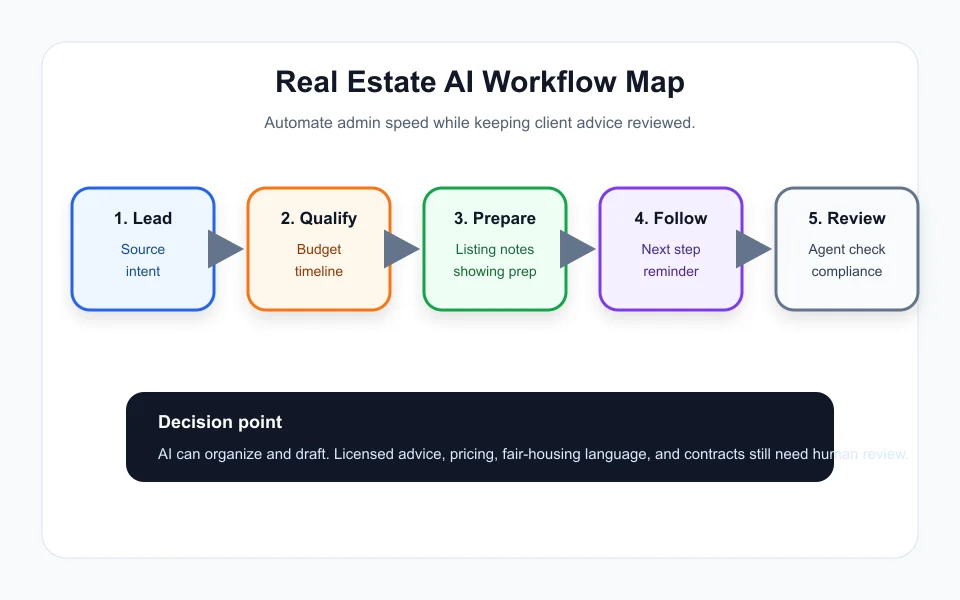
Follow-up is where many agents lose warm leads. AI can draft a quick response, recap the client request, suggest next questions, and schedule reminders after a showing or valuation conversation.
The guardrail is simple: AI can draft, but the agent approves. Do not let automation send pricing advice, legal language, fair-housing-sensitive wording, or negotiation messages without review.
For a deeper follow-up pattern, connect this article with AI lead follow-up automation. The goal is not spam. It is timely, relevant, human-reviewed contact.
Build listing workflows around reusable checklists
Listing work has repeatable pieces: seller questionnaire, repair notes, photo prep, room highlights, neighborhood context, showing instructions, disclosure reminders, marketing copy, and open-house follow-up.
AI automation for real estate agents can convert those inputs into draft descriptions, social captions, email blurbs, and task lists. The agent should still verify facts, measurements, included features, schools, fees, and claims before anything goes public.
If you already build service proposals or listing presentations, the structure is similar to AI proposal automation for contractors: collect facts, draft from approved blocks, review promises, then send.
Choose no-code tools before custom systems
Most real estate teams do not need a custom AI platform at the start. A practical stack may use a form, CRM, calendar, email tool, document templates, and an automation builder that sends data between them.
Start with the no-code route in no-code AI automation stack. If the process saves time and stays clean, then decide whether a larger CRM or dedicated AI tool is worth paying for.
Keep auditability in mind. You should know what the AI drafted, what the agent changed, and what finally went to the client.
Measure response time and trust signals
Track lead response time, follow-up completion, showing conversion, listing prep time, and client questions answered without rework. Those numbers show whether the automation is helping.
Also track mistakes. If AI creates repeated wording issues, overpromises, or incorrect summaries, tighten the prompt, source fields, or approval gate.
Customer-facing workflows should follow the same safety idea as customer service automation guardrails: automate support around the human, not instead of the human.
Quick Checklist
- Use ai automation for real estate agents first on lead intake and follow-up.
- Separate buyer, seller, renter, and investor intake paths.
- Require agent review for advice, pricing, listing copy, and contract language.
- Use approved copy blocks for common messages.
- Connect CRM, calendar, email, and task reminders before buying complex software.
- Track response time, follow-up completion, and error rate.
- Keep a record of AI drafts and human edits.
Bottom Line
AI automation for real estate agents can create real leverage when it handles intake, reminders, summaries, and draft content. Keep local expertise, compliance review, pricing, and client advice with the agent.
Frequently Asked Questions
What can real estate agents automate with AI?
Agents can automate lead intake, CRM summaries, follow-up drafts, listing prep checklists, showing reminders, and past-client nurture tasks.
Should AI send messages to real estate clients automatically?
AI can draft messages, but client-facing advice, pricing, contract language, and listing claims should be reviewed by the agent before sending.
Is ai automation for real estate agents expensive?
It can start cheaply with forms, CRM fields, document templates, and a no-code automation builder before moving to larger software.
Can AI write listing descriptions?
AI can draft listing descriptions from verified facts, but the agent should check every feature, measurement, location claim, and compliance-sensitive phrase.
What is the first workflow to build?
Start with lead intake and follow-up because it is measurable, repetitive, and easy to improve without changing the whole business.
Official sources: OpenAI tools documentation · NAR artificial intelligence resources. Check current program pages before applying.