Operations
AI Proposal Automation for Contractors: Faster Quotes Without Sloppy Scope
Use ai proposal automation for contractors to draft faster quotes while keeping scope, pricing, exclusions, and review under control.

AI proposal automation for contractors is useful when it speeds up quoting without pretending that every job is the same. The best setup captures request details, organizes scope, drafts proposal language, and still forces a human review before anything goes to the customer.
The risk is not that AI writes a sentence badly. The real risk is that ai proposal automation for contractors makes an unclear scope look polished. A faster proposal can still lose money if it promises work, materials, warranty terms, or timing that the crew never approved.
Use this guide as a practical build map. It is designed for local contractors, remodelers, installers, cleaning companies, landscapers, and other field-service teams that want faster quotes while keeping control over price and risk.
| What you see | Likely cause | First move |
|---|---|---|
| Quotes take days to send | Scope notes are scattered across calls, photos, and texts | Centralize intake before drafting |
| AI drafts sound confident but vague | There is no proposal template with exclusions | Lock the scope blocks first |
| Follow-up is inconsistent | The quote send step is not connected to reminders | Add owner, due date, and reply status |
| Pricing mistakes appear late | No human approval gate exists | Require review before the proposal leaves |
Start with a better intake, not a faster writer
Proposal automation starts before the proposal. If the intake form only asks for a name, phone number, and vague project description, the AI has nothing reliable to organize. A stronger intake asks for property type, project area, measurements when possible, photos, preferred timing, budget range, decision maker, and any known constraints.
This is where ai proposal automation for contractors connects naturally with customer intake automation. The intake should classify the job, flag missing information, and route complex requests to an estimator before a quote draft is created.
A simple rule works well: the AI may summarize the request and identify missing fields, but it should not invent measurements, products, permits, warranties, or site conditions.
Build proposal blocks the AI can reuse safely
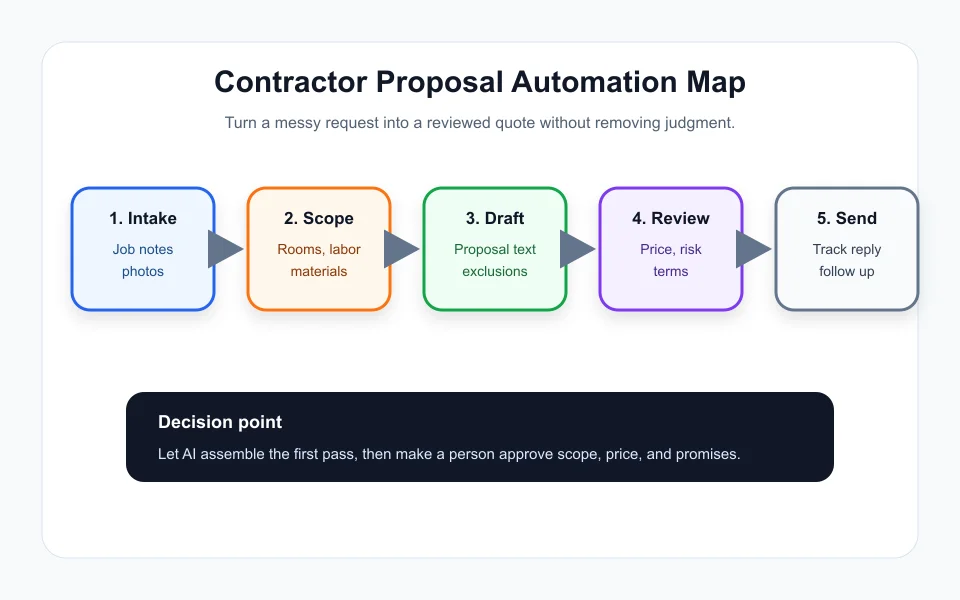
The fastest systems use controlled blocks. Create approved paragraphs for common job types, prep work, customer responsibilities, exclusions, payment schedule, change orders, and cleanup. Then the AI assembles from those blocks instead of writing every clause from scratch.
This makes ai proposal automation for contractors more predictable. The model can still personalize the opening, summarize the requested work, and arrange the proposal, but the legal and operational language stays close to what the business already accepts.
For teams that already manage paperwork, connect this with document automation for small business. Proposal language, invoice notes, and completion paperwork should not contradict each other.
Separate price math from proposal language
AI can explain pricing, but it should not be the only place where price is calculated. Keep line items, labor assumptions, material quantities, margin rules, discount limits, and tax handling in a spreadsheet, CRM, estimating tool, or approved calculator.
A healthy ai proposal automation for contractors workflow asks the AI to describe the approved estimate in plain language. It should not silently change the number because the customer sounded price-sensitive or because the prompt asked for a cheaper option.
For recurring work, add a price-review rule. Any proposal above a threshold, below margin, missing photos, or using unusual materials should pause for manager approval. This mirrors the approval logic described in modern workflow tools, including approval steps used in business automation systems.
Add follow-up automation after the quote is sent
The proposal is only one part of the revenue workflow. After the quote goes out, the system should schedule a first follow-up, mark replies, capture objections, and remind the owner when a warm lead goes quiet.
This is where AI lead follow-up automation matters. A contractor does not need twenty messages. A clean sequence with one helpful reminder, one scope clarification, and one close-the-loop note is usually enough.
If your team uses no-code tools, compare the builder fit before creating a complicated chain. The decision in Make vs Zapier for small business comes down to how much logic, branching, and record updating your proposal process needs.
Keep a human approval gate where promises happen
The strongest ai proposal automation for contractors process is not fully hands-off. It is faster because the draft is ready for review, not because review disappears. A qualified person should check scope, price, schedule, exclusions, payment terms, warranty language, and anything that sounds like a guarantee.
Once the workflow is stable, you can extend it into AI workflow automation for contractors across scheduling, job packets, completion notes, and invoicing. The proposal becomes one connected piece instead of a one-off document.
Track a few basic numbers: lead-to-quote time, revision rate, accepted quote rate, missed follow-up count, and gross margin by job type. If speed improves but margins drop, the automation needs tighter rules.
Quick Checklist
- Use ai proposal automation for contractors only after intake fields are clean.
- Create approved scope, exclusion, warranty, and payment blocks.
- Keep price calculations outside the AI draft text.
- Require human review before sending quotes with money or warranty promises.
- Connect sent proposals to simple follow-up reminders.
- Track revision rate and accepted quote rate after launch.
- Review risky proposals manually even when the draft looks polished.
Bottom Line
AI proposal automation for contractors works best as a speed layer around a disciplined quoting process. Use AI to organize, draft, and follow up, but keep price math, scope promises, and final approval in human hands.
Frequently Asked Questions
Can AI write contractor proposals automatically?
Yes, AI can draft contractor proposals from intake details and approved templates, but a human should approve scope, price, exclusions, and schedule before sending.
What should ai proposal automation for contractors include?
It should include intake capture, scope blocks, estimate references, proposal drafting, human approval, customer delivery, and follow-up tracking.
Can AI calculate contractor pricing?
AI can explain pricing, but the actual estimate should come from approved calculators, estimating software, or reviewed line items.
What is the biggest risk of proposal automation?
The biggest risk is a polished proposal that includes the wrong scope, warranty, or price because the source information was incomplete.
Should small contractors use a no-code tool for this?
Many small contractors can start with forms, documents, and a no-code automation builder before moving into a dedicated proposal platform.
Official sources: OpenAI tools documentation · Microsoft Power Automate approvals documentation. Check current program pages before applying.