Operations
Build Better Small-Business SOPs With AI
Use an ai sop generator for small business to create clear SOPs from real workflows, then review, test, and publish them.

An ai sop generator for small business can turn rough notes, screenshots, or a recorded task into a first draft fast. The draft is only the beginning, though. A useful SOP still needs the right inputs, a clear owner, a test run, and a place where the team can actually find it.
Start with one recurring task that causes delays, rework, or owner dependency. If the process is fuzzy in real life, AI will usually make the fuzziness look cleaner than it is.
| What you see | Likely cause | First move |
|---|---|---|
| Everyone handles the task differently | No agreed source of truth | Document the current best version first |
| The AI draft sounds generic | Weak inputs and missing examples | Add screenshots, real edge cases, and tool names |
| New hires still ask the owner | The SOP skips judgment calls | Add decision points and escalation rules |
| The SOP gets stale quickly | No owner or review cycle | Assign one owner and a monthly review date |
What you need before you start
Estimated time: 20 to 35 minutes. Gather the raw material before opening any generator. You want the AI to organize real work, not imagine a perfect version of your business.
- The name of the process and the business outcome it supports.
- Who performs the work, who approves it, and who receives the output.
- Tools involved, including apps, inboxes, forms, spreadsheets, and templates.
- Inputs needed to begin and the exact definition of "done."
- Two or three messy examples, including one exception or failure case.
- Security, privacy, refund, compliance, or customer-communication limits.
How to use an ai sop generator for small business
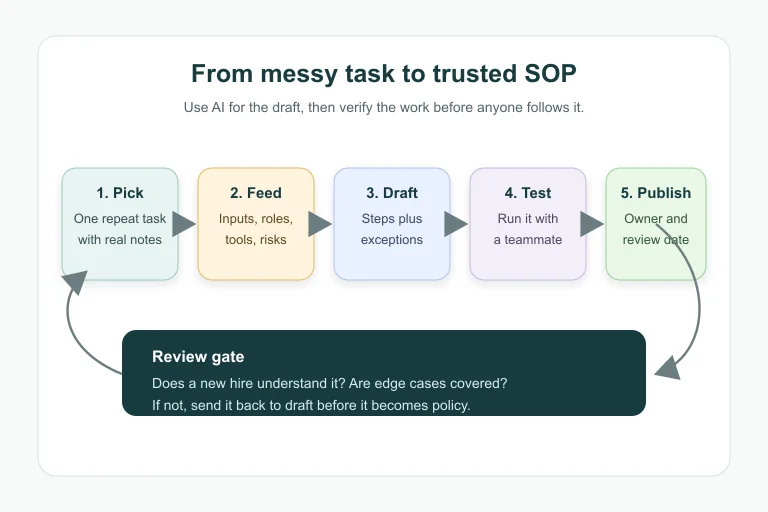
Step 1: Choose a process worth documenting
Estimated time: 10 minutes. Pick a task that repeats at least weekly and creates friction when the owner is busy. Good candidates include invoice follow-up, lead intake, appointment rescheduling, quote review, refund handling, content publishing, inventory checks, or support triage.
Avoid starting with a rare or politically sensitive process. You need a quick win that proves the method and gives your team confidence.
Step 2: Write the process brief before the AI prompt
Estimated time: 15 minutes. Give the generator a short brief with the role, goal, trigger, inputs, tools, decision points, output, and escalation rule. Plain language works better than a vague command like "write an SOP for customer service."
Use this structure: "Write an SOP for [role] to complete [task] when [trigger] happens. Inputs are [list]. Tools are [list]. The output is [definition of done]. Escalate when [risk]. Include quality checks and common mistakes."
Step 3: Ask for the first draft in a usable format
Estimated time: 10 minutes. Request a format your team will follow: purpose, scope, owner, tools, prerequisites, steps, quality checks, exceptions, escalation, and review date. Ask for short steps with one action per line.
For customer-facing work, tell the AI to include approved phrases and banned phrases. For internal work, ask for checkpoints that prevent skipped steps.
Step 4: Add judgment calls the generator cannot know
Estimated time: 20 minutes. Read the draft like a new employee would. Mark every sentence that assumes tribal knowledge: "confirm the account," "send the usual email," "check the folder," or "ask the manager."
Replace those phrases with exact actions. If the step depends on a business rule, turn it into a decision point: "If the invoice is less than 15 days overdue, send reminder A. If it is 15 to 30 days overdue, send reminder B and tag the owner."
Step 5: Test the SOP with someone who did not write it
Estimated time: 20 to 45 minutes. Ask a teammate to follow the SOP while you watch silently. Every question they ask is a missing instruction, unclear term, or weak decision point.
Honestly, this is where most AI-generated SOPs fail. They look tidy, but nobody has tried to run the business from them yet.
Step 6: Publish it where work already happens
Estimated time: 15 minutes. Store the approved SOP in one visible place: your knowledge base, shared drive, project-management tool, CRM notes, or operations wiki. Add the owner, last reviewed date, next review date, and a change log.
Connect the SOP to adjacent workflows. If the process touches booking, review your appointment scheduling automation. If it touches billing, compare it with your invoice automation process.
Prompt template for a stronger SOP draft
Estimated time: 10 minutes. Use a prompt that gives context, constraints, and review rules. Copy this structure into your generator, then replace the bracketed fields with your real details.
Write a standard operating procedure for [role] to complete [task]. The trigger is [event]. Inputs are [documents, forms, customer details, or system records]. Tools are [apps]. The output is [definition of done]. Include numbered steps, quality checks, common mistakes, escalation rules, privacy cautions, and a monthly review checklist. Use plain language for a new employee.
Want a better result? Add one successful example and one failed example. AI is much more useful when it can compare what "good" and "bad" look like in your business.
Where SOP generators fit in your automation stack
Estimated time: 15 minutes. Treat SOP generation as the documentation layer, not the whole automation system. Your SOP explains the process; your automation tools move data, send alerts, assign tasks, and reduce manual copy-paste.
A lean stack might pair SOPs with a form builder, a shared inbox, a CRM, and a no-code automation tool. For broader setup choices, see the starter guide to no-code AI automation and the comparison of Make vs Zapier for small business.
Service businesses should connect SOPs to the workflows that create the most daily drag: email automation, CRM cleanup, lead follow-up, and customer service guardrails.
Quality checks before the SOP goes live
Estimated time: 15 minutes. Before publishing, run the draft through a short review. The goal is not perfect prose. The goal is a document someone can follow without guessing.
- Can a new employee tell when the process starts?
- Does every step name the exact tool, record, folder, or template?
- Are approvals and escalation points clear?
- Does the SOP explain what not to do?
- Are customer-facing messages approved?
- Is there a named owner and review date?
- Did someone test it without coaching?
If the answer is no on any of those, revise before rolling it out. A weak SOP can make a bad process spread faster.
Related workflow guides
Build SOPs around the operations that actually repeat. For field teams, compare your documentation approach with AI workflow automation for contractors. For local service teams, review AI appointment scheduling for salons and AI chatbot guardrails for local business websites.
If you are building a wider operations system, connect this SOP work to AI workflow automation for small business, the best AI automation tools by workflow, AI voice agents, and AI receptionist safety rules.
Quick Checklist
- Pick one repeated task with real business impact.
- Gather inputs, tools, roles, examples, and exceptions before prompting.
- Ask for owner, scope, steps, quality checks, and escalation rules.
- Remove vague phrases and replace them with exact actions.
- Test the SOP with someone who did not write it.
- Publish it in one shared location with a review date.
- Update it whenever the workflow, tool, or policy changes.
AI can save the blank-page time, but your team still owns the process. Use the generator to get moving, then make the SOP specific enough that work gets done the same way when you are not in the room.
Frequently Asked Questions
what is the best ai sop generator for small business
The best option depends on how your team captures work. If you want to record clicks and turn them into guides, look at tools built for process capture. If you want policy-style SOPs from notes, a document-based generator may be enough.
can chatgpt write standard operating procedures
Yes, ChatGPT and similar tools can draft SOPs from a clear brief. You still need to verify each step, add business rules, remove private data, and test the document with a real user.
how do i create an sop with ai
Choose one repeatable task, collect the inputs and examples, prompt the AI for a structured SOP, edit the draft for exact actions, test it with a teammate, and publish the approved version in your knowledge base.
are ai generated sops accurate
They can be accurate when the inputs are accurate and specific. They are risky when the prompt is vague, the process has many exceptions, or nobody reviews the output before publishing.
what should a small business sop include
Include purpose, scope, owner, trigger, required tools, inputs, numbered steps, quality checks, common mistakes, escalation rules, review date, and a change log.
Official sources: Scribe SOP Generator · Waybook Free AI SOP Generator.