AI Automation
AI Automation for Home Service Business: Jobs, Quotes, Scheduling, and Follow-Up
Use ai automation for home service business intake, scheduling, quote follow-up, reminders, reviews, and handoff checks without losing owner control.

AI automation for home service business teams works best when it removes admin drag without pretending the owner can disappear from the process. The useful target is not a magic agent. It is a controlled workflow that catches new requests, prepares job details, nudges customers, and leaves pricing or safety decisions for a person.
For plumbers, cleaners, HVAC shops, landscapers, electricians, and local repair teams, the highest-return automation is usually the boring work: intake forms, missed-call summaries, quote reminders, scheduling handoffs, job closeout notes, invoice prompts, and review requests. AI automation for home service business owners should make those steps faster while keeping the business accountable.
| What you see | Likely cause | First move |
|---|---|---|
| Leads arrive by phone, form, and SMS | Requests are scattered across channels | Route every inquiry into one intake record |
| Quotes go cold after the first reply | No timed follow-up sequence | Create quote status stages and reminders |
| Dispatch details are incomplete | The booking process asks too little | Use required fields before scheduling |
| Reviews are inconsistent | No closeout trigger exists | Send a polite request after confirmed completion |
Start With the Jobs That Already Repeat
The first mistake is trying to automate every part of the company at once. AI automation for home service business workflows should start with repeatable, low-risk admin steps. A missed-call summary, a structured intake form, a quote follow-up reminder, or a job completion email can save time without changing how technicians diagnose equipment or price a complex job.
A strong first workflow looks like this: inquiry arrives, AI summarizes the request, the system checks for service area and urgency, the customer receives a confirmation, and the owner gets a clean task with the right fields. That is not flashy, but it reduces lost leads and keeps the company from relying on memory.
- Choose one service line first, such as tune-ups, small repairs, cleaning visits, or estimate requests.
- Keep human approval for prices, warranties, safety issues, and anything involving property damage.
- Measure response speed, booked jobs, and follow-up completion before expanding.
Build the Intake Record Before the AI Reply
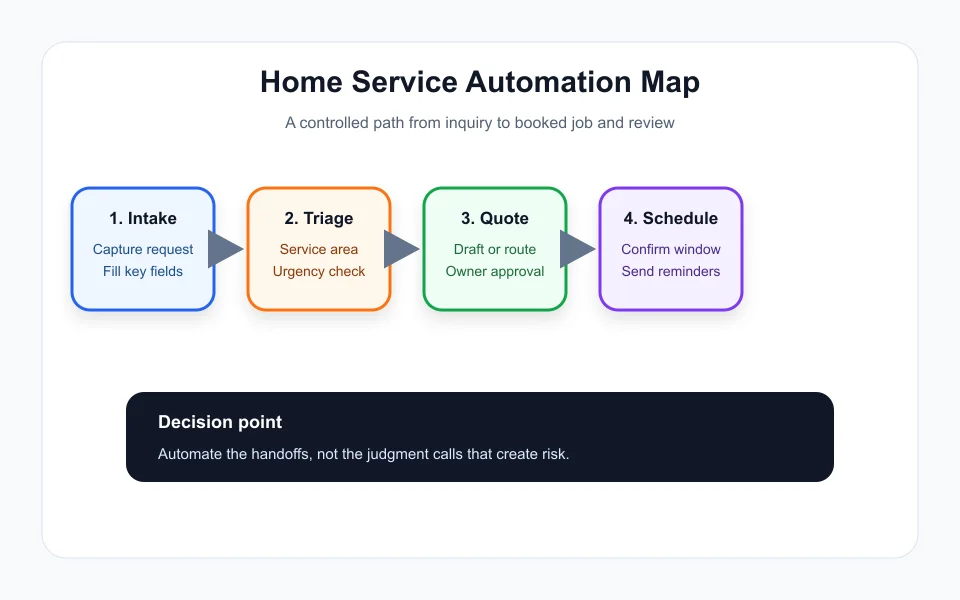
A good intake record is the foundation of AI automation for home service business operations. The record should capture name, contact method, address or service area, preferred appointment window, problem type, photos when useful, urgency, and whether the customer is new or returning. Without that structure, AI produces pleasant replies but the team still has to chase missing details.
Use the first automated message to confirm receipt and ask for only the next missing detail. A cleaner might need square footage and pets. An HVAC company might need equipment type and whether heat or cooling is completely out. A landscaper might need lot size and photos. The rule is simple: ask for the information that changes the next operational decision.
This workflow connects naturally with existing guides on the site, especially AI Automation for Cleaning Business: Jobs, Routes, Quotes, and Follow-Up, AI Automation for Real Estate Agents: Lead Follow-Up, Listings, and Safer Workflows, AI Proposal Automation for Contractors: Faster Quotes Without Sloppy Scope, AI Customer Intake Form Automation: A Practical Workflow for Small Teams, and AI Document Automation for Small Business: What to Automate First.
Quote Follow-Up Is Usually the Fastest Payback
Many local operators lose money after the quote is sent, not before. AI automation for home service business quote follow-up can create a simple stage system: quote drafted, quote sent, customer question, owner review, booked, lost, or stale. Each stage gets a message, a task, or a reminder.
The automation should not pressure customers with fake urgency. It should answer practical questions, remind them what was included, and make it easy to book. If the customer asks for a discount, scope change, warranty promise, or unusual schedule, the automation should stop and hand the thread to a person.
Use Scheduling Automation as a Guardrail
Scheduling is where automation can either help or create chaos. The safe version does not let every customer grab any empty calendar slot. It checks service area, job type, technician skill, estimated duration, and travel time before offering windows. For urgent calls, the system should alert the dispatcher instead of pretending there is infinite capacity.
AI automation for home service business scheduling also needs cancellation and reschedule rules. A simple reminder sequence the day before and the morning of the visit can reduce no-shows. After completion, the same job record can trigger closeout notes, invoice review, and a review request.
What to Track Before Adding More Automations
The best signal is not how many automations exist. Track response time, quote follow-up rate, booked jobs from quotes, missed-call recovery, invoice delay, review request completion, and owner intervention rate. If owner intervention is high, the workflow is not yet structured enough.
Once the first workflow is stable, add one new automation at a time. AI automation for home service business growth should feel like removing friction from a real operation, not layering software on top of a messy one.
Quick Checklist
- Pick one service line and one repeated admin problem.
- Create a required intake record before using AI replies.
- Keep pricing, safety, warranty, and scope approvals human.
- Add quote follow-up stages before adding complex agents.
- Track response speed, booked jobs, and owner intervention rate.
Bottom Line
AI automation for home service business teams is strongest when it is narrow, measurable, and supervised. Start with intake and quote follow-up, prove the workflow saves time or recovers jobs, then expand into scheduling, invoice handoffs, and reviews.
Frequently Asked Questions
What is the best first AI automation for home service business owners?
The best first workflow is usually lead intake or quote follow-up because both are repeatable, easy to measure, and unlikely to require risky autonomous decisions.
Can AI schedule home service jobs automatically?
It can help, but the workflow should check service area, job type, duration, technician availability, and urgent exceptions before offering appointment windows.
Should AI send prices to customers?
AI can draft or organize pricing information, but a person should approve final prices, scope, exclusions, warranties, and unusual customer requests.
Official sources: OpenAI platform tools documentation · Power Automate approvals overview. Check current program pages before applying.