Operations
AI Meeting Notes Automation for Small Business: Capture Decisions, Tasks, and Follow-Up
Use ai meeting notes automation small business workflows to capture decisions, assign tasks, summarize calls, and follow up without losing context.

AI meeting notes automation small business workflows are useful because most teams do not fail during the meeting. They fail after it, when decisions are vague, tasks are not assigned, and customer promises sit inside someone's memory. A good automation turns the meeting into a usable follow-up record.
The goal is not to record everything forever. The goal is to capture decisions, open questions, owners, deadlines, risks, and customer commitments. AI meeting notes automation small business teams can trust should keep the raw context available while producing a short action summary that people actually read.
| What you see | Likely cause | First move |
|---|---|---|
| Meetings end with no owner | Notes capture topics but not tasks | Require owner and due date fields |
| Customers repeat themselves | Call history is not tied to CRM | Attach the recap to the account record |
| Summaries feel too long | The prompt asks for transcripts, not decisions | Request decisions, risks, and next actions |
| Tasks never move | No follow-up trigger exists | Push accepted tasks to the team workspace |
Start With the Follow-Up Problem
AI meeting notes automation small business owners should start with the meeting type that causes the most rework: sales discovery, client kickoff, weekly operations, support escalation, or project review. Each meeting type needs a different summary. Sales needs pain points and next step. Operations needs blockers and owners. Support needs facts, timeline, and promise made.
Do not judge a notes tool by how pretty the transcript looks. Judge it by whether the next person can act without asking what happened. A strong recap has a short summary, decisions, action items, deadlines, open questions, and links to supporting documents.
Create a Notes Template Before Adding AI
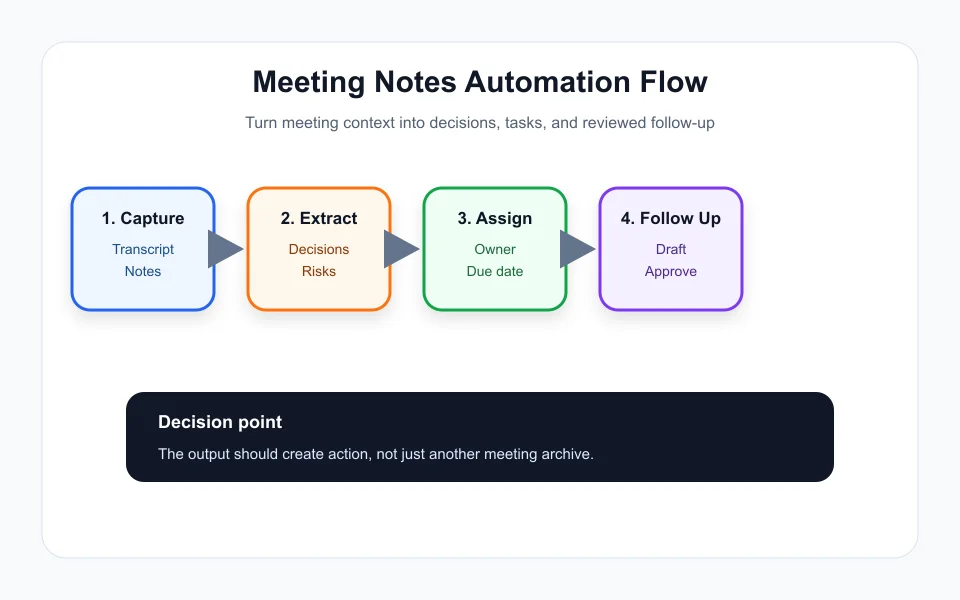
AI works better when the structure is clear. Create a template with fields for meeting purpose, attendees, decision made, task owner, due date, customer promise, risk, and follow-up message. Then ask the AI to fill the template from the transcript or notes.
This avoids the common trap where AI meeting notes automation small business tools produce a polished paragraph that nobody uses. The output should fit the workflow: CRM note, project task, customer email, Slack or Teams summary, and owner reminder.
This connects with related workflow guides such as AI Automation for Home Service Business: Jobs, Quotes, Scheduling, and Follow-Up, AI Automation for Cleaning Business: Jobs, Routes, Quotes, and Follow-Up, AI Automation for Real Estate Agents: Lead Follow-Up, Listings, and Safer Workflows, AI Proposal Automation for Contractors: Faster Quotes Without Sloppy Scope, and AI Customer Intake Form Automation: A Practical Workflow for Small Teams.
Keep Approval on Customer-Facing Messages
AI can draft the follow-up email, but a person should approve anything that promises price, timeline, scope, refund, legal terms, or technical results. Meeting notes are often messy, and summaries can miss nuance. The workflow should mark uncertain statements and ask for review.
A safe rule is simple: AI drafts internal notes automatically, but customer-facing follow-up waits for approval. That keeps speed without letting a summary become a contract.
Send Tasks Where Work Already Happens
If the team uses a CRM, project board, ticket system, or shared planner, the automation should send tasks there. A separate AI notes dashboard becomes another place to forget. The best AI meeting notes automation small business setup is invisible after the meeting: tasks appear where the team already works.
Use owner, due date, source meeting, and short context fields. Add the meeting link or transcript only when someone needs detail. This makes the task actionable instead of overwhelming.
Measure Whether Meetings Improve
Track action-item completion, follow-up time, customer response time, repeated questions, and overdue tasks. If those numbers do not improve, the automation is only documentation theater. Better prompts, shorter summaries, and clearer owner rules usually matter more than adding another AI tool.
AI meeting notes automation small business teams can rely on should reduce confusion, not create a larger archive. Start narrow, review weekly, and keep only the summaries that help work move.
Quick Checklist
- Pick one recurring meeting type first.
- Define fields for decisions, owners, due dates, risks, and promises.
- Send tasks into the existing CRM or project tool.
- Require approval for customer-facing follow-up.
- Measure follow-up time and overdue task rate.
Bottom Line
AI meeting notes automation small business teams should be judged by follow-up quality. If decisions, owners, and tasks move faster after the meeting, the automation is working. Keep the workflow narrow at first, review a few real recaps every week, and remove any summary field that does not help someone take action. The best AI meeting notes automation small business setup is boring in a good way: it records the decision, names the owner, and keeps the next step visible.
Frequently Asked Questions
What should AI meeting notes include?
They should include a short summary, decisions, action items, owners, due dates, open questions, risks, and any customer promises that need review.
Can AI send meeting follow-up emails automatically?
It can draft them, but a person should approve messages that mention price, scope, timeline, legal terms, or sensitive commitments.
Where should meeting tasks go?
Tasks should go into the CRM, project board, or task tool the team already uses, not into a separate notes-only dashboard.
Official sources: Take meeting notes in Microsoft Teams · Recap in Microsoft Teams. Check current program pages before applying.