Small Business
Build an AI Email Triage System That Small Teams Can Trust
Build ai email triage for small business with labels, routing rules, safe AI drafts, and a daily review loop that keeps control.

ai email triage for small business works best when it starts as a controlled routing system, not a free-running bot. The goal is simple: sort the inbox faster, surface urgent work, draft low-risk replies, and keep anything sensitive in front of a person.
Start small. A cleaner inbox is useful only if the team trusts the labels, knows who owns each message, and can see when the AI got something wrong.
| What you see | Likely cause | First move |
|---|---|---|
| Important customer emails sit unread | No priority signal beyond arrival time | Create urgency labels tied to sender and intent |
| Two people answer the same thread | Ownership is not assigned when mail arrives | Route each category to one accountable owner |
| AI drafts sound confident but miss context | The model lacks policy, order, or customer history | Limit drafts to approved reply types first |
| Promotions bury real work | Rules catch senders but not business impact | Separate vendor, billing, lead, and support mail |
| Staff stop trusting automation | Errors are not reviewed and corrected | Run a short daily triage audit |
What You Need Before You Automate
Estimated time: 25 minutes. Gather one week of real inbox examples before building anything. Pull 20 to 40 messages across sales, support, billing, vendor, hiring, spam, and internal admin so your categories reflect real work instead of wishful thinking.
- Choose the inbox scope. Start with one shared inbox such as info, support, bookings, or estimates. Personal executive inboxes usually need stricter privacy review and more manual control.
- List the decision outcomes. Use plain outcomes: reply now, assign to sales, assign to support, needs owner approval, archive, or ignore.
- Write a short escalation policy. Any refund demand, legal threat, angry customer, health or safety issue, payment dispute, or private customer data should be routed to a person.
- Decide where labels live. Use native mailbox filters where possible, then add AI only where simple rules fail.
1. Map the Inbox Into Business Outcomes
Estimated time: 35 minutes. Before choosing software, define what every message should become. Honestly, most inbox automation fails because the team automates vague labels like urgent or follow up without agreeing what those words mean.
- Create 6 to 8 categories. Good starter categories are new lead, current customer, billing, appointment change, vendor, internal, complaint, and low-value marketing.
- Attach one owner to each category. A message should not land in a label that nobody checks. Put a name, role, or shared queue beside every category.
- Add a priority rule. Priority should come from business impact, not emotional wording alone. For example, a cancellation from an active customer outranks a cold sales pitch with urgent in the subject line.
- Document the action. For each category, write the next action in one sentence: assign to sales within two hours, draft a reply for approval, archive after label, or escalate to owner.
Want a wider operating model? Pair this inbox map with small-business SOPs built with AI so the routing rules match the way the team already works.
2. Set the Rules for AI Email Triage for Small Business
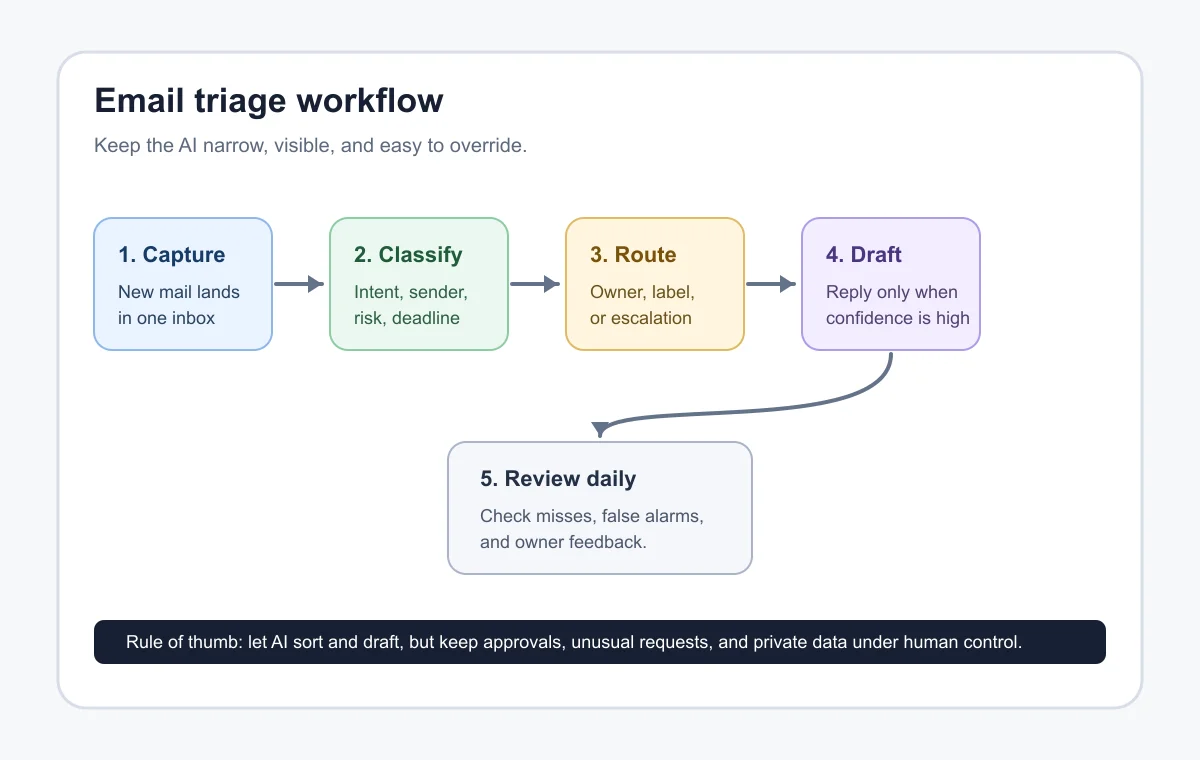
Estimated time: 45 minutes. Build the first layer with deterministic rules. Then let AI handle the fuzzy middle, where a message needs intent, tone, deadline, or account context to be sorted correctly.
- Use mailbox filters for obvious traffic. Newsletters, invoices from known vendors, system alerts, and recurring internal reports do not need AI. Native filters are cheaper and easier to audit.
- Send ambiguous mail to AI classification. Ask the model for a category, urgency level, confidence score, short reason, and recommended owner.
- Require confidence thresholds. High-confidence labels can route automatically. Medium-confidence labels should be marked for review. Low-confidence items should stay in the inbox.
- Block sensitive actions. Do not let the AI send refunds, change bookings, quote binding prices, cancel accounts, or approve exceptions without a human step.
For service businesses, this often connects with customer intake form automation, appointment scheduling automation, and AI receptionist workflows. The inbox is usually one part of a larger front-desk system.
3. Build the Routing Workflow
Estimated time: 60 to 90 minutes. A practical routing setup has five parts: trigger, classifier, rules, assignment, and review log. Use the simplest automation builder your team can maintain.
- Trigger on new messages. Pull new mail from the shared inbox every few minutes or use a provider event if your platform supports it.
- Strip what the model does not need. Send the subject, sender domain, latest message body, thread age, and a few safe metadata fields. Avoid forwarding entire thread history unless it is needed.
- Ask for structured output. Request a fixed JSON response with category, urgency, owner, confidence, reason, and draft_allowed.
- Apply business rules after the AI response. If confidence is below your threshold, do not route automatically. If the category is complaint or billing dispute, force review.
- Write back to the mailbox or help desk. Add labels, assign the owner, create a task, or draft a reply. Keep a log of the model output and final human correction.
If your team already uses automation builders, compare the tradeoffs in Make vs Zapier for small business and the starter approach in no-code AI automation. Keep it maintainable. Fancy workflows that nobody can debug become inbox debt.
4. Add Safe Draft Replies
Estimated time: 45 minutes. Drafting is where the system starts to feel valuable, but it is also where mistakes become visible to customers. Keep drafts narrow at first.
- Start with low-risk templates. Good first drafts include appointment confirmation, missing information requests, receipt acknowledgement, lead qualification questions, and support handoff notes.
- Give the AI approved facts. Provide business hours, service area, refund policy, booking rules, pricing caveats, and escalation language. Do not ask the model to guess.
- Make every draft reviewable. Save the draft in the mailbox or help desk, but do not auto-send until the team has reviewed enough examples.
- Use tone rules that match your business. A salon, contractor, real estate office, and cleaning company should not sound identical.
Industry workflows can share the same foundation while using different policy details. See examples for home service businesses, cleaning companies, real estate agents, and salon appointment scheduling.
5. Test With Real Mail Before You Trust It
Estimated time: 3 to 5 business days. Run the workflow in shadow mode before routing real work. Let it label and draft, but have a person compare the output against what the team actually did.
- Score at least 100 messages. Track correct category, correct owner, correct urgency, false escalation, missed escalation, and acceptable draft.
- Look for expensive mistakes. A few harmless archive errors matter less than one missed refund dispute or angry customer.
- Adjust rules before prompts. If known vendor invoices are misclassified, fix the filter. Do not make the AI solve a problem a simple rule can own.
- Promote one action at a time. First allow labels, then assignments, then drafts. Auto-send should be rare and limited to very safe confirmations.
For adjacent workflows, link inbox outcomes to meeting notes automation, proposal automation for contractors, invoice automation, and CRM automation. That keeps email from becoming a disconnected task pile.
6. Review, Tune, and Keep Humans in Control
Estimated time: 15 minutes per day for two weeks, then weekly. The best triage systems improve because someone reviews the edge cases. Do not skip this part.
- Review the exception queue daily. Check low-confidence messages, escalations, and anything the team manually changed.
- Keep a correction list. Write down the sender, category, mistake, and preferred rule. This becomes your improvement backlog.
- Watch for policy drift. Promotions, seasonal offers, staffing changes, and new services can all break old routing rules.
- Audit privacy exposure. Confirm which fields the model receives and whether customer data is being retained by any vendor you use.
If customer conversations continue after the first email, connect this setup to customer service automation guardrails, local website chatbot escalation rules, lead follow-up automation, and broader email automation rules.
More document-heavy teams should also connect triage categories to document automation and, for contractors, contractor workflow automation. Email is usually the entry point, not the whole operation.
Quick Checklist
- Choose one shared inbox for the first rollout.
- Define 6 to 8 categories with one owner each.
- Use native filters for obvious sender and newsletter rules.
- Ask AI for category, urgency, owner, confidence, and reason.
- Escalate complaints, payment disputes, legal issues, and private-data cases.
- Run shadow testing before automatic assignment or draft creation.
- Review corrections weekly and update rules before prompts.
Frequently Asked Questions
what is ai email triage?
AI email triage is the use of rules and a language model to classify incoming mail, estimate urgency, route messages to the right owner, and sometimes prepare a draft reply for review.
how do small businesses use ai for email?
Small businesses usually start with labels, routing, lead qualification, support handoff, appointment changes, and reply drafts. The safest setup keeps final approval with a person until the workflow proves reliable.
can ai automatically reply to customer emails?
Yes, but automatic replies should be limited to low-risk situations such as confirmations or missing-information requests. Complaints, refunds, legal issues, and account changes should stay human-reviewed.
is ai email triage safe for customer data?
It can be safe if you limit the data sent to the model, review vendor privacy terms, avoid unnecessary thread history, and keep sensitive categories under human control.
what is the best first ai email workflow?
The best first workflow labels and routes new messages without sending anything. Once the team trusts the categories, add draft replies for a few routine scenarios.
does gmail already have email triage rules?
Gmail includes filters and categories that can handle many simple routing jobs. Add AI only where native rules cannot reliably understand intent, urgency, or context.
A good AI triage setup should make the inbox calmer, not mysterious. Keep the model’s job narrow, make every decision reviewable, and expand only after the team trusts the output.
Official sources: Using tools · Create rules to filter your emails. Check current program pages before applying.