Operations
AI Estimate Automation for Contractors: Faster Quotes Without Losing Control
Use ai estimate automation for contractors to prep faster quote packets while keeping pricing, scope, and approvals under control.

ai estimate automation for contractors works when it turns messy job requests into reviewed estimate packets, not when it lets software guess at price, scope, or site conditions. The best setup helps a contractor answer faster while keeping labor assumptions, materials, exclusions, and final approval under human control.
Contractor estimating has a different risk profile than a normal office workflow. A clean-looking quote can still be wrong if the AI misses photos, unclear measurements, permit limits, travel time, crew availability, or a customer request that changed halfway through the conversation.
Use the workflow below as a build map for remodelers, installers, cleaning companies, landscapers, trades, and other local service teams that need faster estimates without turning every request into a promise.
| What you see | Likely cause | First move |
|---|---|---|
| Estimates take two or three days | Photos, notes, and measurements live in different places | Create one intake record before drafting |
| Drafts sound polished but vague | The AI has no approved scope blocks or exclusions | Build reusable estimate language first |
| Prices change after review | Labor, materials, and margin rules are not locked | Keep price math in an estimating tool or spreadsheet |
| Customers ask the same follow-up questions | The quote does not explain assumptions or next steps | Add a clear review, expiry, and revision path |
| Small jobs get ignored | No triage rule separates quick estimates from site visits | Classify lead type before sending anything |
Where AI Estimate Automation for Contractors Fits
Start with the estimate packet, not the price. AI is strongest at gathering request details, summarizing conversations, extracting fields from forms, drafting scope language, and flagging missing information. It is weaker when it is asked to infer real-world conditions from thin notes.
A practical flow begins with customer intake automation. Ask for service type, address or service area, photos, measurements when possible, timing, budget range, decision maker, and any known constraints. If the request is urgent or high-value, route it to a person before the AI drafts the estimate.
For contractors already using a broader field-service workflow, connect this with AI workflow automation for contractors. Estimate automation should sit between lead capture and proposal delivery, not off to the side as a disconnected writing tool.
Build the Estimate Packet Before You Automate the Quote
A reliable estimate packet has five parts: the customer request, job facts, photos or files, pricing inputs, and review status. If those pieces are scattered across calls, texts, email threads, and a notebook, the first automation should simply pull them together.
For example, a roofing, HVAC, cleaning, flooring, or remodeling inquiry can be classified by job type and urgency. The AI can summarize what the customer wants, list missing fields, and create a draft checklist for the estimator. That alone may cut response time without changing how your business prices work.
Pair the packet with document automation for small business when estimates later become proposals, work orders, invoices, or completion notes. Scope language should stay consistent across every document a customer sees.
Keep Price Math Outside the AI Draft
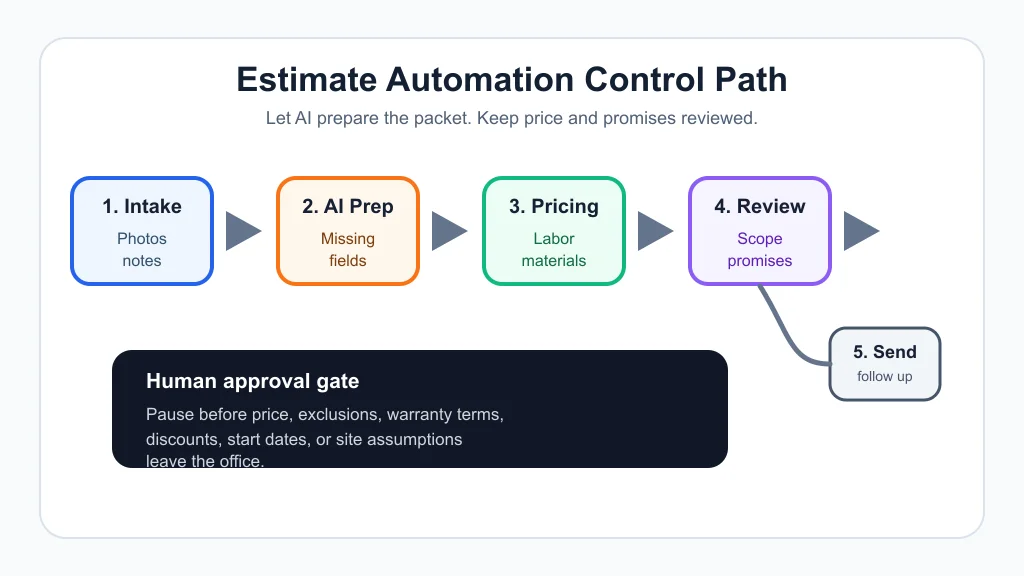
Let the AI explain an approved estimate, but do not let it become the calculator. Labor hours, material quantities, minimum trip charges, tax handling, disposal fees, subcontractor costs, and margin rules belong in an estimating platform, spreadsheet, CRM, or approved calculator.
That separation protects the business. The model can turn line items into plain English, write a short customer summary, and prepare assumptions. It should not silently discount the job because a prompt says the customer is price-sensitive.
For larger jobs, add thresholds. Any estimate over a set amount, below target margin, missing photos, using unusual materials, or promising a tight start date should pause for human approval. The same discipline applies to AI proposal automation for contractors, where polished language can hide sloppy scope.
A Practical Workflow From Lead to Reviewed Estimate
Here is the clean version. A lead arrives from a call, form, email, ad, or chatbot. The system creates one request record, the AI summarizes the request, missing fields are requested, and the estimate packet is routed by job type.
For service calls and smaller jobs, the system may draft a simple estimate from approved price rules and scope blocks. For complex jobs, it should prepare the packet and schedule an estimator review. Either way, the customer-facing quote waits until a person approves the numbers and promises.
Phone-heavy teams can connect the front door with AI receptionist safety rules and missed-call text-back automation. Web-heavy teams should use local business chatbot rules so the site captures useful detail without pretending to price every job instantly.
After the estimate is sent, follow-up matters. A short sequence can confirm receipt, ask whether scope needs adjusting, and remind the owner when a warm quote goes quiet. Keep it connected to CRM automation cleanup so the pipeline does not fill with duplicates.
Controls That Prevent Expensive Estimating Mistakes
Contractor estimates touch money, property, scheduling, and customer expectations. That means the guardrails need to be stricter than a generic email workflow.
- Use approved scope blocks. Let AI assemble language from reviewed services, exclusions, prep work, cleanup, and customer responsibilities.
- Require source fields. A draft should show which notes, photos, measurements, or files were used.
- Block invented assumptions. If room size, access, material grade, or site condition is unknown, the estimate should say so.
- Lock discount rules. Discounts, payment terms, and expiry dates should come from policy, not generated copy.
- Log every automated step. Track who approved the estimate, when it was sent, and what changed after review.
Service teams that already handle many customer messages should also read customer service automation guardrails. Complaints, warranty disputes, and refund requests should not be routed like routine estimate reminders.
Tool Stack Options for Small Contractor Teams
Small teams do not need a complex stack on day one. A workable version can use a form, shared inbox, spreadsheet or CRM, estimating calculator, document template, and automation builder. Add AI only where it reduces retyping or improves consistency.
No-code builders can handle many handoffs. Compare no-code AI automation with Make vs Zapier for small business before building a chain that nobody can debug. The right choice depends on branching, app support, error handling, and who will maintain it.
Some contractors will be better served by a dedicated estimating or field-service platform. AI takeoff and estimating vendors focus on drawing review, quantity extraction, and structured cost outputs, while general AI tools are better at summarizing, drafting, and routing. Those are different jobs.
Measure Whether the System Is Actually Helping
Watch the numbers for a few weeks before expanding. Track lead-to-estimate time, missing-information rate, estimate revision rate, accepted quote rate, gross margin by job type, follow-up completion, and customer complaints tied to estimate wording.
Good automation should make the office calmer. If staff spend the afternoon fixing duplicate records, correcting bad assumptions, or apologizing for confusing messages, simplify the workflow before adding more AI.
Related workflows can extend the same pattern. Use invoice automation controls after approved work notes, meeting notes automation for sales calls and site-visit recaps, and AI email triage to keep estimate replies from getting buried.
Related Workflows to Build Around Estimating
Estimate automation improves faster when the surrounding operations are clean. Contractors with recurring appointments can adapt appointment scheduling for small business, while high-volume service desks may learn from appointment scheduling workflows even outside the salon niche.
Field-service businesses with similar handoffs can compare home service automation and cleaning business automation. Sales-heavy teams may borrow routing ideas from real estate follow-up automation.
Once the first estimate workflow is stable, document the rule set with SOPs with AI. That makes maintenance easier when prices, staff roles, territories, or service packages change.
Quick Checklist
- Choose one estimate type to automate first, such as service calls, small repairs, maintenance jobs, or cleaning quotes.
- Define required intake fields before drafting estimate language.
- Keep price calculations in an approved calculator, spreadsheet, CRM, or estimating tool.
- Use AI to summarize, classify, draft, and flag missing information.
- Require human approval for price, scope, exclusions, timing, warranty, discounts, and payment terms.
- Log sent estimates, revisions, approvals, and follow-up status.
- Review errors weekly before adding another workflow.
Frequently Asked Questions
can AI create estimates for contractors?
AI can help create estimate drafts from intake details, photos, notes, templates, and approved line items. A person should still approve the final price, scope, assumptions, exclusions, and schedule before sending it to the customer.
what is the best way to automate contractor estimates?
Start by automating intake and estimate packet preparation. Once the source data is clean, connect approved pricing rules, scope blocks, human review, and follow-up reminders.
is AI estimating accurate for construction work?
Accuracy depends on the data and the use case. AI can speed up takeoff, classification, summaries, and draft language, but site conditions, measurements, materials, and labor assumptions still need review.
should contractors use ChatGPT for estimates?
Contractors can use ChatGPT-style tools for summarizing requests, drafting scope notes, and creating customer-friendly explanations. Do not rely on a chat response alone for pricing, legal terms, warranty promises, or final approval.
how much does estimate automation cost for contractors?
Cost depends on the estimating software, automation builder, AI usage, number of users, setup help, and custom integrations. Compare the cost against faster quote response, fewer missed leads, lower admin time, and protected margin.
Bottom Line
Estimate automation is worth building when it makes the estimator's job cleaner, faster, and easier to review. Let AI prepare the packet and draft the customer language, but keep price math and promises under a real approval step.
Official sources: OpenAI tools documentation · Autodesk construction AI estimating overview.