Operations
Calculate AI Workflow Automation ROI Before You Buy Another Tool
Build an ai workflow automation roi calculator small business owners can trust before buying tools, hiring help, or automating workflows.

An ai workflow automation roi calculator small business owners can trust is not a fancy spreadsheet. It is a plain test of whether a workflow saves enough time, reduces enough mistakes, or protects enough revenue to beat the monthly cost of the tools and setup work.
Start with one workflow. Then price the real labor, the software, the maintenance, and the risk of getting it wrong.
| What you see | Likely cause | First move |
|---|---|---|
| People keep retyping the same details | Data moves by copy and paste | Measure minutes per handoff |
| Leads wait hours for a reply | No automatic intake or follow-up | Count lost or stale inquiries |
| Invoices, quotes, or notes pile up | Admin work depends on one person | Track weekly backlog hours |
| Tool demos all look profitable | Costs are being undercounted | Add setup, review, and failure time |
What You Need Before You Calculate ROI
Gather the numbers before you open a calculator. Guessing here is how small teams talk themselves into subscriptions they barely use.
- The workflow name, owner, and current trigger.
- How many times the task happens each week.
- Average minutes spent per occurrence.
- The loaded hourly cost for the person doing the work.
- Expected tool, integration, and consultant costs.
- Review time, exception handling, and maintenance time.
- A clear success rule, such as payback inside six months.
Step 1: Pick One Workflow Worth Measuring
Estimated time: 20 minutes. Choose a workflow that happens often enough to matter and is repetitive enough to standardize. Lead intake, quote follow-up, meeting notes, document routing, and invoice reminders usually beat vague ideas like "use AI more."
- Write the workflow in one sentence: "When X happens, someone does Y, then Z gets updated."
- Circle every manual handoff, copy-paste step, waiting period, and duplicate data entry point.
- Mark the steps that need judgment, approval, or customer-sensitive handling.
Do not automate a messy process just because it is annoying. Clean up the process first, then test whether AI belongs in it.
Step 2: Measure the Current Cost
Estimated time: 30-45 minutes. Build the baseline from time, volume, and labor cost. You are trying to answer one blunt question: what does this workflow cost every month before automation?
Use this simple formula:
Monthly manual cost = weekly task volume x minutes per task x 4.33 / 60 x loaded hourly cost.
- Watch the task happen three to five times, or pull timestamps from your CRM, inbox, calendar, help desk, or accounting tool.
- Use the median time, not the fastest time. The cleanest example is usually not your real baseline.
- Add time spent fixing errors, chasing missing information, or reworking outputs.
Step 3: Add the Full Automation Cost
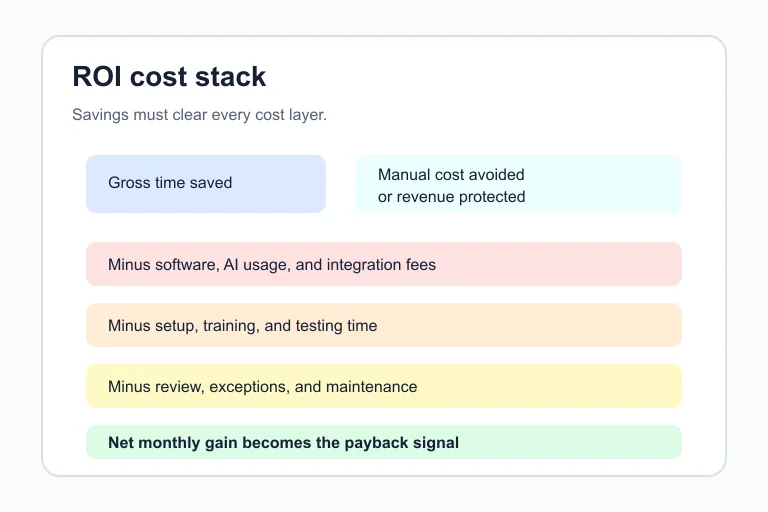
Estimated time: 25-40 minutes. The subscription price is only one line. A small business ROI model should include setup work, testing, staff training, monitoring, and the time spent handling edge cases.
- List every recurring tool cost, including AI model usage, automation platform plans, CRM add-ons, storage, and notification tools.
- Add one-time build costs, whether that means an owner building it after hours, an employee documenting the process, or an outside implementer doing the setup.
- Reserve monthly review time. Even a simple workflow needs someone to check failures, update prompts, and adjust rules when the business changes.
Be skeptical of any ROI number that ignores maintenance. Honestly, that is where a lot of "easy automation" math falls apart.
Step 4: Build an ai workflow automation roi calculator small business owners can actually use
Estimated time: 45-60 minutes. Put the model in a spreadsheet with inputs you can change without breaking the formulas. Keep it boring. Boring gets used.
| Input | Formula or value | Why it matters |
|---|---|---|
| Monthly manual cost | Volume x minutes x labor rate | Baseline spend |
| Expected time saved | Manual cost x saved percentage | Gross benefit |
| Monthly automation cost | Tools + usage + review time | Ongoing cost |
| One-time setup cost | Build + training + testing | Payback hurdle |
| Net monthly gain | Time saved value - monthly cost | Cash-flow signal |
| Payback period | Setup cost / net monthly gain | How long until it pays back |
Use three scenarios: cautious, expected, and aggressive. For a first build, I would rather see a cautious model that still pays back than a flashy model that needs perfect adoption.
Step 5: Pressure-Test the Result Before You Buy
Estimated time: 30 minutes. ROI is not a yes-or-no number until you test the assumptions. Change the saved-time percentage, raise the monthly software cost, and add more human review time.
- Drop expected time savings by 25 percent and see if the project still works.
- Double the setup estimate if nobody has built this kind of workflow before.
- Add a failure bucket for reruns, broken automations, bad inputs, and customer escalations.
- Decide who owns the workflow after launch. No owner means no ROI.
One helpful rule: if the automation only works when everything goes perfectly, it is not ready for a lean team.
Step 6: Choose a Pilot Size and Launch Gate
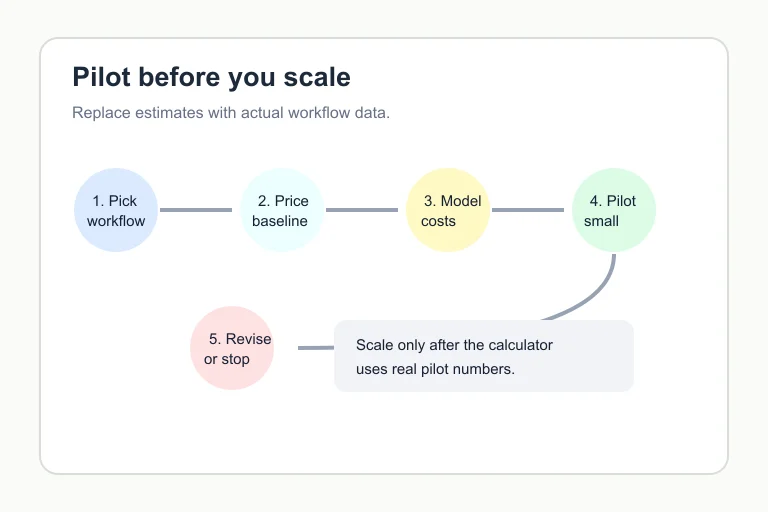
Estimated time: 20-30 minutes. Run a pilot small enough to reverse. A good first pilot handles one trigger, one team, one output, and one clear review path.
- Set a pilot length, usually two to four weeks for a recurring admin workflow.
- Define the stop rule, such as more than two serious customer-facing errors in a week.
- Define the success rule, such as saving five owner hours per month with no increase in rework.
- Review the calculator after the pilot and replace assumptions with actual numbers.
Think of the first pilot as a measurement tool, not a victory lap. You are buying evidence.
Workflow Examples to Plug Into the Model
Pick the workflow closest to your business, then run the same ROI math against it. These examples can help you choose a concrete starting point instead of modeling automation in the abstract.
- AI estimate automation for contractors
- missed call text-back automation
- AI email triage for small business
- AI meeting notes automation
- AI automation for home service business
- AI automation for cleaning business
- AI automation for real estate agents
- AI proposal automation for contractors
- AI customer intake form automation
- AI document automation for small business
- small-business SOPs with AI
- AI appointment scheduling for salons
- contractor workflow automation
- AI customer service automation
- no-code AI automation stack
- local business website chatbot
- appointment scheduling automation
- Make vs Zapier for small business
- AI invoice automation
- AI CRM automation
Quick Checklist
- Choose one recurring workflow with measurable volume.
- Calculate the current monthly manual cost before looking at tools.
- Use loaded labor cost, not just hourly wages.
- Add setup, training, monitoring, and exception-handling time.
- Run cautious, expected, and aggressive savings scenarios.
- Set a pilot stop rule before customers are affected.
- Replace assumptions with real pilot data before expanding.
Frequently Asked Questions
how do you calculate roi for ai automation?
Calculate the monthly value of time saved, add any measurable revenue or error-reduction benefit, subtract monthly automation costs, then compare the net gain against setup cost. The payback period is setup cost divided by net monthly gain.
what is a good payback period for small business automation?
For a small business, a first automation should usually pay back within three to six months unless it solves a serious risk, compliance, or customer experience problem. Longer payback can still work, but it needs stronger confidence and a clear owner.
what costs should be in an ai automation roi calculator?
Include software subscriptions, AI usage, automation platform fees, setup labor, testing, training, monitoring, prompt updates, exception handling, and rework. Skipping human review time makes the result look cleaner than it really is.
which workflows should small businesses automate first?
Start with high-volume, repeatable workflows where the rules are clear and the downside of a mistake is limited. Lead follow-up, intake routing, meeting summaries, invoice reminders, quote drafts, and CRM cleanup are common first candidates.
can ai workflow automation lose money?
Yes. It can lose money when the workflow volume is too low, setup takes too long, staff do not trust the output, tool costs grow, or the process needs more human judgment than expected. That is why the pilot matters.
Final Take
Use the calculator to slow the buying decision down. If the workflow saves real hours, has a clear owner, and still pays back under cautious assumptions, it is a good pilot candidate. If the math only works in the best case, fix the process before you add another tool.