Operations
AI Invoice Reminders for Small Businesses That Need Faster Payment
Build ai invoice reminder automation small business owners can trust with safer timing, tone, status checks, and escalation rules.

ai invoice reminder automation small business is not about nagging customers with louder emails. Used well, it gives a small business a consistent accounts-receivable rhythm: send the right reminder at the right time, pause when payment arrives, and flag the few invoices that need a human call.
Think of it as a guardrail around follow-up, not a replacement for judgment. The best setup keeps your tone professional, protects customer relationships, and stops overdue invoices from living in somebody's memory.
| What you see | Likely cause | First move |
|---|---|---|
| Customers say they never saw the invoice | The invoice email lands once, then disappears in a busy inbox | Add a polite pre-due reminder and confirm the billing contact |
| Payment comes only after a personal text | The automated message sounds generic or lacks context | Rewrite the template around the job, due date, and payment link |
| Staff send duplicate reminders | Accounting, CRM, and inbox status are not synced | Use one source of truth for invoice status before triggering follow-up |
| Good customers get awkward overdue emails | No pause rule for disputes, promises to pay, or recent partial payments | Add stop conditions and a human review lane |
| Owners still chase invoices on Fridays | The automation sends messages but does not create next actions | Escalate aged invoices into a call list or task board |
The reminder sequence that actually helps cash flow
Start with timing. A useful reminder sequence usually has four moments: a short note before the due date, a friendly due-date message, a firmer overdue reminder, and a human escalation after the customer has had enough chances to respond.
Small teams often skip the first message because it feels unnecessary. Honestly, that is usually the cleanest email. It lets the customer fix a missing purchase order, update a card, or ask a question before the invoice becomes late.
Use your accounting system as the source of truth when you can. QuickBooks Online, for example, documents automatic invoice reminders that can be scheduled before or after the invoice due date, while Xero documents reminder settings for invoices that are approaching due or already overdue.
Build around invoice status, not just dates
Date-based reminders are easy. Status-aware reminders are safer. Before any message goes out, the workflow should check whether the invoice is paid, voided, disputed, credited, recently promised for payment, or already escalated to a person.
That extra check prevents the classic mistake: an automated overdue email landing five minutes after a customer has paid. You only need to see that happen once to know why the pause rule matters.
For teams already tightening admin work, connect this with your AI email triage system. If a customer replies with "paid," "sent ACH," "wrong amount," or "need W-9," the inbox workflow can route that reply before another reminder fires.
Where AI belongs in the workflow
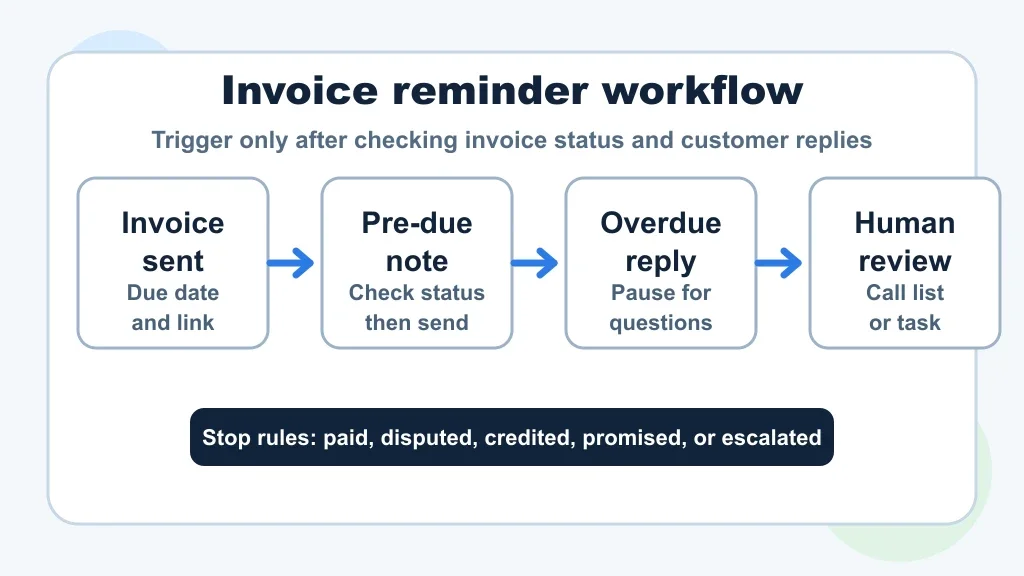
Let AI handle classification, drafting, and routing. Keep payment policy, final escalation, and sensitive customer decisions under human control.
A practical setup can read the invoice age, customer history, email replies, and job context, then suggest the next best action. For a regular customer who is two days late, the message can stay warm. For an invoice 35 days overdue with no reply, the system should create a call task instead of sending the seventh email.
Owners choosing a build path should compare a simple no-code automation stack with a more flexible builder. Our Make vs Zapier comparison is useful if the workflow needs branching rules, CRM updates, and task creation.
What the first version should automate
- Invoice sent: confirm the customer has a payment link and the correct billing contact.
- Three to five days before due: send a short reminder only if the invoice is still open.
- Due date: send a direct but friendly payment note with the invoice number and amount.
- Seven days overdue: ask whether anything is blocking payment and route replies to the right person.
- Fourteen to twenty-one days overdue: create a call task, account note, or owner review item.
Keep the first version narrow. If the workflow cannot handle those five states reliably, adding SMS, voice calls, and AI-written negotiation language will only make the mess harder to debug.
Service businesses can reuse pieces of other follow-up systems. A missed-call text-back flow teaches the same lesson about speed and tone, while appointment scheduling automation shows how calendar events can trigger billing tasks after a visit.
Message templates that do not sound desperate
Good reminder copy is specific, calm, and easy to act on. Mention the invoice, the amount, the due date, and the payment link. Skip guilt, sarcasm, and fake urgency.
Use a different tone for each stage. Before due, the message can read like a courtesy note. After due, it should ask for payment or a reply. After two weeks, it should make clear that a person will follow up.
Customer support rules matter here. If the business already has customer service automation guardrails, reuse them for billing language. If customers ask invoice questions through a site assistant, your local website chatbot escalation rules should route payment disputes to a person, not improvise policy.
Connect billing to the rest of operations
Invoice reminders work better when the earlier workflow is clean. Bad estimates, vague proposals, missing intake details, and messy job notes all show up later as payment friction.
Contractors should connect reminder rules to the estimate automation workflow, proposal automation workflow, and contractor workflow automation that close the job. Home-service teams can map the same handoff in the home service automation guide.
Recurring-service businesses need a slightly different rhythm. The cleaning business automation guide is a good model because a missed payment can affect the next scheduled visit, not just last month's invoice.
Documentation also matters. A clean customer intake automation flow captures billing contacts early, document automation guide keeps invoices and receipts findable, and AI-assisted SOPs make the escalation rules clear enough for someone else to follow.
Tool choices and buying checks
Before buying another subscription, calculate whether the workflow is worth building. Use an automation ROI calculator to compare monthly tool cost, setup time, overdue balance, and staff hours spent chasing payments.
A small business usually needs fewer tools than it thinks. Accounting software should handle invoice state. Email or SMS should handle delivery. A CRM or task manager should handle escalation. AI should help classify replies and draft safe messages inside the rules you set.
Owners in appointment-heavy businesses can borrow patterns from salon scheduling automation, while sales-led teams can compare follow-up boundaries in the real estate automation guide. If invoices start from generated work orders or notes, meeting notes automation can capture payment promises after calls.
Controls that keep the workflow from embarrassing you
- One invoice source: use the accounting platform, not a spreadsheet copy, to decide whether an invoice is open.
- Quiet hours: do not send reminders at odd times unless customers have opted into that channel.
- Reply detection: pause the sequence when a customer asks a question or disputes the amount.
- VIP exceptions: flag strategic accounts for review before overdue escalation.
- Audit trail: log the reminder date, channel, template, and next action.
- Human owner: assign one person to review stuck invoices every week.
Pair those controls with the companion AI invoice automation guide if you are also automating invoice creation. Reminder automation cannot fix inaccurate invoices. It just follows up on them faster.
Quick Checklist
- Choose one accounting system as the invoice-status source of truth.
- Write reminder templates for pre-due, due-date, overdue, and escalation stages.
- Add pause rules for paid, disputed, credited, promised, or partially paid invoices.
- Route customer replies into the inbox, CRM, or task list before the next reminder sends.
- Test the workflow with old invoices before turning it loose on real customers.
- Review aged receivables weekly so automation does not hide stuck accounts.
- Measure days-to-payment and staff time saved after the first month.
Official sources
Official sources: QuickBooks invoice reminder support · Xero invoice reminder support.
Bottom line
Invoice reminder automation should feel like a calm billing assistant, not a collection bot. Start with clean invoice status, measured timing, and clear stop rules, then let AI help with routing and drafting where it reduces real work.
Get that foundation right and the system pays for itself in fewer awkward Fridays, faster follow-up, and a cleaner view of who actually needs a personal call.
Frequently Asked Questions
how do i automate invoice reminders for a small business?
Start inside your accounting software if it supports automatic reminders. Then add rules for timing, paid-status checks, reply detection, and human escalation before connecting email, SMS, CRM, or AI tools.
what is the best invoice reminder automation for small business?
The best setup is usually the one tied closest to your invoice source of truth. For many teams, that means accounting-software reminders first, then a no-code workflow only when you need CRM tasks, custom reply routing, or AI-assisted message drafts.
can ai send payment reminders automatically?
AI can help draft, classify, and route payment reminders, but the send rule should still depend on reliable invoice status and approved templates. Let AI assist the workflow, not invent billing policy on its own.
should invoice reminders be email or text?
Email is usually the safest default because it preserves invoice detail and a paper trail. Text can work for service businesses when customers expect it, but it needs consent, short copy, and a clear link back to the invoice.
how often should a small business send overdue invoice reminders?
A common pattern is before due, on the due date, one week overdue, and two to three weeks overdue with human review. The exact timing should match your payment terms, customer type, and contract language.