Small Business
AI Phone Answering for Small Business: What to Automate First
Choose an ai phone answering service for small business with call maps, escalation rules, CRM logging, and a practical setup checklist.
An ai phone answering service for small business can be useful when calls are easy to classify, follow-up is repeatable, and missed leads are costing you money. Treat it like a front-desk workflow, not a magic receptionist. The best setup answers quickly, collects clean details, and knows when to hand the call to a human.
| What you see | Likely cause | First move |
|---|---|---|
| Many missed calls after hours | Customers call outside staffed hours | Start with message capture and next-day callback tasks |
| Reception staff repeat the same answers | Basic questions are not documented | Write a short answer bank before choosing software |
| Booked calls still need cleanup | The bot lacks scheduling rules or required fields | Define required intake fields and appointment boundaries |
| Callers get frustrated | The bot is trying to handle judgment calls | Add escalation triggers for price, complaints, and urgent requests |
Where an AI Phone Answering Service for Small Business Fits
Start with the calls that already follow a script. New lead intake, appointment requests, business-hour questions, order status checks, and simple message taking are usually safer than billing disputes or angry-customer calls.
Think of the system as a filter. It should answer fast, confirm the caller's reason, collect the right fields, and push the next action into your calendar, CRM, or inbox. That is close to the same operational logic behind missed call text-back automation, except the phone conversation happens first.
Build the Call Map Before You Buy Software
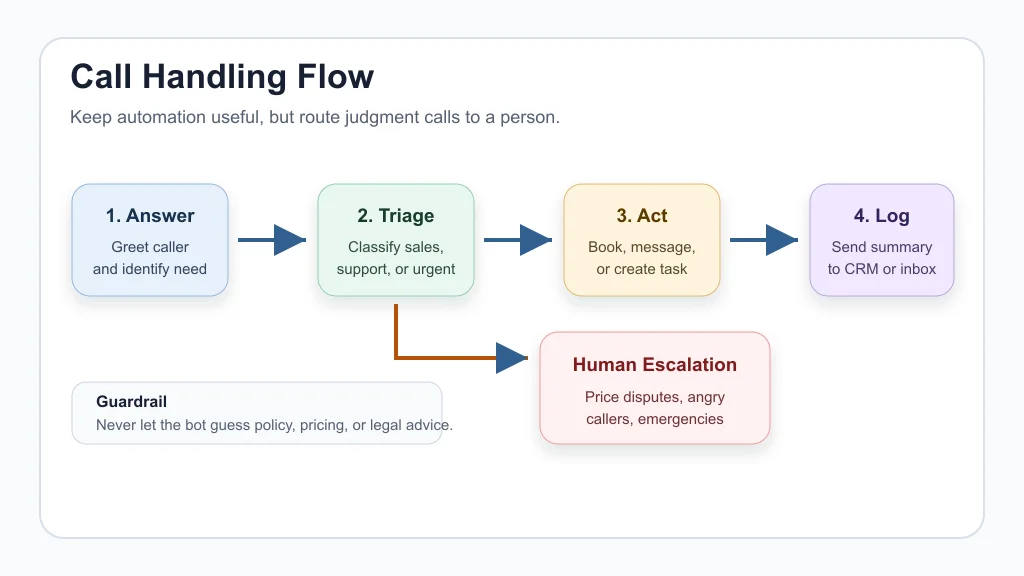
Pick three call categories and write the first version of the script. For each one, decide what the caller wants, what information must be captured, what the system may say, and what should trigger a handoff.
For a home service company, that might mean separating emergency jobs, quote requests, reschedules, and warranty questions. For a salon, it might mean new bookings, cancellations, service questions, and late arrivals. If appointment volume is the main pain, pair phone answering with AI appointment scheduling for small business or a more specific workflow such as AI appointment scheduling for salons.
Keep the first version narrow. A bot that handles five call types badly is worse than one that handles two call types cleanly.
What the Bot Should Capture on Every Call
Every call record should include the caller's name, phone number, reason for calling, urgency, preferred callback time, and any job-specific detail your team needs before responding. Add consent language where recording, SMS follow-up, or appointment reminders are involved.
Good phone workflows do not stop at transcription. They create a task, update a record, or route a summary to the person who owns the next step. That is why the phone system should connect with the same operating stack you use for customer intake automation, email triage, meeting-note follow-up, and AI invoice reminders.
Honestly, this is where many small teams lose the benefit. They buy a voice tool, then still copy notes by hand.
When to Escalate to a Human
Escalation rules matter more than a clever voice. Send calls to a person when the caller is upset, asks for a discount, reports safety risk, disputes an invoice, needs legal or medical advice, or describes something outside the approved script.
Use the same guardrail thinking you would use in AI customer service automation. The AI can gather facts and set context, but a human should make judgment calls that affect money, trust, liability, or reputation.
How to Compare Tools Without Getting Distracted
Vendor pages often lead with friendly voices and 24/7 coverage. Useful, but not enough. Compare tools by call-routing controls, calendar integration, CRM logging, transcript quality, handoff speed, pricing model, and how easily you can edit scripts without a developer.
Match the tool to your workflow. A contractor may care most about quote requests and job details, so AI estimate automation for contractors, proposal automation, or workflow automation for contractors should shape the phone script. A cleaning company may need recurring-service questions and route notes, while real estate teams need fast lead capture and safe follow-up, similar to AI automation for cleaning businesses and AI automation for real estate agents.
Cost also needs a plain view. Include the phone tool, call minutes, CRM seats, calendar tools, setup time, and the owner time needed to maintain scripts. A quick AI workflow automation ROI check can stop you from overbuying.
Setup Steps That Keep the System Manageable
- Audit call logs: Count missed calls, repeat questions, after-hours calls, and calls that already follow a script.
- Choose one workflow: Start with lead capture, appointment booking, or message taking.
- Write the call rules: Define allowed answers, required fields, forbidden promises, and escalation triggers.
- Connect one destination: Send outcomes to your CRM, calendar, help desk, or shared inbox.
- Test with real scenarios: Include noisy callers, vague requests, angry callers, and edge cases.
- Review weekly: Fix scripts from missed handoffs, bad summaries, and repeated caller confusion.
Keep the surrounding stack simple. If you are still building the basics, a no-code AI automation stack or a practical Make vs Zapier comparison can help you avoid a tool chain that nobody maintains.
How Phone Answering Connects to the Rest of Operations
Phone answering works best when it is part of the broader workload system. A lead should become a CRM record. A reschedule should update the calendar. A document request should become a task. A customer question should feed the same knowledge base used by your website chatbot.
That is why phone AI often sits beside home service business automation, document automation, small-business SOPs, and an AI chatbot for a local business website. Each channel should follow the same rules, not invent its own version of your business.
Quick Checklist
- Choose one high-volume call type to automate first.
- Write approved answers for common questions.
- Define required fields before booking or routing a call.
- Add human handoff rules for complaints, risk, pricing, and emergencies.
- Connect the system to one real destination, such as a CRM or calendar.
- Review transcripts weekly for the first month.
- Track missed calls, booked appointments, callbacks, and bad handoffs.
Frequently Asked Questions
what is the best ai phone answering service for small business?
The best choice depends on your call volume, booking needs, integrations, and escalation rules. Shortlist tools only after you map the calls you want the AI to handle.
can an ai phone answering service book appointments?
Yes, many services can book appointments when they connect to your calendar and follow clear availability rules. Test reschedules, cancellations, and double-booking prevention before going live.
is ai phone answering better than a virtual receptionist?
AI is usually better for repeatable, always-on call capture. A human virtual receptionist is still better for judgment-heavy conversations, upset customers, and calls where nuance matters.
how much does ai phone answering cost for a small business?
Pricing varies by vendor, call volume, minutes, features, and integrations. Compare the full cost against missed leads, staff interruptions, and the time spent cleaning up call notes.
will callers know they are talking to ai?
They should. Use clear disclosure and do not design the system to trick callers. Transparency protects trust and sets the right expectation when the call needs a human.
Start small, then improve the workflow from real calls. A good AI answering setup should reduce missed opportunities and admin cleanup, not create another dashboard your team has to babysit.
Official sources: OpenAI tools documentation · AI Receptionist. Check current program pages before applying.