AI Automation
Quote Follow-Up Automation That Wins More Work With AI
Build ai quote follow up automation that sends timely reminders, routes risky replies, and helps small teams close more quotes.

AI quote follow up automation is the practical layer between sending an estimate and hoping the customer remembers you. Done well, it reminds the right prospect at the right time, drafts a useful message, and hands anything sensitive back to a person before the deal gets weird.
Small teams usually do not lose quotes because nobody cares. They lose them because the next call, invoice, job, or walk-in customer crowds out the follow-up window. Automation fixes that gap, but only if you keep pricing, scope, compliance, and tone under control.
| What you see | Likely cause | First move |
|---|---|---|
| Quotes go quiet after the first email | No reminder rule after the estimate is sent | Add a 24- or 48-hour follow-up trigger |
| Customers ask the same basic questions | The quote email skips next steps, availability, or exclusions | Give the AI approved answer snippets |
| Staff follow up too late | Replies, calls, and quote status live in separate tools | Sync CRM, inbox, and task owner fields |
| Follow-ups sound pushy | The template is written for pressure, not service | Use helpful check-ins and clear opt-out language |
| Discounts appear inconsistently | The workflow can improvise pricing | Lock price changes behind human approval |
Start With the Quote Status, Not the AI Tool
Begin with the boring field that decides everything: quote status. Sent, opened, replied, accepted, rejected, expired, and needs-review are enough for many small businesses.
Once those states are clear, the automation can act sensibly. A quote that has not been opened needs a different nudge than one where the customer replied, “Can you do it next Friday?”
For contractors and home services, connect this with AI estimate automation for contractors so the follow-up uses the same job details as the original estimate. If you sell project work, pair it with AI proposal automation for contractors to keep proposal terms and reminder language aligned.
Build a Follow-Up Sequence Customers Will Actually Answer
A good sequence is short. One helpful check-in, one value-adding reminder, and one final “should I close this out?” message will beat a long drip campaign for most local and service businesses.
Use timing based on quote size and urgency. A same-week repair quote can get a faster reminder, while a large B2B service quote may need a longer pause before the first follow-up.
- First reminder: confirm the customer received the quote and ask if anything is unclear.
- Second reminder: restate the decision point, such as schedule, options, or deposit.
- Final reminder: ask whether to keep the quote open, revise it, or close the file.
Honestly, most broken workflows fail because they chase too hard. Your follow-up should feel like a helpful operations system, not a salesperson trapped in a loop.
Where AI Helps, and Where It Should Stay Out
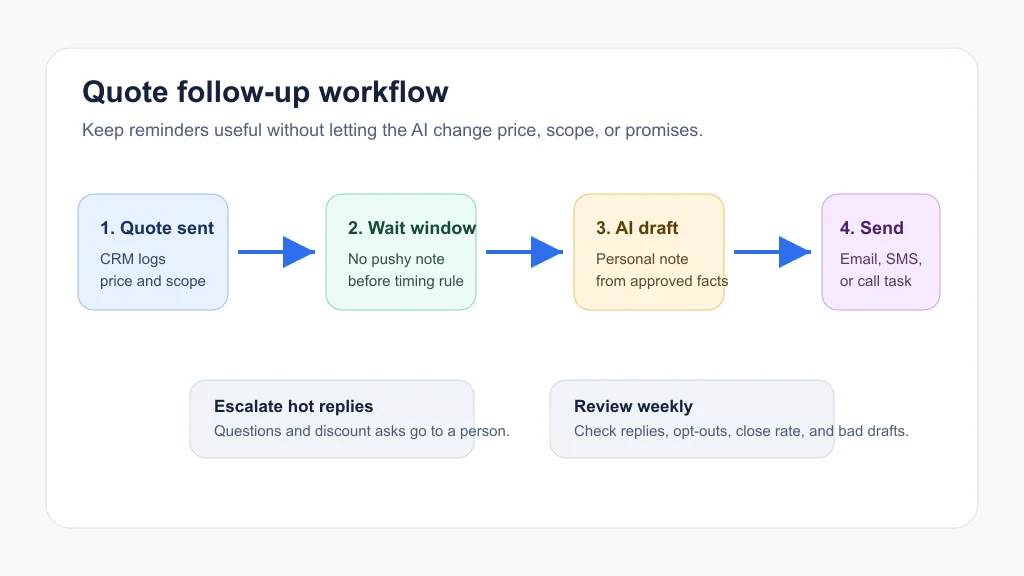
AI is useful for drafting, summarizing, classifying replies, and choosing the next task. It should not invent discounts, rewrite scope, promise delivery dates, or decide that a borderline deal deserves special terms.
OpenAI’s tool documentation describes how models can call tools, retrieve files, use function calling, and connect to outside services. In a quote workflow, that means the model can draft from approved quote data, but your app still needs rules for what it may read, write, and send.
Need a broader operating model? Use an AI workflow automation ROI calculator before buying another tool, then map the quote workflow beside AI invoice reminders. Follow-up before the sale and reminders after the sale often share the same contact data and escalation rules.
Human Review Rules Keep the Workflow From Going Sideways
Set review triggers before you write prompts. The AI can send a plain “checking in” email, but it should create a task when the customer asks for a discount, changes the scope, mentions a complaint, requests legal terms, or sounds upset.
Salesforce’s quote automation guide describes a quoting process built around product catalogs, pricing rules, approvals, and customer history. That structure matters for small teams too, even if your stack is simpler than enterprise CPQ software.
- Route pricing changes to the owner.
- Route scheduling conflicts to dispatch or operations.
- Route complaints to a manager before another automated message goes out.
- Route “yes, I’m ready” replies to a booking or payment step.
Teams that already use AI missed call text-back automation or AI phone answering for small business should share the same escalation logic. A customer should not get a cheery quote reminder five minutes after leaving an angry voicemail.
Use Email and SMS Without Creating Compliance Debt
Quote follow-up often feels transactional, but some messages can cross into marketing. The FTC’s CAN-SPAM guidance says commercial email rules cover business-to-business messages too, and it lists requirements around honest headers, accurate subject lines, postal address, opt-out handling, and timely opt-out processing.
Keep the workflow conservative. Identify your business clearly, make the message match the quote, include the right opt-out path when the message is promotional, and suppress contacts who opted out.
That same discipline applies when you connect quote follow-up with AI email triage, AI meeting notes automation, or AI customer intake form automation. One clean contact record matters more than one clever prompt.
Tool Stack for a Small Business Quote Follow-Up System
You do not need a giant platform on day one. A workable stack needs a quote source, customer record, message channel, automation runner, AI drafting step, and human task queue.
| Layer | What it does | Watch out for |
|---|---|---|
| CRM or job system | Stores customer, quote, owner, and status | Duplicate contacts and stale quote totals |
| Email or SMS tool | Sends the approved follow-up | Consent, opt-outs, and deliverability |
| Automation builder | Runs timing, routing, and task rules | Loops that resend after a customer replies |
| AI drafting step | Writes a first draft from approved fields | Made-up details, tone drift, and new promises |
| Task queue | Hands sensitive replies to staff | No clear owner or due date |
For industry examples, see how quote and follow-up work fits inside AI automation for home service business, AI automation for cleaning business, and AI automation for real estate agents. Each niche needs different timing and risk rules.
Measure Replies, Not Just Messages Sent
Message volume is a weak metric. Track quote-to-reply rate, reply-to-booking rate, average time to first follow-up, opt-outs, complaints, and the number of AI drafts staff had to rewrite.
Bad automation can look productive because it sends a lot of messages. Better automation protects the customer relationship and gives the owner a clearer view of which quotes need attention today.
Document the workflow in small-business SOPs built with AI, then connect related service workflows like AI appointment scheduling for small business and AI appointment scheduling for salons when booking is the next step after quote approval.
Quick Checklist
- Define quote statuses before writing any AI prompt.
- Limit the sequence to a few helpful reminders.
- Feed the AI approved quote facts instead of full inbox access.
- Require human review for discounts, scope changes, complaints, and legal language.
- Sync opt-outs and reply status before sending another reminder.
- Track reply quality, close rate, and rewrite rate every week.
- Use a manageable no-code AI automation stack before adding custom code.
Quote follow-up is a good first automation project because the goal is clear: fewer forgotten estimates and faster human attention when a customer is ready. Keep the workflow grounded in real quote data, give the AI narrow permissions, and make escalation easy. That is where the wins are.
As your system matures, connect it with AI customer service automation, a local business website chatbot, AI document automation, and contractor workflow automation so customers get consistent answers wherever they contact you.
Official Sources
Frequently Asked Questions
what is ai quote follow up automation?
It is a workflow that watches sent quotes, drafts timely follow-up messages, routes replies, and reminds staff when a human should step in. The AI should support the sales process, not change pricing or scope on its own.
how soon should you follow up after sending a quote?
For most service businesses, one useful check-in after 24 to 48 hours works better than instant pressure. Urgent repair, event, or seasonal work may need a shorter window if the customer expected speed.
can ai follow up with customers by text?
Yes, but only if your consent, opt-out, and message-record process is clean. Text can work well for local service quotes, but risky messages should create a task for a person instead.
what should an automated quote follow up say?
It should confirm the quoted job, ask whether the customer has questions, restate one helpful next step, and make it easy to reply. Avoid fake urgency, new discounts, or promises that were not in the quote.
does quote follow up automation replace a salesperson?
No. It removes missed reminders and first-draft busywork. People still need to handle negotiation, unusual scope, pricing exceptions, and trust-building conversations.
Official sources: OpenAI tools documentation · FTC CAN-SPAM Act compliance guide. Check current program pages before applying.