Tool Comparisons
AI Receptionist or Virtual Assistant: Which Front Desk Fits a Small Business?
Compare ai receptionist vs virtual assistant small business choices by cost, coverage, call complexity, and human handoff risk.
Choosing between an ai receptionist vs virtual assistant small business setup is really a decision about call risk, volume, and how much judgment each conversation needs. A small clinic, contractor, salon, or local service team does not need the fanciest phone stack first. It needs fewer missed leads, fewer awkward handoffs, and a front desk process that customers can trust.
Start with the work you want handled. If the job is repeatable, bounded, and easy to verify, an AI receptionist can be a good first layer. If the call often turns into intake, judgment, billing questions, or relationship repair, a human virtual assistant is still the safer choice.
| What you see | Likely cause | First move |
|---|---|---|
| Calls are missed after hours | No always-on capture layer | Test an AI receptionist for intake and callback routing |
| Customers ask the same basic questions | Staff are answering routine scripts | Move hours, pricing ranges, and booking rules into a controlled phone flow |
| Calls need judgment or persuasion | The caller is not just asking for information | Use a virtual assistant or a hybrid escalation path |
| Appointments are booked incorrectly | The system lacks clear rules and confirmations | Fix calendar rules before adding more automation |
| Leads fall through after the call | No connected follow-up workflow | Pair the front desk with CRM, SMS, and email follow-up |
AI receptionist vs virtual assistant small business: the quick answer
Use an AI receptionist when the job is narrow: answer the phone, qualify the caller, book a standard appointment, take a message, or send the next step. Use a virtual assistant when the job needs context, tact, negotiation, or follow-through across several systems.
Most small businesses do not have to pick one forever. A good setup often starts with AI for the first response and uses a human assistant for exceptions. That keeps coverage high without pretending every caller can be handled by a script.
What an AI Receptionist Is Best At
An AI receptionist is strongest when the conversation has clear boundaries. Think missed-call capture, after-hours answering, simple appointment requests, address confirmation, intake questions, and FAQs that do not change often.
For a salon, that might mean handling new appointment requests and sending a booking link. For a contractor, it might mean collecting the job type, location, urgency, photos, and preferred callback window. For a clinic or office with sensitive calls, the AI layer should be much more conservative.
AI also works well when it can trigger a defined workflow. For example, a missed call can start missed-call text-back automation, push the lead into a CRM, and create a task for a human to review the next morning.
Where a Virtual Assistant Still Wins
A virtual assistant is better when the caller needs reassurance, judgment, or flexible problem-solving. People notice when they are being forced through a rigid path during a stressful call.
Use a human assistant for complicated intake, complaint recovery, high-value sales calls, billing confusion, rescheduling edge cases, and anything where tone matters as much as accuracy. Human help also makes sense when your offer changes often and you do not yet have clean scripts or SOPs.
That last point matters. If your process is messy, automation exposes the mess. A human assistant can work around it while you build better operating rules, including small-business SOPs with AI that eventually make automation safer.
Cost, Coverage, and Control
AI receptionists usually appeal because they can cover nights, weekends, lunch breaks, and overflow without paying for every minute of human time. That does not make them automatically cheaper. Setup, monitoring, call minutes, integrations, and mistakes all count.
Virtual assistants cost more per handled hour, but they can do work that would otherwise bounce back to the owner. They can clarify vague requests, update records, chase missing details, and decide when a conversation needs escalation.
Run the decision through a simple ROI lens before buying another tool. Estimate how many calls are missed, how many become real leads, what each lead is worth, and what the wrong booking or bad handoff costs. The same logic applies when you calculate AI workflow automation ROI for any operations tool.
The Hybrid Model Usually Fits Best
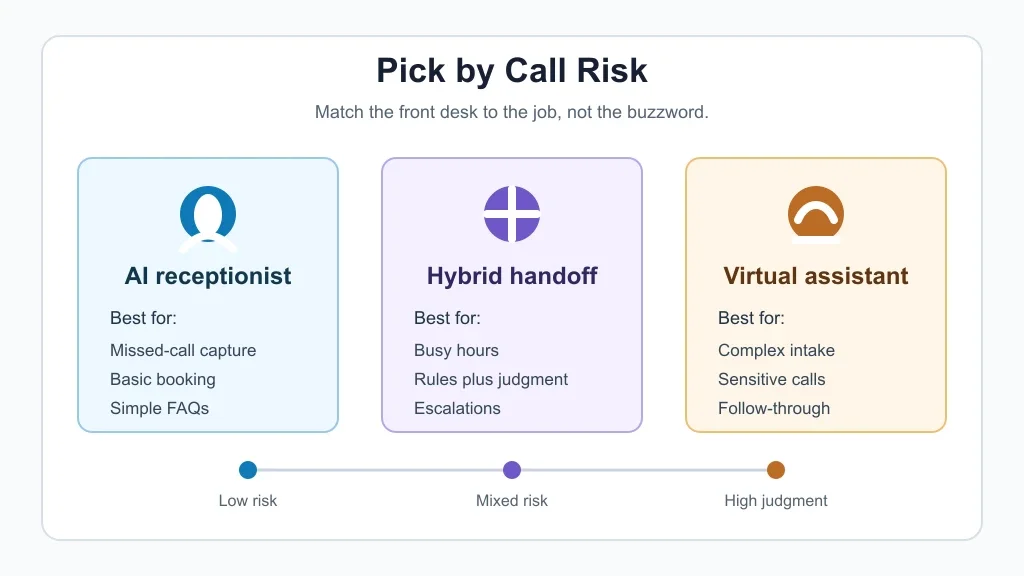
For many small businesses, the best front desk is not fully AI or fully human. It is a layered model:
- AI answers every call immediately.
- AI handles simple intake, booking, and FAQs.
- Rules flag risky or unclear calls.
- A virtual assistant or staff member takes over when judgment is needed.
- Follow-up automation keeps the lead from going cold.
That structure gives you speed without losing control. It also lets you improve in stages instead of redesigning the whole front desk in one pass.
How to Choose by Workflow
Match the front-desk choice to the workflow behind the call. A phone answer is only useful if the next step happens cleanly.
If callers mostly need basic information, start with an AI phone answering service for small business and a short script. If callers need quotes, connect the call flow to quote follow-up automation so estimates do not sit unanswered.
Contractors may need intake tied to AI estimate automation or proposal automation. Home service teams often need routing across jobs, quotes, scheduling, and reminders, which is why a broader home service automation workflow may matter more than the phone agent alone.
Cleaning companies, real estate agents, and salons each need different rules. A cleaning business may care about addresses, access notes, and recurring jobs, making cleaning business automation the better planning frame. Agents may care more about lead speed, listings, and follow-up, which changes the shape of AI automation for real estate agents. Salons need calendar control, deposits, and service duration rules, so AI appointment scheduling for salons deserves its own setup.
What to Automate Around the Front Desk
Phone automation gets better when it is connected to the rest of the admin stack. Without that, you get cleaner call notes but the same follow-up workload.
Use customer intake forms when callers need to provide structured details. A practical AI customer intake form automation can collect the facts before a human reviews the case. Use AI email triage when voicemail, inbox, and web leads all compete for attention.
Billing, documents, and admin work can sit behind the same front-desk process. For example, a virtual assistant might handle sensitive payment conversations while AI invoice reminders take care of routine nudges. If calls create forms, contracts, or onboarding packets, pair the front desk with document automation so staff are not retyping the same details later.
Meeting-heavy teams may also connect calls to AI meeting notes automation so decisions and tasks are captured after the conversation.
Local websites need the same boundary rules. A phone assistant and an AI chatbot for a local business website should agree on what they answer, what they collect, and when they escalate.
Implementation Checklist Before You Buy
Do this before signing up for any AI receptionist or virtual assistant package:
- List your top 20 call reasons from the last month.
- Mark each reason as low, mixed, or high judgment.
- Write the approved answer for low-risk calls.
- Define the handoff trigger for risky calls.
- Connect booking, CRM, SMS, and email only after the script is stable.
- Review call transcripts weekly during the first month.
- Track booked jobs, lost leads, bad handoffs, and owner time saved.
If you are building with no-code tools, keep the first version small. A starter stack like no-code AI automation for small business should prove one workflow before you add ten more.
When to Avoid AI Reception
Skip or heavily limit AI reception when calls are legally sensitive, medically sensitive, emotionally charged, or hard to recover from if the answer is wrong. Also slow down if your booking rules change every week or your team cannot review transcripts.
Customer service is a different risk profile from basic answering. If you need ticket routing, reply drafting, and escalation logic, plan around AI customer service automation guardrails rather than a simple phone script.
Contractors should be careful too. A general AI receptionist may collect a lead, but AI workflow automation for contractors needs job type, scope, site details, scheduling rules, and quote follow-up working together.
Quick Checklist
- Choose AI for repeatable, low-risk calls.
- Choose a virtual assistant for complex or sensitive conversations.
- Use a hybrid setup when call volume is high but exceptions matter.
- Write handoff rules before connecting live systems.
- Test booking, CRM, and follow-up workflows with fake calls first.
- Review transcripts and outcomes every week at launch.
- Measure lead capture, booked appointments, bad handoffs, and owner time saved.
Official Source
Official source: For tool-connected AI workflows, see OpenAI tools documentation.
Pick the front desk model that matches the risk of the conversation. AI is excellent for immediate response and repeatable intake. A virtual assistant is still better when the caller needs judgment, care, and follow-through. For most small businesses, the smartest answer is a measured hybrid that starts small, watches the handoffs, and improves from real call outcomes.
Frequently Asked Questions
is an ai receptionist better than a virtual assistant?
An AI receptionist is better for fast, repeatable call handling. A virtual assistant is better for complex calls, sensitive issues, and tasks that need judgment after the call.
how much does an ai receptionist cost for a small business?
Costs vary by provider, call minutes, setup, integrations, and whether you need human backup. Compare total monthly cost against missed leads, saved owner time, and bad-handoff risk.
can an ai receptionist book appointments?
Yes, if your calendar rules are clear and the system is connected correctly. Test service length, buffers, location limits, cancellation rules, and confirmation messages before going live.
what can a virtual assistant do that ai cannot?
A virtual assistant can handle unclear requests, emotional callers, complex scheduling, judgment calls, relationship repair, and follow-through across messy systems.
should a small business use ai phone answering?
Use AI phone answering when missed calls are costing you leads and most first-step conversations are predictable. Keep a human handoff for complaints, custom quotes, and sensitive topics.