Tool Comparisons
CRM Automation Tools Small Teams Can Actually Run
Choose the best crm automation tools for small business with a workflow-first checklist, comparisons, and buying guardrails.

best crm automation tools for small business is a buyer-intent search, but the right answer is not a universal top-ten list. A small service company, a solo consultant, and a retail operator need different follow-up rules, different handoffs, and very different tolerance for setup work.
Start with the work your CRM must take off someone's plate. Then compare tools by the automations you will actually switch on in the first 30 days.
| What you see | Likely cause | First move |
|---|---|---|
| New leads sit untouched for a day | No owner, reminder, or stage rule is created when the lead arrives | Automate assignment and a same-day follow-up task |
| Quotes are sent, then forgotten | The CRM records the deal but does not create next actions | Add quote-age reminders and stale-deal alerts |
| Staff keep separate spreadsheets | The CRM is too hard to update or does not match the real workflow | Simplify fields before adding more software |
| Reports look wrong | Stages, sources, and close reasons are inconsistent | Clean the pipeline definitions and require fewer fields |
| Automations annoy customers | Sequences keep running after a reply, booking, or sale | Add stop conditions and a human review lane |
best crm automation tools for small business: the practical shortlist
Use this shortlist as a starting point, not a verdict. CRM buying goes wrong when a team chooses the tool with the longest feature page instead of the tool that matches its next bottleneck.
- HubSpot CRM: Best first stop when web forms, email capture, contact records, and simple sales follow-up need to live together. It is often the cleanest start for small teams that want a low-friction free CRM before paid hubs enter the picture.
- Zoho CRM: Best broad suite option for owners who want sales automation, reporting, and room to configure processes without jumping straight into enterprise software.
- Pipedrive: Best for teams that think in deals, stages, activities, and follow-up discipline. It works well when the core problem is "we lose track after the first conversation."
- monday sales CRM: Best for visual operators who want CRM stages to connect with work boards, service handoffs, onboarding steps, or internal approvals.
- Freshsales: Best to evaluate when you want CRM, communication, and service context close together and prefer a package that feels less like a blank canvas.
- Salesforce Starter or Pro Suite: Best for small teams expecting more complex permissions, reporting, or a future handoff to a larger sales operation.
Choose by workflow, not by feature count
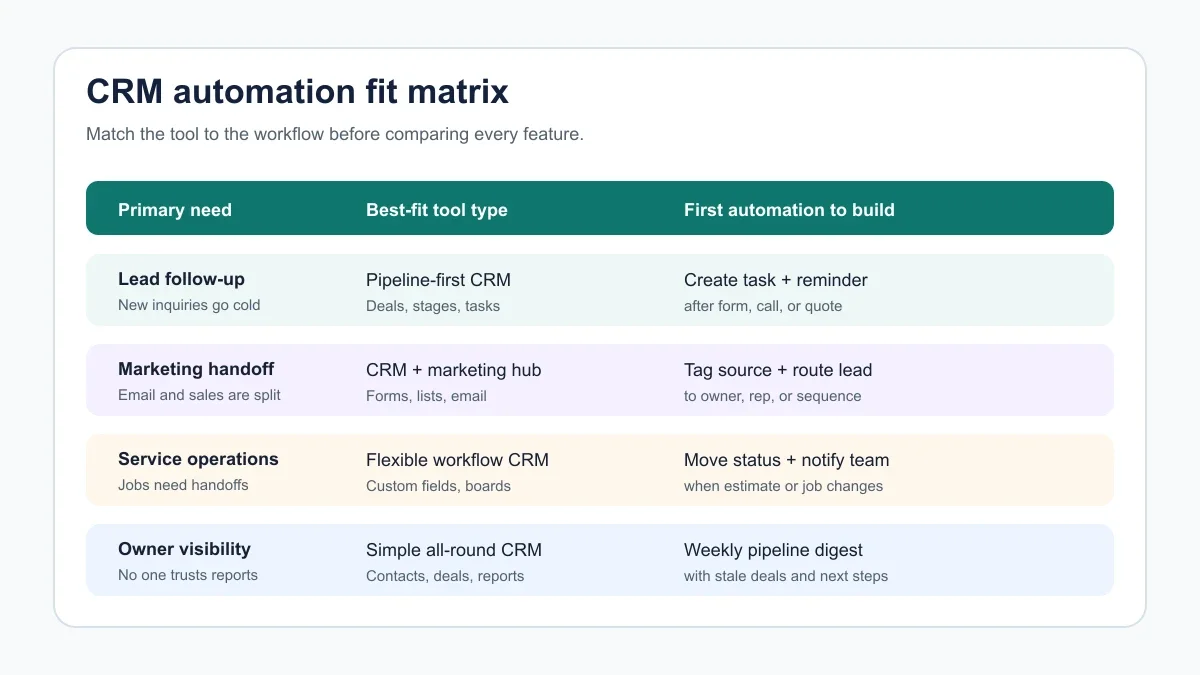
A CRM automation tool should fix a named workflow. "Keep better track of customers" is too vague. "Create a task two days after a quote is sent if no reply came in" is specific enough to test.
For lead-driven teams, the first workflow is usually capture, assign, respond, and follow up. For service teams, the first workflow may be intake, estimate, schedule, job status, invoice, and reactivation. Different shape, different CRM fit.
Owners who are still deciding whether automation will pay back the setup effort should run the numbers with an automation ROI calculator. A CRM that saves two hours a week but takes 60 hours to configure is not automatically a win.
Tool-by-tool fit for small teams
HubSpot CRM
Pick HubSpot when your website, forms, emails, and sales pipeline need to connect quickly. The appeal is not just contact storage. It is the simple path from an inbound lead to a contact record, owner, task, and nurture path.
Watch the upgrade path carefully. HubSpot can start free, but the moment you need heavier automation, paid seats, marketing features, or advanced reporting, plan selection starts to matter.
Zoho CRM
Choose Zoho CRM when you want a configurable CRM inside a larger business software ecosystem. It can make sense for owners who want sales workflows, contact management, reporting, and integrations without rebuilding the company around one sales app.
Expect to spend more time on setup decisions. Zoho can do a lot, which is useful only if you are disciplined about fields, stages, and rules.
Pipedrive
Use Pipedrive when the sales pipeline itself is the workbench. It is a strong fit for quote follow-up, activity reminders, stage movement, and keeping a small team honest about the next action.
It is less appealing if your CRM must also be a marketing hub, service desk, project board, and operations database on day one. That is not a criticism. It is a boundary.
monday sales CRM
monday sales CRM fits teams that already think visually. If a deal turns into onboarding, production, a service visit, or a multi-step internal handoff, its board-based structure can feel more natural than a traditional sales-only pipeline.
Check automation action limits by plan. Visual workflows are useful, but they can become expensive or constrained if every status change fires several actions.
Freshsales and Salesforce Starter
Freshsales is worth a look when you want sales and customer communication context close together. Salesforce Starter or Pro Suite is worth a look when you expect stronger reporting, permissions, and future scale.
Be honest about admin capacity. More powerful CRM systems ask for more governance, especially around fields, permissions, duplicates, and training.
The first five automations to build
Small teams should avoid launching 20 rules at once. That creates noise, makes debugging harder, and gives everyone a reason to distrust the CRM.
- Lead assignment: when a form, call, chat, or referral arrives, assign an owner and create a response task.
- Speed-to-lead reminder: alert the owner if a new lead has no reply, call, or booked appointment within a defined window.
- Quote follow-up: create a timed reminder after a quote or proposal is sent, then stop the reminder after a reply or sale.
- Stale deal alert: flag deals that have not moved for seven, 14, or 30 days depending on your sales cycle.
- Weekly owner digest: send a short summary of new leads, stuck deals, missed tasks, and upcoming renewals.
That set is enough to prove value. Once it works, connect more specialized workflows such as quote follow-up automation, missed-call text-back automation, and AI invoice reminder automation.
How AI should fit inside CRM automation
Let AI help with classification, summaries, drafts, and routing. Keep sales policy, pricing decisions, refunds, and sensitive customer decisions under human control.
Good uses include summarizing a call into next steps, classifying an inbound email, drafting a follow-up from approved talking points, or tagging a lead source from form data. Riskier uses include letting AI promise discounts, change service terms, or decide whether a customer is worth serving.
If your team handles calls, compare CRM handoff rules with AI phone answering for small business and the front-desk tradeoffs in AI receptionist versus virtual assistant. If email is the bottleneck, start with AI email triage before building complex CRM sequences.
Buying checks before you sign
CRM demos are polished. Your messy data, half-finished follow-up habits, and real team capacity are not. Build the buying process around those facts.
- Automation limits: count workflow actions, sequences, triggers, and task rules, not just users.
- Integration depth: confirm whether forms, phone, calendar, email, invoicing, and quoting tools sync both ways.
- Data cleanup: ask how duplicates, imports, old spreadsheets, and required fields are handled.
- Stop rules: make sure automations pause after replies, booked calls, closed deals, disputes, or manual owner review.
- Reporting trust: require simple source, stage, owner, and close-reason reports before chasing advanced dashboards.
- Exit path: check export options for contacts, activities, notes, custom fields, and files.
For no-code integrations around the CRM, keep the stack modest. A no-code AI automation stack can connect tools cleanly, but only after the CRM fields and stages are stable.
Workflow examples by business type
Home-service teams often need CRM automation around missed calls, estimates, scheduling, job status, and repeat service. Start with AI automation for home service business, then use AI estimate automation for contractors and AI proposal automation for contractors to tighten the quote-to-close path.
Contractors need job and document context attached to deals, so AI workflow automation for contractors, AI customer intake form automation, and AI document automation are good companion workflows.
Appointment-heavy teams need booking status and reminders to sync with contacts. The salon example in AI appointment scheduling for salons shows how a CRM can support booked, no-show, rebook, and reactivation stages.
Real estate, cleaning, and support-heavy businesses need different signals. Compare AI automation for real estate agents, AI automation for cleaning business, and AI customer service automation before copying a generic sales pipeline.
Finally, build operating rules around the CRM. small-business SOPs with AI and AI meeting notes automation help the team capture decisions, ownership, and follow-up without turning the CRM into another chore.
Quick Checklist
- Name the first workflow before comparing CRM platforms.
- Limit the first version to lead assignment, follow-up, stale deals, and reporting.
- Check current plan limits for automations, sequences, users, and integrations.
- Clean pipeline stages and required fields before importing old spreadsheets.
- Add stop rules for replies, booked calls, closed deals, and human review.
- Test with five real leads or deals before rolling out to the whole team.
- Measure response time, task completion, stale deals, and closed revenue after 30 days.
Official sources
Official sources: HubSpot CRM product page · Zoho CRM pricing page.
Bottom line
The best CRM automation tool is the one that makes your next customer handoff more reliable. HubSpot, Zoho, Pipedrive, monday, Freshsales, and Salesforce can all be sensible choices when the workflow fit is clear.
Do not start with the biggest platform. Start with the follow-up rule your team keeps missing, prove it, then expand from there.
Frequently Asked Questions
what is the best crm automation tool for small business?
The best choice depends on the workflow. HubSpot is strong for a free marketing-to-sales start, Pipedrive is strong for pipeline follow-up, Zoho CRM is a broad lower-cost suite, and monday sales CRM fits visual team handoffs.
what crm is easiest for a small business to automate?
The easiest CRM to automate is usually the one your team will keep updated. Look for simple fields, clear deal stages, built-in task rules, and integrations with your forms, phone, email, and calendar.
is hubspot or zoho better for small business crm automation?
HubSpot is often easier when marketing forms and email handoffs matter. Zoho CRM can be a stronger fit when you want a broader business suite and more configurable CRM workflows at a careful budget.
do small businesses need crm automation?
Small businesses need CRM automation when leads, quotes, appointments, renewals, or service follow-ups are being missed. If the team already follows up consistently, start with reporting before adding more automation.
how much should a small business spend on crm automation?
Start with the cheapest plan that covers the workflow you can prove. Budget for setup time, data cleanup, integrations, and training, not just the monthly software price.