AI Automation
AI Inventory Automation for Small Business: A Practical Setup Plan
Use ai inventory automation for small business to track stock, draft reorders, and keep purchasing decisions under human control.

ai inventory automation for small business is not about letting software buy stock on its own. The safer win is a workflow that catches low stock sooner, cleans up SKU data, drafts reorder decisions, and still lets an owner or manager approve money before it leaves the business.
Start with the repetitive inventory decisions that already follow rules. If your team is guessing from memory, fixing stockouts after customers complain, or copying numbers between your POS and a spreadsheet, automation can remove a lot of avoidable work.
| What you see | Likely cause | First move |
|---|---|---|
| Popular items run out without warning | Reorder points are missing or too low | Set alerts for fast sellers and seasonal items |
| Inventory reports never match the shelf | Sales, returns, damage, and counts are not reconciled | Clean adjustment reasons before adding AI |
| Staff over-order slow products | No sell-through view by item or location | Track weeks of supply before purchasing |
| Supplier orders are rushed | Lead times are not built into reorder rules | Add vendor lead time to every reorder trigger |
| Managers ignore alerts | Too many noisy notifications | Limit alerts to items with real sales impact |
Where ai inventory automation for small business fits
Good inventory automation sits between raw stock data and the purchasing decision. It watches sales, stock counts, returns, damaged goods, supplier lead times, and recent demand. Then it turns those signals into a clear next action.
For a small shop, cafe, clinic, parts counter, or local ecommerce business, that might mean a daily low-stock digest, a suggested purchase order, or a warning that one location is about to run short while another has extra stock.
Start With Clean Inventory States
Before you add AI, define what each stock number means. Available stock, on-hand stock, incoming units, committed orders, damaged goods, and unavailable items should not be treated as the same bucket.
Shopify's inventory documentation separates inventory states such as available, on hand, committed, unavailable, and incoming stock. That distinction matters because a model cannot make a good reorder suggestion if it is fed mixed signals.
Square's inventory tools take a similar practical angle for lean teams: track stock, adjust counts, and set low-stock alerts so managers can act before an item is out. You do not need a warehouse-grade system to start. You do need consistent inputs.
Choose the First Workflow by Business Pain
Pick one inventory pain that costs money every week. Retailers usually start with low-stock alerts. Food businesses may start with ingredient usage and waste. Contractors and repair shops often care more about parts availability and job delays.
If stockouts are the main problem, automate reorder alerts. If dead stock is tying up cash, build a slow-mover review. If staff keep entering the same data twice, connect the POS, ordering sheet, and bookkeeping workflow.
That same discipline applies across operations. Use an AI workflow audit checklist to find the repeated handoffs before you buy a tool. If the numbers matter to cash flow, run the idea through an AI workflow automation ROI calculator before rolling it out.
What AI Should Do, and What It Should Not Do
Let AI summarize, compare, and draft. Be more careful when it can change records, order goods, or message suppliers without review.
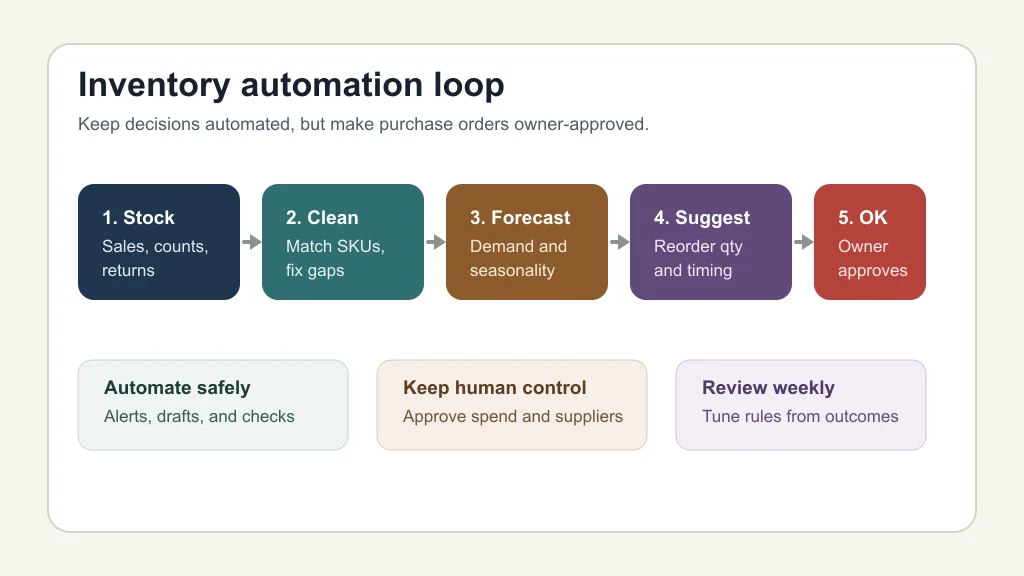
A practical setup might let AI flag unusual sales spikes, suggest reorder quantities, explain why a product is risky, and create a draft purchase order. Final approval should stay with a person until the workflow has months of clean outcomes.
If you are already experimenting with agents, keep guardrails tight. A setup like Zapier AI Agents for small business or a custom tool-calling workflow can work, but only when the agent has narrow permissions and clear approval steps.
Tool Stack Options for Lean Teams
Most small businesses do not need a custom inventory platform on day one. Start with the system of record you already use, usually Shopify, Square, your POS, your ecommerce platform, or your accounting tool.
Then add one automation layer. Zapier, Make, or n8n can move data between your store, spreadsheet, email, Slack, and supplier order process. If you are choosing between platforms, compare n8n vs Zapier for small business based on permissions, error handling, and who will maintain the workflow.
For teams that also need CRM or service workflows, the inventory process may connect to other systems. A parts shortage can affect quoting, scheduling, and customer follow-up, so it may sit beside CRM automation tools, quote follow-up automation, or AI estimate automation for contractors.
A Safe Setup Sequence
Build this in stages. Each stage should produce a visible result before the next one gets permission to act.
- Clean the catalog: merge duplicate SKUs, standardize item names, and remove products nobody sells.
- Set reorder rules: choose minimum stock, preferred stock, supplier lead time, and review owner.
- Create alerts: send a daily digest instead of interrupting staff all day.
- Add AI review: ask the model to explain exceptions, unusual demand, and suggested quantities.
- Draft purchase orders: create drafts only, then require manager approval.
- Review outcomes: compare suggestions with actual sell-through every week.
This sequence pairs well with broader operations work. If you also need cleaner customer records, read the guide to AI CRM lead scoring for small business. If support or admin tickets keep creating inventory questions, connect the process to customer support knowledge base automation.
Rules That Prevent Expensive Mistakes
Inventory automation fails when it confuses speed with control. A reorder rule that ignores supplier minimums, cash limits, storage space, or seasonality can create a different problem: too much stock.
Set spending caps by vendor and item class. Require approval for new products, unusually large orders, and anything with low confidence. Block the workflow from deleting inventory records, changing prices, or committing supplier orders unless a person approves.
Small-business automation mistakes often come from fuzzy ownership. The same pattern shows up in AI automation mistakes small business owners make: nobody owns the exception queue, so the tool looks fine until something breaks.
Where It Connects With the Rest of Operations
Inventory rarely lives alone. A clinic may tie supplies to booking volume. A contractor may tie parts to estimates. A local retailer may tie stock to web chat, email, and phone questions.
For appointment-heavy businesses, inventory alerts may connect to AI booking automation for clinics. For inbound sales, low-stock warnings can shape what a lead-qualification chatbot promises to customers.
Teams that receive supplier emails, invoices, and meeting notes can also connect inventory signals to AI email triage, AI invoice reminders, AI bookkeeping automation, and AI meeting notes automation. That is where inventory stops being a spreadsheet problem and becomes an operations system.
If the workflow begins to span several departments, consider an AI operations assistant for small business. Keep it read-first and approval-heavy until the team trusts the data.
When Not to Automate Yet
Wait if your counts are wildly wrong, your staff do not scan consistently, or your suppliers change pack sizes without notice. AI will not fix a broken counting process. It will just make confident suggestions from bad data.
Also wait if nobody has time to review alerts. A workflow that creates more ignored notifications is not automation. It is clutter.
For customer-facing teams, the same caution applies to related channels like AI phone answering, AI receptionist vs virtual assistant decisions, and AI missed call text-back automation. Automate the repeatable part, then define the human handoff.
Quick Checklist
- Define available, on-hand, incoming, damaged, and committed inventory clearly.
- Start with one costly workflow: stockouts, over-ordering, or duplicate entry.
- Set reorder points, supplier lead times, and approval owners for priority items.
- Use AI to explain and draft, not to buy without review.
- Limit alerts to items that matter financially or operationally.
- Review suggestions against actual sell-through every week.
- Expand only after the first workflow produces cleaner decisions.
Official Sources
Official sources: Shopify explains inventory states in its inventory states documentation. OpenAI explains tool-connected model workflows in its tools documentation.
Inventory automation should make small purchasing decisions clearer, not invisible. Start with clean stock states, narrow rules, and owner-approved reorders. Once that loop works, you can add forecasting, supplier drafts, and cross-system workflows without turning inventory into a black box.
Frequently Asked Questions
what is ai inventory automation for small business?
It is the use of AI and automation tools to monitor stock signals, summarize demand, flag low inventory, draft reorder suggestions, and reduce manual inventory admin for a small business.
how can ai help with inventory management?
AI can spot unusual demand, explain low-stock risks, summarize sell-through patterns, draft purchase order recommendations, and help owners decide which items need attention first.
can ai automatically reorder inventory?
Technically yes, but small businesses should start with draft purchase orders and human approval. Automatic buying is risky when counts, supplier lead times, or cash limits are not clean.
what is the best inventory automation tool for a small business?
The best tool is usually the one connected to your current POS, ecommerce platform, or accounting workflow. Add an automation layer only after your product data and stock rules are reliable.
does inventory automation work for service businesses?
Yes, if the service business depends on parts, supplies, uniforms, consumables, or equipment. The workflow should focus on job readiness, supplier timing, and avoiding last-minute shortages.