AI Automation
The AI Automation Mistakes That Cost Small Businesses Time
Avoid ai automation mistakes small business owners make by fixing weak workflows, messy data, review gaps, and tool sprawl first.

The ai automation mistakes small business owners make usually do not start with bad software. They start with vague handoffs, messy data, and a rush to automate work that nobody has written down clearly.
That does not mean small teams should avoid AI. It means the first job is choosing boring, repeatable workflows where the rules are visible and a person still owns the outcome.
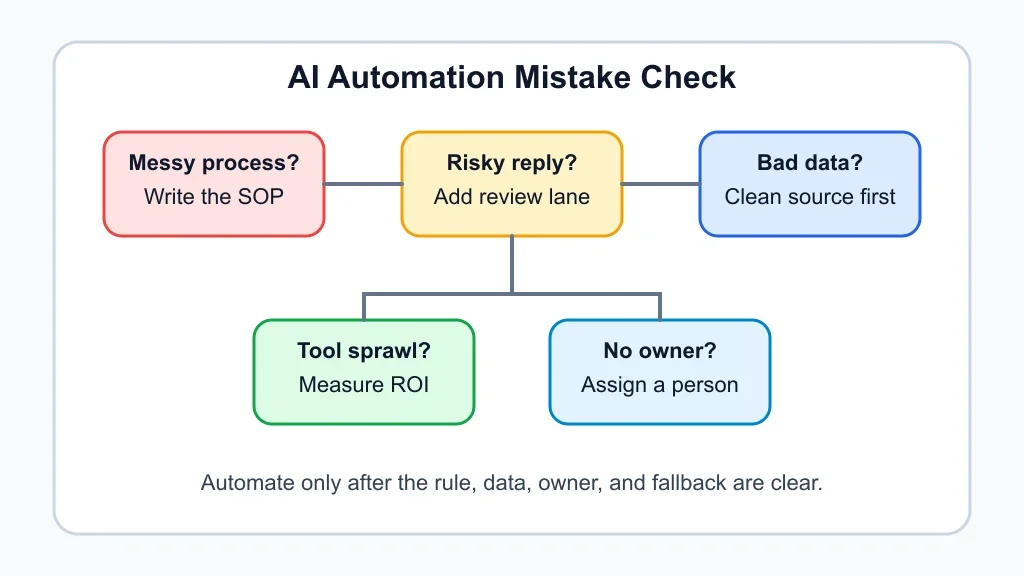
| What you see | Likely cause | First move |
|---|---|---|
| The bot gives different answers each week | No approved source of truth | Write the policy, price, or SOP before connecting the AI |
| Staff ignore the automation | The workflow adds review work instead of removing it | Map the handoff and remove one manual step |
| Customers get odd replies | Messages are sent without human review rules | Route refunds, complaints, legal issues, and custom quotes to a person |
| Tool costs keep creeping up | Too many overlapping apps | Pick one workflow owner and measure hours saved before buying more |
| Reports look impressive but decisions do not change | The data is noisy or not tied to action | Track one decision the automation should improve |
Why Small-Business Automation Goes Sideways
Small businesses usually buy AI to save time, answer faster, or keep leads from slipping through the cracks. Fair goals. The trouble starts when the tool is asked to fix a workflow the team has never agreed on.
Ask a simple question before you automate anything: what should happen when the answer is uncertain? If nobody can answer that, the automation is not ready.
The ai automation mistakes small business owners make first
Starting with the flashiest workflow is the first mistake. Voice agents, chatbots, auto-replies, and AI sales assistants all look exciting because the demo is clean. Real business work is rarely that clean.
Begin with work that already has a repeatable path: lead capture, missed-call text-back, invoice reminders, meeting summaries, intake forms, document routing, or follow-up reminders. For example, missed call text-back automation is often safer than a full phone agent because the goal is narrow and easy to audit.
A broader AI operations assistant for a small business can come later, after the team has proven that smaller workflows save time without creating cleanup work.
Mistake 1: Automating a Broken Process
Automation makes a messy process faster. That sounds useful until the mistake also moves faster.
Write the current process in plain language before picking software. Who receives the request? What information is required? What counts as an exception? Who approves the final answer?
Run a quick AI workflow audit checklist before you connect apps. If the work cannot be explained in ten steps or fewer, shrink the first version.
Mistake 2: Letting AI Talk to Customers Without Guardrails
Customer-facing AI needs a shorter leash than back-office AI. A strange internal summary is annoying. A strange customer reply can cost trust, reviews, and revenue.
Set escalation rules for refunds, complaints, medical or legal questions, price exceptions, angry customers, and anything that sounds like a custom quote. A front-desk workflow should know when to stop.
Compare the risk before you choose a channel. AI phone answering for small business and an AI receptionist or virtual assistant setup can help with triage, but only if staff decide which calls can be handled automatically.
Mistake 3: Feeding Tools Bad Data
Bad data is quiet. It sits in old spreadsheets, duplicate contact records, stale price lists, and service notes that only one employee understands.
Clean the source before the AI reads it. For sales and service teams, that may mean standardizing statuses inside CRM automation tools small teams can actually run. For admin teams, it may mean tagging invoices, contracts, and forms consistently before adding AI document automation.
Mistake 4: Buying a Stack Before Measuring the Workflow
Owners often buy three tools when one checklist would have shown the real bottleneck. That is expensive, but the bigger cost is confusion.
Pick one workflow and measure it for two weeks: volume, time spent, errors, rework, response time, and owner attention. Then estimate the value with an AI workflow automation ROI model before paying for another seat or connector.
Need a practical starting point? Compare setup effort against workflows like AI invoice reminders, AI email triage, and AI meeting notes automation. Each one has a clear before-and-after test.
Mistake 5: Skipping the Human Review Lane
Human review is not a weakness. It is how a small company keeps judgment in the places where judgment matters.
Create three lanes: safe to automate, needs approval, and never automate. Safe work might include reminders, summaries, routing, and status updates. Approval work includes quotes, refunds, custom proposals, and sensitive replies. Never-automate work depends on the business, but legal commitments and high-stakes advice usually belong there.
Contractors can see this clearly in AI estimate automation for contractors and AI proposal automation for contractors. The AI can draft, sort, and prepare. A person still approves scope, exclusions, and price.
Mistake 6: Forgetting the Industry-Specific Exceptions
A cleaning company, real estate team, salon, and home-service contractor do not need the same automation rules. Generic prompts miss the details that create real-world problems.
Build around the work pattern. A home-service company may need job photos, arrival windows, quote approvals, and warranty notes, which makes AI automation for a home service business different from AI automation for a cleaning business. Real estate agents need lead speed, listing details, and compliance-aware messaging, so AI automation for real estate agents needs a different review lane.
Even appointment-based businesses need their own rules. AI appointment scheduling for salons should protect service durations, deposits, reschedules, and staff calendars before it tries to sound clever.
Mistake 7: Never Turning the Workflow Into an SOP
AI workflows drift when nobody owns the written rule. A prompt gets edited, a field name changes, a teammate adds a workaround, and three weeks later nobody knows why the automation behaves that way.
Keep a short SOP beside every workflow. Include the trigger, required inputs, tool owner, review rules, failure alerts, and the monthly check. If the process is still informal, start with small-business SOPs with AI before adding more automation.
Strong intake helps too. A clean AI customer intake form automation can prevent half the downstream errors because the system receives better information from the start.
Quick Checklist
- Choose one repeatable workflow with clear volume, owner pain, and measurable rework.
- Write the current process before buying or connecting another AI tool.
- Clean the source data, especially prices, policies, customer records, and service notes.
- Create safe, review, and never-automate lanes before customer messages go live.
- Test edge cases, including angry customers, missing data, refunds, custom quotes, and urgent requests.
- Measure hours saved, errors reduced, and response-time changes for at least two weeks.
- Turn the final workflow into an SOP and review it monthly.
Bottom Line
Small-business AI works best when it is boring at first. Automate the repeatable work, protect the judgment calls, and measure whether the workflow actually gives time back.
Start narrow with quote follow-up automation or another workflow where the rules are obvious. Then expand after the team trusts the handoff.
Frequently Asked Questions
what are the biggest ai automation mistakes small businesses make?
The biggest mistakes are automating unclear processes, skipping human review, using bad data, buying too many tools, and letting customer-facing AI answer questions without escalation rules.
how can small business owners use ai automation safely?
Start with one low-risk workflow, write the rules, clean the source data, test edge cases, and keep a person responsible for reviewing exceptions and updating the process.
should ai replace customer service for a small business?
No. AI can handle routing, drafts, FAQs, reminders, and simple updates, but complaints, refunds, sensitive questions, and unusual requests should still reach a trained person.
what should a small business automate first with ai?
Choose repetitive work with clear rules, such as missed-call follow-up, invoice reminders, meeting notes, intake forms, email sorting, or quote follow-up. Avoid complex judgment work at the beginning.
how do you know if ai automation is worth it?
Measure the workflow before and after launch. Track time saved, errors reduced, faster responses, fewer missed leads, less rework, and whether staff actually use the new process.
Official sources: AI for small business. Check current program pages before applying.