Operations
Customer Support Knowledge Base Automation That Stays Trustworthy
Use ai customer support knowledge base automation to cut repeat tickets while keeping answers accurate, reviewed, and easy to maintain.

ai customer support knowledge base automation works when it turns messy support knowledge into reviewed, reusable answers, not when it lets a bot guess from stale articles. Small teams get the biggest lift by treating the knowledge base as an operations system: collect the real questions, map them to approved answers, route edge cases to people, and update the source content when customers expose a gap.
That sounds less glamorous than a fully autonomous support agent. Good. Support automation should be boring in the places where customers need accuracy, refunds, account access, or policy answers.
| What you see | Likely cause | First move |
|---|---|---|
| AI answers feel confident but wrong | The knowledge base has old policies, duplicate articles, or no source ranking | Freeze automation on high-risk topics and clean the source articles first |
| Agents keep rewriting the same response | Common ticket intents are not mapped to approved answer blocks | Cluster the last 100 tickets by intent and write answer templates for the top issues |
| Customers reopen tickets after bot replies | The answer is technically correct but misses the customer context | Add routing rules for account-specific, billing, and exception cases |
| The help center has plenty of articles but low usage | Article titles, tags, and internal search terms do not match customer language | Rewrite headings around real phrases from tickets and chat logs |
| Support leaders cannot see what changed | Article updates, AI prompts, and answer performance are not logged together | Create a change log for content edits, bot rules, and escalation thresholds |
What the automation should actually do
Start with the job, not the software. A knowledge-base automation workflow should find the right source article, draft a useful answer, show why that answer was chosen, and learn from the outcome after the ticket closes.
Retrieval is not truth. It is a search step. The system still needs approved content, confidence thresholds, and a handoff path when the question touches billing, compliance, security, cancellations, medical advice, legal advice, or anything else your team does not want improvised.
Where ai customer support knowledge base automation fits
Use automation around repeatable support knowledge: password resets, setup steps, shipping rules, appointment policies, troubleshooting paths, warranty basics, onboarding answers, and internal agent macros. Keep humans close to exceptions, frustrated customers, account-specific judgment, and anything involving money or access.
Small businesses often benefit before they add a public chatbot. An internal agent-assist workflow can draft answers from the knowledge base while a person reviews tone and accuracy. That gives you speed without handing the entire customer conversation to a model on day one.
Want a quick boundary test? If the answer can be written as a clear SOP, it is a candidate. If the answer depends on judgment, negotiation, customer history, or policy interpretation, route it to a person.
Clean the source knowledge before adding AI
Knowledge-base automation fails quietly when source content is dirty. Before you automate, remove duplicates, merge thin articles, mark old policies as archived, and give each article one owner.
Run a simple content audit: compare your top ticket reasons with your top help-center articles. If customers ask about refund timing but the article is buried under a generic billing title, AI retrieval will struggle too. Search systems are only as good as the language they can match.
For a broader cleanup pass, use the AI workflow audit checklist before you wire support content into automations. It helps you find the weak handoffs that usually hide between inboxes, CRMs, docs, and ticket queues.
Design the ticket-to-answer loop
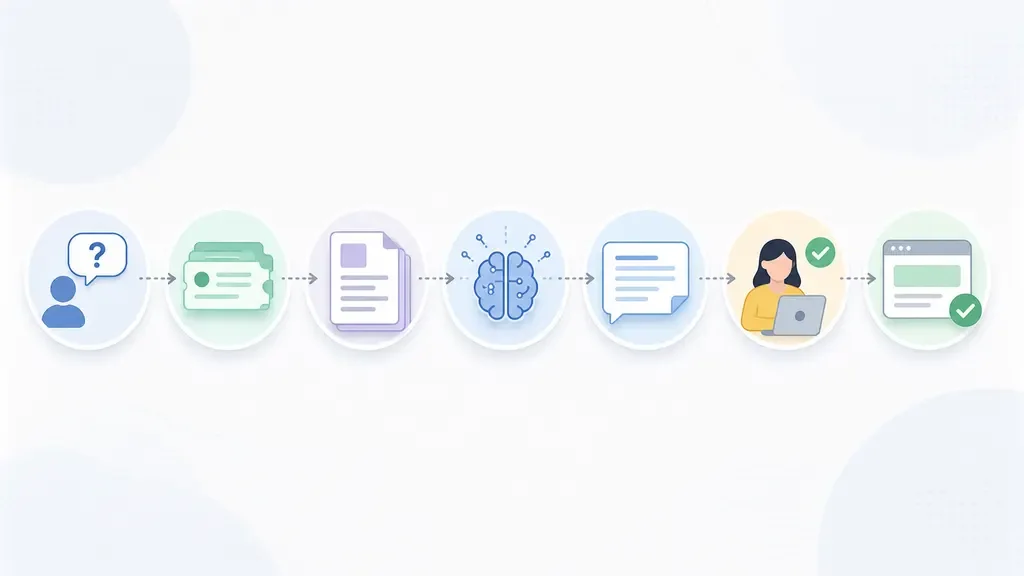
Build the loop in five pieces. First, classify the ticket intent. Second, retrieve candidate articles. Third, draft the answer with source snippets attached. Fourth, require human review when confidence is low or risk is high. Fifth, feed unresolved questions back into the knowledge-base backlog.
That last step matters. Most teams obsess over the reply. Better teams watch the article gaps. If ten customers ask the same follow-up after reading the same help article, the article needs work.
Teams already using AI email triage can reuse intent labels for support tickets. If lead or customer data matters, connect the handoff with CRM lead scoring carefully so support urgency does not get confused with sales priority.
Choose the right level of automation
Level one is internal search improvement. Agents get better article suggestions, but customers never see AI-written text. Level two is agent assist, where AI drafts a response and the agent edits it. Level three is supervised self-service, where customers receive automated answers for low-risk intents. Level four is autonomous resolution, and most small teams should approach it slowly.
Owners often jump straight to the public bot because it feels like the visible win. Honestly, that is where the damage is easiest to see. A safer first win is cutting agent research time on repeat tickets.
For front-desk and intake-heavy businesses, compare this support path with AI receptionist versus virtual assistant workflows, AI phone answering, and missed-call text-back automation. Voice, SMS, and chat need the same guardrails, just with less time for review.
Tool stack decisions for small teams
Keep the stack plain. You need a help center or document source, a ticketing inbox, a retrieval layer, an AI drafting step, and a place to log outcomes. If one tool handles several of those pieces reliably, use it.
Automation builders can still help when your tools do not talk to each other. The n8n or Zapier comparison is useful when you need to route ticket events, update records, and trigger review tasks. If the support workflow depends on customer records, scan the CRM automation tools guide before choosing where the source of truth should live.
Budget matters too. Use the AI workflow automation ROI calculator to compare tool cost against ticket volume, average handle time, and the cost of wrong answers. Saving three minutes per ticket is not worth much if it creates escalations your team has to repair.
Guardrails that keep answers safe
- Approved-source rule: AI can answer only from published, owner-approved articles or selected internal docs.
- Confidence rule: Low-confidence answers become drafts, not customer-visible replies.
- Risk-topic rule: Billing disputes, cancellations, account access, refunds, legal, and safety topics route to people.
- Change-log rule: Every content update records who changed it, why, and which ticket pattern caused the change.
- Review-window rule: New or edited support articles stay in human-review mode until enough answers perform well.
- Escalation-language rule: The bot must say when it is handing the issue to a person instead of pretending it solved the case.
These rules also prevent the common failures listed in AI automation mistakes small business owners make. Most failures are not model failures. They are ownership failures, stale-content failures, and missing-escalation failures.
How this connects to the rest of operations
Support knowledge is rarely isolated. A quote question may come from sales. A warranty question may come from field service. A billing question may come from bookkeeping. The knowledge base should reflect those handoffs instead of treating support like a separate island.
For sales-led teams, connect support answers to quote follow-up automation, estimate automation, and proposal automation so customers hear consistent scope and pricing language. For service teams, map support policies into home service automation, cleaning business automation, and real estate agent automation where response timing and handoff rules affect revenue.
Back office workflows matter too. A support answer about invoices should match AI invoice reminder automation, while refund or account questions may need clean records from AI bookkeeping automation. For recurring meetings or customer calls, AI meeting notes automation can capture the decisions that later become support knowledge.
If the system starts to behave like a cross-functional assistant, read how to choose an AI operations assistant before expanding its permissions. More access means more value, but also more review responsibility.
Measure quality before you measure deflection
Ticket deflection is tempting because it looks clean on a dashboard. Measure answer quality first. Watch reopen rate, customer satisfaction after AI-assisted replies, escalation accuracy, and how often agents reject the draft.
Set a weekly review rhythm. Pull ten accepted answers, ten rejected drafts, and ten unresolved customer questions. If the rejected drafts point to the same missing article, fix the source. If accepted answers still create follow-up tickets, tighten the answer format.
Give agents a fast feedback button: correct, incomplete, wrong source, wrong tone, needs policy review. That feedback becomes the maintenance backlog for the knowledge base, not a vague complaint about AI being bad.
Quick Checklist
- List the top 20 support intents from recent tickets, chats, and calls.
- Map each intent to one approved knowledge-base article or mark it as a content gap.
- Archive duplicate, stale, and conflicting support articles before enabling AI retrieval.
- Start with agent-assist drafts before exposing automated answers to customers.
- Add confidence thresholds and risk-topic escalations for billing, access, policy, and exception cases.
- Review reopened tickets weekly and update the source article, not just the AI prompt.
- Track acceptance rate, reopen rate, article gaps, and human escalation accuracy.
Official sources
Official sources: OpenAI tools documentation · Zendesk AI knowledge base guide.
Bottom line
Customer support knowledge-base automation is worth building when it makes answers easier to find, easier to review, and easier to improve. It is risky when it hides messy policies behind confident language.
Start with the source content. Then add retrieval, drafting, review, and feedback loops in that order. You will move faster, and customers will still know when a real person is taking over.
Frequently Asked Questions
what is AI knowledge base automation for customer support?
AI knowledge base automation for customer support uses approved help articles, internal docs, and ticket context to suggest or draft answers. The safest setup still uses human review for risky, unclear, or account-specific questions.
how do I automate a customer support knowledge base?
Start by cleaning duplicate and outdated articles, then map common ticket intents to approved answers. Add retrieval, AI drafting, review rules, escalation paths, and a feedback loop for missing or weak articles.
can AI write customer support answers from a knowledge base?
Yes, AI can draft answers from a knowledge base, but it should cite or surface the source article for review. Low-confidence drafts and sensitive topics should go to a human before the customer sees them.
what support tickets should not be automated?
Avoid full automation for billing disputes, refunds, cancellations, account access, legal questions, safety issues, angry customers, and anything that depends on customer history or policy judgment.
how do you keep AI support answers accurate?
Keep the source articles current, restrict answers to approved content, set confidence thresholds, review rejected drafts, and update articles when reopened tickets reveal a missing or unclear answer.