Operations
A Practical AI Workflow Audit Checklist for Small Business Teams
Use this ai workflow audit checklist for small business to rank tasks, spot risky handoffs, and choose safer automations first.

If you are looking for an ai workflow audit checklist for small business, start with the boring work: list the tasks, score the friction, and decide where a human still needs control. Small teams do not need a giant transformation plan. They need a clear way to find the workflows that waste time without turning every messy process into a software project.
Use this audit when you are considering AI for follow-up, intake, scheduling, inbox triage, invoices, meeting notes, proposals, or customer support. The goal is not to automate everything. The goal is to make the next automation decision obvious.
| What you see | Likely cause | First move |
|---|---|---|
| Leads wait hours for a reply | No owner, no trigger, or no shared inbox rule | Map the handoff from form, call, or email to first response |
| Staff retype the same details into two systems | Disconnected tools or weak intake fields | Record every field that gets copied and where it should land |
| Automation ideas keep stalling | No scoring method for value, risk, and readiness | Use a simple 1 to 5 score before buying another tool |
| AI drafts sound helpful but create mistakes | Missing guardrails, examples, or review rules | Separate draft-only tasks from tasks that can act on their own |
| Everyone agrees the process is broken | The real workflow lives in side conversations | Interview the person who fixes exceptions, not only the manager |
What You Need Before the Audit
Set aside 60 to 90 minutes and pick one part of the business, not the whole company. A good first audit area is a workflow that touches revenue or customer trust: quote follow-up, missed calls, appointment booking, invoice reminders, or support triage.
- A list of the tools involved, including email, phone, forms, CRM, calendar, accounting software, spreadsheets, and chat.
- Three to five recent examples of the workflow, including one messy case.
- The person who does the work and the person who owns the outcome.
- Basic numbers: weekly volume, average delay, rework rate, and estimated labor time.
- A place to score tasks from 1 to 5 for volume, friction, risk, data readiness, and ownership.
Step 1: Map the Real Workflow, Not the Ideal One
Estimated time: 20 minutes. Write down the trigger, each handoff, every system touched, and the final outcome. Keep the language plain. For example: customer submits form, office manager checks email, details get copied to the CRM, owner approves the quote, customer gets a follow-up message.
Ask the person doing the work to show you the last real example. Screenshots, email threads, call notes, and spreadsheet rows reveal details a meeting will miss. Honestly, most workflow audits fail because they map what leadership thinks happens instead of what the team actually does on a busy Tuesday.
- Name the trigger that starts the work.
- List each manual decision or copy-paste step.
- Mark the waiting points where customers or staff lose time.
- Circle any step where a mistake would create a refund, complaint, privacy issue, or wrong promise.
If the workflow starts with a call, compare it with AI phone answering for small business and missed call text-back automation. If it starts with a form, use the intake structure in AI customer intake form automation.
AI Workflow Audit Checklist for Small Business: Score Each Task
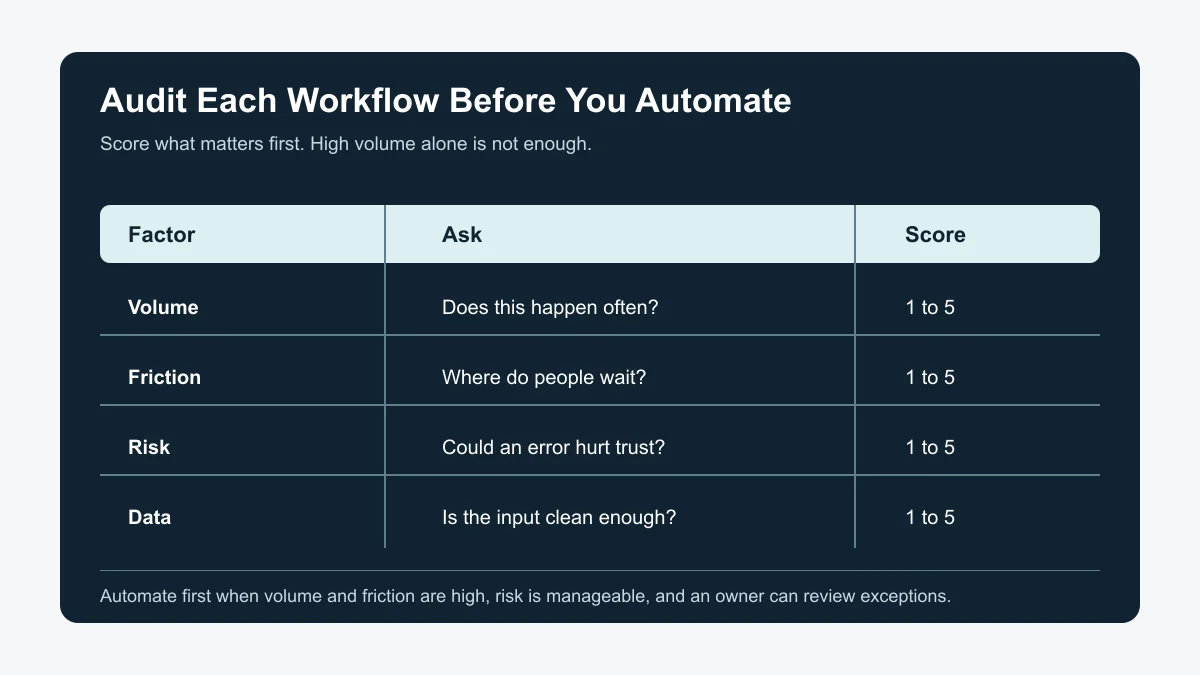
Estimated time: 25 minutes. Score every task from 1 to 5 across five factors: volume, friction, risk, data readiness, and ownership. A task with high volume, high friction, clean data, and a clear owner is usually a better first automation candidate than a rare task with lots of edge cases.
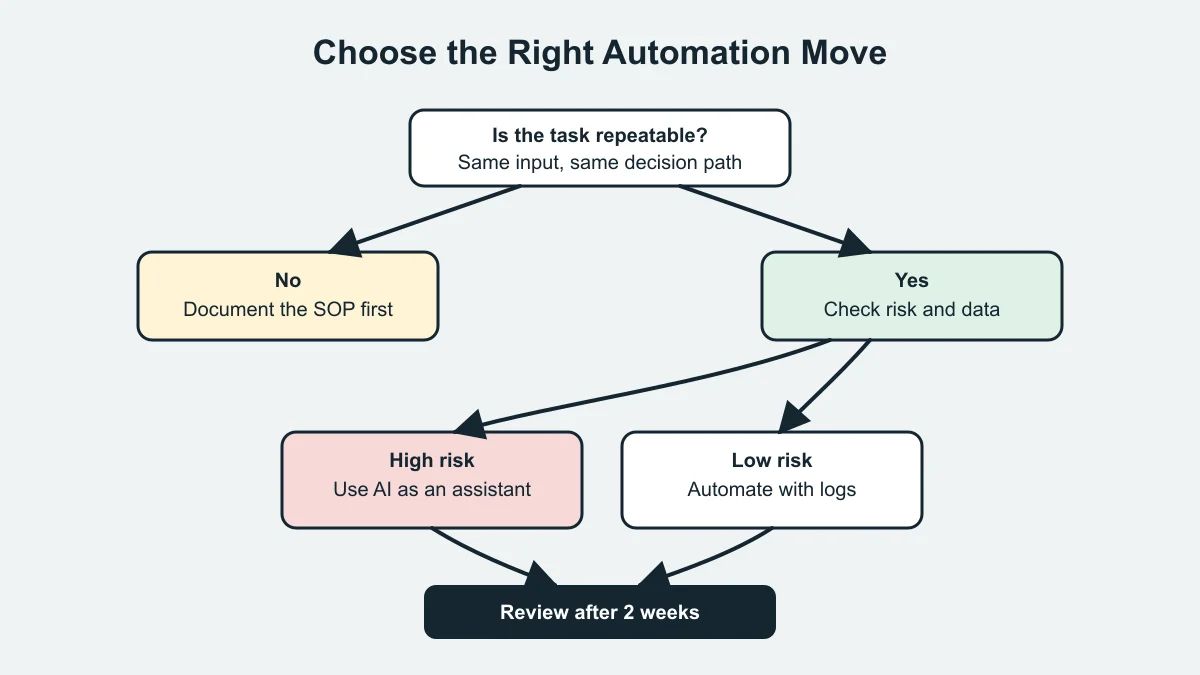
Use this quick rule: automate high-volume routine work, assist judgment-heavy work, and document chaotic work before touching AI. That distinction matters. AI can draft, classify, summarize, route, and remind, but it should not quietly make high-risk promises without review.
- Give volume a 5 when the task happens daily or several times per week.
- Give friction a 5 when staff wait, chase, retype, or check status repeatedly.
- Give risk a 5 when errors affect money, legal promises, personal data, safety, or customer trust.
- Give data readiness a 5 when inputs are structured, consistent, and easy to verify.
- Give ownership a 5 when one person can approve changes and monitor results.
For revenue workflows, pair the score with an AI workflow automation ROI calculator. For sales handoffs, look at quote follow-up automation, AI estimate automation for contractors, and AI proposal automation for contractors.
Step 3: Sort Work Into Automate, Assist, Document, or Skip
Estimated time: 20 minutes. Turn the scores into a decision. Do not let a shiny AI feature decide for you. A task earns full automation only when the rules are clear, the input is reliable, and the downside of a wrong action is low.
Use four buckets:
- Automate: repeatable reminders, routing, tagging, data entry, status updates, and low-risk follow-ups.
- Assist: drafts, summaries, first-pass classifications, quote notes, support reply suggestions, and research prep.
- Document: messy processes that depend on tribal knowledge or unclear approvals.
- Skip: low-volume work, sensitive decisions without oversight, and tasks where the tool cost beats the time savings.
Customer-facing workflows deserve extra care. Before automating replies, read AI customer service automation guardrails. For front desk choices, compare AI receptionist vs virtual assistant. For appointment-heavy businesses, review AI appointment scheduling for salons.
Step 4: Check Data, Privacy, and Human Review Rules
Estimated time: 25 minutes. Before you connect tools, decide what data the automation can read, what it can write, and what it must never do without a human. This is the difference between a useful assistant and a risky shortcut.
NIST's AI Risk Management Framework groups AI risk work around govern, map, measure, and manage. For a small business, translate that into four practical questions: who owns it, where is it used, how will we test it, and what happens when it is wrong?
- Remove sensitive fields the AI does not need.
- Require review for refunds, pricing exceptions, contract terms, health details, legal language, and angry customer replies.
- Store prompts, example inputs, and approval rules where the team can find them.
- Log every automated action that changes a customer record, sends a message, or creates a task.
- Write a rollback plan before launch.
Inbox and document workflows are common first projects, but they can expose sensitive data fast. Use AI email triage for small business, AI document automation, and AI meeting notes automation as narrower templates.
Step 5: Pick One Pilot and Define the First Two Weeks
Estimated time: 20 minutes. Choose one workflow with a clear before-and-after measure. Good pilots reduce delay, retyping, missed follow-up, or status confusion. Weak pilots chase novelty.
Write the pilot as a short operating rule: "When a new web lead arrives, create a CRM contact, tag the service type, draft a reply, and assign a review task to the owner within five minutes." That is testable. "Use AI for leads" is not.
- Choose one trigger and one owner.
- Define the automation's allowed actions.
- Define the human review point.
- Track baseline time, delay, errors, and customer response rate.
- Review results after two weeks before expanding.
Industry-specific examples can make the pilot easier to picture. See AI automation for home service businesses, AI automation for cleaning businesses, AI automation for real estate agents, and AI workflow automation for contractors.
Step 6: Build the Control Layer Before Scaling
Estimated time: 30 minutes. Once the pilot works, add controls before you copy it everywhere. Create a lightweight SOP, assign a backup owner, write exception rules, and set a weekly review habit.
Think of AI automation as a junior teammate with speed but no business judgment. You would not let a new hire change prices, promise deadlines, or handle complaints without supervision on day one. Treat the workflow the same way.
- Save the final prompt or automation rule.
- Write the review checklist for exceptions.
- Set alerts for failed runs, missing fields, and unusual volume.
- Confirm who can pause the automation.
- Update the SOP when the process changes.
For tool choices and operating structure, compare CRM automation tools for small teams and the SOP process in building better small-business SOPs with AI. If cash collection is the pain point, use AI invoice reminder automation as a safer back-office pilot.
Quick Checklist
- Pick one business area, not the whole company.
- Map the real workflow using recent examples.
- Score volume, friction, risk, data readiness, and ownership.
- Sort each task into automate, assist, document, or skip.
- Remove data the AI does not need.
- Require human review for risky promises, payments, and sensitive details.
- Run one two-week pilot before scaling the automation.
Frequently Asked Questions
what is an ai workflow audit?
An AI workflow audit is a practical review of a business process to find which steps are repetitive, slow, risky, or ready for automation. It helps you decide whether AI should automate the task, assist a person, or wait until the process is clearer.
how do you audit a small business workflow for AI?
Map the real workflow, collect recent examples, score each task, check data quality, define human review rules, and choose one pilot. Keep the scope narrow so the team can test results quickly.
what small business tasks should not be automated with AI?
Do not fully automate tasks that involve legal advice, medical judgment, pricing exceptions, refunds, sensitive personal data, angry customers, or final contract promises. Use AI to draft or organize those tasks, then require review.
what is the best first AI automation for a small business?
The best first automation is usually a high-volume, low-risk workflow with clean inputs and a clear owner. Missed-call replies, lead routing, invoice reminders, meeting summaries, and simple CRM updates often fit that pattern.
how often should a business review AI workflows?
Review a new workflow weekly for the first month, then monthly once it is stable. Recheck it any time you change tools, prices, staff roles, forms, or customer promises.
Bottom Line
A good audit keeps AI automation grounded in real work. Map the task, score it honestly, protect the risky steps, and pilot one workflow before expanding. Small businesses move faster when they automate the right work first.
Official sources: NIST AI Risk Management Framework Playbook · AI Companies: Uphold Your Privacy and Confidentiality Commitments. Check current program pages before applying.