Operations
Smarter AI Bookkeeping Automation for Small Business Owners
Use ai bookkeeping automation for small business without losing control: workflows, guardrails, tool choices, and review steps.

AI bookkeeping automation for small business works best when it removes repetitive sorting, chasing, and matching without pretending the books can run unattended. The goal is not to replace accounting judgment. The goal is to make every receipt, bill, deposit, and exception easier to review before month-end.
Small teams usually feel the pain in the same places: receipts arrive late, card charges get guessed into the wrong expense account, invoices sit unpaid, and the owner only looks at the numbers when cash gets tight. Automation can help, but only if you design it around review points, permissions, and clean source data.
| What you see | Likely cause | First move |
|---|---|---|
| Expense categories keep changing | Rules were trained on messy vendor names or too many one-off purchases | Group vendors first, then create narrow rules for repeat charges |
| Receipts pile up after every job | The capture step depends on the owner remembering later | Use receipt upload, email forwarding, or a shared inbox the same day |
| Bank reconciliation takes hours | Payments, fees, and deposits are not matched before review day | Automate matching suggestions, then review exceptions weekly |
| Reports look clean but cash feels wrong | Automation is posting transactions without owner approval | Add an approval queue before final categorization or month close |
| The accountant keeps asking for context | Notes, attachments, and job references are missing from transactions | Capture supporting details at intake, not during tax season |
Where ai bookkeeping automation for small business actually fits
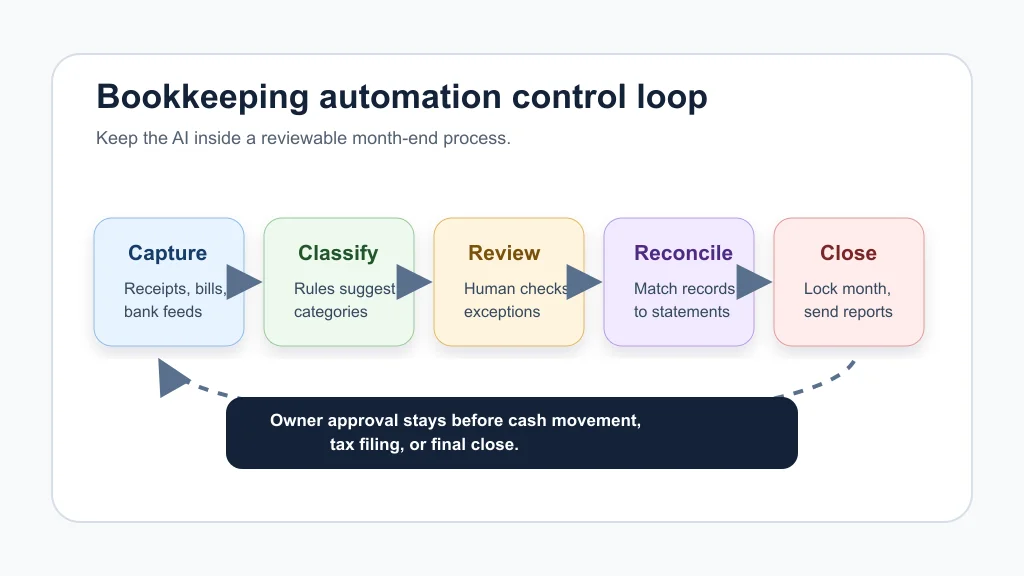
Start with the work that is repetitive, rules-based, and easy to verify. Receipt capture, vendor matching, bank feed categorization, invoice reminders, bill intake, and monthly exception lists are usually safer first moves than letting an agent make broad financial decisions.
Think about the bookkeeping workflow as a control loop. Data comes in, software proposes a treatment, a human reviews anything risky, and the month closes only after the owner or bookkeeper signs off. That loop matters more than the tool logo.
Build the workflow before buying another app
Owners often shop for automation too early. Map the bookkeeping path first: who receives the receipt, where the bill lands, who approves payment, who reviews categories, and when the month gets locked. If that map is fuzzy, AI will only speed up a fuzzy process.
Use an AI workflow audit checklist to spot the jobs that repeat every week. Then compare those steps with the common AI automation mistakes small business owners make, especially automating around bad data or skipping the human checkpoint.
Bookkeeping also connects to the rest of operations. If your sales pipeline creates invoices, your CRM should not live in a separate world from your accounting process. The same thinking behind CRM automation tools for small teams applies here: keep the handoff simple, logged, and easy to reverse.
What to automate first
Receipt and bill capture
Receipt capture is a strong first candidate because the inputs are visible and easy to check. Many accounting platforms can accept uploaded or emailed receipts, extract dates and amounts, and create transactions for review. That does not remove the review step, but it does stop paper from living in coat pockets and truck consoles.
For service businesses, connect this to the front of the job. A technician, cleaner, agent, or office admin should know exactly where to send proof of purchase before the day ends. Pairing this with AI document automation for small business keeps invoices, W-9s, receipts, and job files from scattering across email threads.
Bank feed categorization
Bank rules are useful when they are specific. A monthly software subscription can be categorized automatically. A big-box store charge may need review because it could be supplies, equipment, repairs, or owner spending.
Here is the line I would draw: let rules handle boring repeat transactions, but send ambiguous items to a review queue. That is boring advice, and it is also where a lot of messy books get fixed.
Invoice follow-up and payment reminders
Late payments create bookkeeping noise because the owner starts carrying the real status in their head. Automating polite reminders, payment links, and follow-up notes can reduce that noise before it reaches reconciliation.
If receivables are the bigger problem, look at AI invoice reminder automation before touching the general ledger. For quote-heavy teams, quote follow-up automation and AI proposal automation for contractors can prevent work from getting stuck before an invoice even exists.
The controls that keep automation from making expensive mistakes
Financial automation needs tighter controls than scheduling or email triage. Give the tool only the access it needs, use separate approval permissions for payment movement, and keep audit logs on any workflow that changes transaction status.
Use three lanes. Low-risk repeat transactions can post after review rules are stable. Medium-risk items should enter a weekly review queue. High-risk items, such as payroll, taxes, refunds, loans, and large transfers, should stay manual or require explicit approval.
Good controls also make the rest of your AI stack safer. If you are considering choosing an AI operations assistant, keep finance actions read-only at first. The same goes for an AI email triage system that sees invoices, statements, or vendor notices.
Pick tools by workflow, not by the word AI
Accounting platforms, receipt apps, workflow builders, and AI agents can all claim to automate bookkeeping. The right mix depends on what breaks most often in your business.
- Use native accounting features for bank feeds, receipt uploads, categorization rules, reconciliation, and reports.
- Use workflow automation when data must move between forms, email, CRM, storage, and accounting software.
- Use AI extraction when documents arrive in inconsistent formats and need fields pulled into a review queue.
- Use an agent carefully when the task requires judgment, reminders, summaries, or exception routing, not silent posting.
Before paying for another subscription, run the numbers with an AI workflow automation ROI estimate. If a tool saves 20 minutes a week but adds another reconciliation problem, it is not saving you much.
Examples by business type
A home service company might start with job deposits, materials receipts, vendor bills, and unpaid invoice reminders. The broader playbook for AI automation for a home service business fits well here because field work creates a steady stream of receipts and job notes.
A cleaning company may care more about route costs, payroll handoff, repeat supply orders, and client payment reminders. That is where AI automation for a cleaning business can connect scheduling, expenses, and receivables without adding admin work.
Real estate agents often need commission tracking, marketing expenses, mileage, transaction folders, and vendor payments organized by deal. For that case, AI automation for real estate agents should keep bookkeeping tied to each property or client file.
Contractors have another layer: estimates, change orders, deposits, materials, and progress invoices. AI estimate automation for contractors can reduce double entry if the estimate data flows cleanly into invoices and job costing.
Where bookkeeping automation connects with customer operations
Bookkeeping rarely breaks by itself. Missed calls, vague intake forms, and scattered job notes become messy invoices later. That is why a finance workflow often improves when the customer workflow gets cleaner.
If leads arrive by phone, an AI phone answering service, AI receptionist versus virtual assistant comparison, or AI missed call text-back automation can capture the details that later become estimates, deposits, and invoices. For form-heavy teams, AI customer intake form automation keeps billing names, job addresses, tax details, and requested services consistent from the start.
Meeting notes matter too. A short finance review can turn into clean tasks when AI meeting notes automation captures who will chase missing receipts, approve bills, and review exceptions before close. Then document the routine with building better small-business SOPs with AI so the process survives vacations and staff changes.
Implementation plan for the first 30 days
- Week 1: Export the last three months of transactions and mark every item that required manual cleanup.
- Week 1: Create a short list of repeat vendors, recurring subscriptions, deposit patterns, and high-risk categories.
- Week 2: Turn on receipt capture and define one shared destination for bills and receipts.
- Week 2: Add narrow bank rules for repeat transactions only.
- Week 3: Build an exception review queue for unclear charges, missing receipts, refunds, and tax-sensitive items.
- Week 4: Run the first month-end close with automation suggestions visible but not fully trusted.
- Week 4: Review mistakes, tighten rules, and document what still stays manual.
Resist the urge to automate everything in one pass. A clean 30-day pilot beats a flashy setup that nobody understands by the second billing cycle.
Quick Checklist
- Choose one bookkeeping pain point before adding tools.
- Keep payment movement and tax-sensitive work behind human approval.
- Use receipt capture or email forwarding before month-end cleanup.
- Create narrow rules for repeat vendors, not broad guesses for every charge.
- Review exceptions weekly so reconciliation is not a monthly surprise.
- Attach receipts, notes, job names, or customer context to unclear transactions.
- Document the workflow so the owner is not the only person who understands it.
Frequently Asked Questions
what is ai bookkeeping automation for small business?
It is the use of accounting software, rules, document extraction, and AI-assisted workflows to reduce manual bookkeeping tasks such as receipt capture, categorization, invoice reminders, matching, and exception review. The safest version still keeps a person in charge of approvals and final books.
can ai do bookkeeping for my small business?
AI can help with parts of bookkeeping, but it should not run the entire function without oversight. Use it for draft categorization, data extraction, reminders, summaries, and exception routing while a qualified person reviews the books.
is ai bookkeeping safe for small businesses?
It can be safe when permissions are limited, data sources are clean, payment actions require approval, and every automated rule is easy to audit. It becomes risky when tools can post, move money, or change records without review.
what bookkeeping tasks should i automate first?
Start with receipt capture, recurring vendor rules, invoice reminders, bank-feed matching suggestions, and weekly exception lists. Avoid starting with payroll, tax filings, loans, owner draws, or large transfers.
do i still need a bookkeeper if i use ai?
Most small businesses still need bookkeeping judgment, whether that comes from an owner, staff member, accountant, or external bookkeeper. AI can reduce repetitive work, but it does not understand every tax rule, business context, or cash decision.
Used well, bookkeeping automation gives owners faster visibility and fewer month-end messes. Used carelessly, it just makes mistakes faster. Start with one workflow, keep the approval points clear, and let the system earn more trust only after the numbers stay clean.
Official sources used: QuickBooks receipt and bill forwarding support · OpenAI tools documentation.