Small Business
Lead Scoring Your Small Business CRM Can Actually Use
Use ai crm lead scoring for small business to prioritize better leads, set routing rules, and avoid CRM scoring mistakes.

ai crm lead scoring for small business works best when it answers one plain question: which lead deserves human follow-up right now? For a lean team, the score is not a trophy, a dashboard decoration, or a magic prediction. It is a routing rule that protects scarce sales time.
Start smaller than the software vendors suggest. A useful first model scores fit, engagement, freshness, and next action, then shows the reason behind the score so your team can challenge it.
| What you see | Likely cause | First move |
|---|---|---|
| Hot leads sit untouched for days | No owner or follow-up rule tied to the score | Create one queue for leads above the handoff threshold |
| Sales ignores the CRM score | The model rewards vanity activity instead of buying intent | Score fewer signals and explain why each one matters |
| Old prospects keep ranking high | No score decay for stale activity | Reduce points after 7, 14, or 30 days without a new signal |
| Every web form becomes urgent | Fit data is missing from the intake step | Add one or two qualifying fields before the form reaches sales |
| AI recommendations feel random | CRM history is incomplete or inconsistent | Clean lifecycle stages before trusting predictive scoring |
Start with the decision, not the score
Ask what should happen when a lead reaches a certain threshold. Should a rep call within an hour? Should the lead get a quote request email? Should a poor-fit lead skip the sales queue and enter a nurture sequence?
That decision matters more than whether the score is 72, 86, or 94. Small teams do not need a perfect model. They need a model that changes the next action.
What AI should score in your CRM
Useful scoring combines two families of signals. Fit signals describe whether the lead matches your best customer profile. Engagement signals show whether the person is acting like a buyer.
Fit can include service area, company size, industry, budget range, job type, property type, or use case. Engagement can include a demo request, pricing-page view, reply to a quote email, booked call, repeat visit, or completed intake form.
AI helps when it compares those signals against conversion history, but your history has to be clean enough to learn from. If the CRM has duplicate contacts, vague stages, and missing lost reasons, predictive scoring will mostly automate your mess.
Build a simple model before turning on prediction
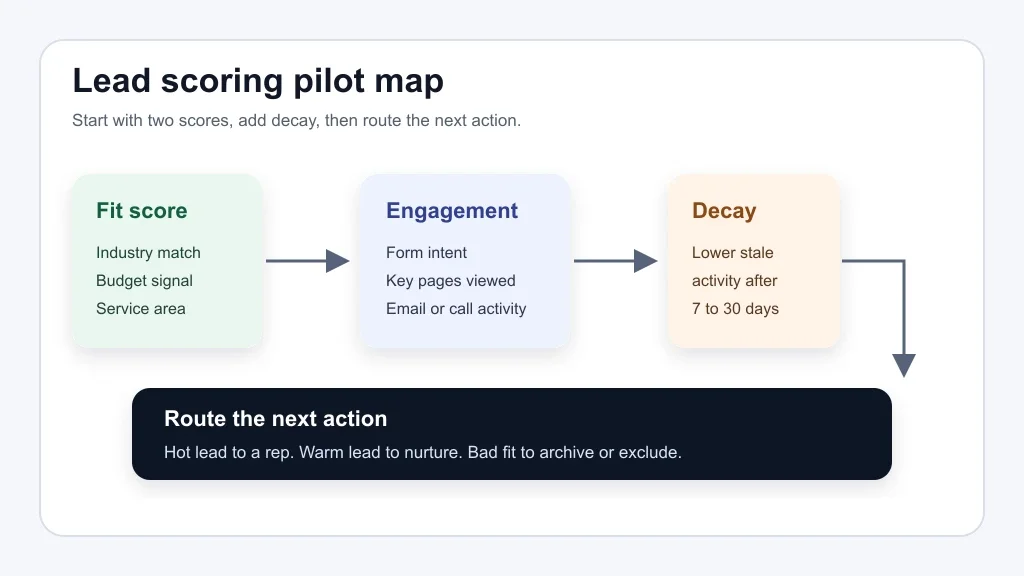
Begin with a manual scoring model your team can explain in two minutes. Give positive points to real buying signals and negative points to bad-fit clues. Then review the top-scored leads every week for a month.
A practical starter model might add points for a pricing inquiry, a booked consultation, a service-area match, and a complete intake form. It might subtract points for an unsupported location, a student research request, a competitor domain, or a budget below your minimum.
After that, test AI scoring in parallel. Compare the AI ranking with closed-won deals, closed-lost reasons, and sales notes. If the AI keeps surfacing leads your team would never call, do not blame the reps first. Look at the data.
Use scoring to reduce follow-up lag
Lead scoring gets valuable when it shortens the gap between interest and response. A small business can lose a good lead while debating whether the CRM score is sophisticated enough.
Connect the score to one workflow. A hot quote request can trigger a task, a same-day email, and a call reminder. A warm lead can enter a short nurture sequence. A poor-fit lead can receive a polite disqualification path instead of sitting in the pipeline forever.
For service businesses, this is where missed call text-back automation, AI phone answering for small business, and AI customer intake form automation become useful inputs, not separate experiments.
Front-desk choices matter too. If the first response is handled by an AI receptionist versus virtual assistant workflow, make sure the call outcome updates the same CRM fields the score depends on.
Make the model visible to sales
Sales teams distrust black boxes for good reasons. If a lead is marked hot, the CRM should show why: pricing page viewed twice, in service area, requested an estimate, and replied to the first email.
Keep the explanation close to the contact record. HubSpot, Salesforce, Zoho, and other CRM platforms approach scoring differently, but the operational rule is the same: reps need enough context to decide what to say next.
Use a short field such as "score reason" or "next best action" if your CRM allows it. Even a basic note is better than forcing a rep to reverse-engineer the number.
Where automation fits around the CRM
Lead scoring is one part of a broader operating system. If the CRM score says a lead is hot but the quote process is slow, the business still feels slow to the customer.
For adjacent workflows, connect the scoring model with quote follow-up automation, AI estimate automation for contractors, and AI proposal automation for contractors. That keeps the next step moving after the lead is prioritized.
Back-office data can help too. AI bookkeeping automation for small business and AI invoice reminders can show whether repeat customers pay on time, buy profitable services, or create extra admin load.
Choose tools by workflow, not feature count
Many small businesses already have enough software. The better question is whether the CRM can capture the signals you trust and trigger the actions you need.
If you are comparing platforms, start with CRM automation tools for small business. Then pressure-test the surrounding stack with an AI workflow audit checklist and an AI workflow automation ROI calculator.
Different industries need different scoring logic. A cleaner may care about recurring job potential and route density, so AI automation for cleaning business has a different scoring path than AI automation for real estate agents or AI automation for home service business.
Common mistakes to avoid
Big scoring models break in small businesses because nobody owns them. Assign one person to review the score rules, the handoff threshold, and the missed follow-up report every week.
Avoid scoring every possible activity. Newsletter opens, generic page views, and old downloads can inflate weak leads. Stronger signals usually come from quote requests, pricing behavior, service fit, direct replies, calls, demos, and repeat engagement.
Watch for automation sprawl as well. A scoring rule should work with AI email triage for small business, AI meeting notes automation, and AI document automation for small business, not create three more places to check.
For a broader sanity check, review the AI automation mistakes small business owners make before you add another scoring layer. If a workflow agent will monitor the queue, define that role using an AI operations assistant for small business playbook.
Quick Checklist
- Define the one sales decision the lead score should trigger.
- Pick three to five fit signals and three to five engagement signals.
- Add negative points for clear bad-fit leads.
- Use score decay so old activity stops looking urgent.
- Show the score reason inside the CRM contact record.
- Review top-scored leads weekly against real outcomes.
- Connect the threshold to a follow-up task, email, or routing rule.
Official sources checked
Official sources: HubSpot Lead Scoring Software · Salesforce Einstein Lead Scoring.
Frequently Asked Questions
What is AI lead scoring in CRM?
AI lead scoring in a CRM uses customer data, sales history, and engagement signals to estimate which leads are most likely to become useful opportunities. The score should guide follow-up priority, not replace sales judgment.
How do small businesses use lead scoring?
Small businesses use lead scoring to decide who gets called first, who enters nurture, and who should be filtered out. The best setup is usually simple: fit score, engagement score, freshness, and a clear next action.
Is AI lead scoring worth it for a small business?
AI lead scoring is worth testing when the business has enough CRM history and a real follow-up bottleneck. If the CRM data is messy or lead volume is tiny, fix intake and routing first.
What CRM data is needed for lead scoring?
You need reliable contact fields, lifecycle stages, source data, engagement history, deal outcomes, and lost reasons. Without those basics, the score may look precise while ranking the wrong leads.
Can lead scoring automate sales follow-up?
Lead scoring can trigger follow-up tasks, reminders, emails, and routing rules. Keep a human review point for expensive deals, referrals, unusual accounts, and leads with incomplete data.
Bottom line
Good CRM lead scoring is not about making sales feel automated. It is about giving a small team a cleaner order of work, a faster response path, and fewer cold leads stealing attention from real buyers.