Workflow Agents
How Small Businesses Should Use Zapier AI Agents Without Losing Control
Learn where zapier ai agents for small business fit, what to automate first, and the guardrails that keep workflows reviewable.

zapier ai agents for small business is a practical search because owners are not looking for another AI demo. They want to know whether Zapier can help with real work such as lead follow-up, intake, support triage, CRM updates, and admin handoffs without creating a mess behind the scenes.
Start with a narrow job, a clear approval step, and a simple way to audit what the agent did. That approach is less flashy, but it is the difference between useful automation and a system your team quietly stops trusting.
| What you see | Likely cause | First move |
|---|---|---|
| Leads sit unanswered for hours | No single owner for first response | Route new inquiries to a draft reply and task |
| CRM records have missing notes | Manual updates happen after the busy work | Summarize forms, calls, or emails before creating records |
| Support replies vary by employee | Knowledge lives in scattered documents | Connect the agent to approved answer sources only |
| Automations break quietly | No review log or exception queue | Send uncertain cases to a human inbox |
Where zapier ai agents for small business fit
Think of a Zapier AI agent as a controlled helper sitting between your apps, not as a fully independent employee. It can read a trigger, interpret context, choose from allowed actions, and pass work into tools your business already uses.
That makes it strongest when the task is repetitive but still needs judgment. Good examples include sorting a website inquiry, drafting a customer reply, summarizing a meeting note, turning an invoice question into a task, or deciding whether a lead should go into your CRM.
Best first workflows for a lean team
Lead follow-up is usually the best starting point because the value is obvious. A new form submission can trigger an agent to classify the request, draft a short reply, create a CRM note, and notify the right person. If you already have leads slipping through cracks, pair this with a tighter quote follow-up automation flow.
Customer support triage is another good candidate. The agent can compare an incoming question with approved help content, draft a response, tag the ticket, and flag anything that needs a human. Teams with scattered support answers should first clean up their customer support knowledge base automation so the agent is not guessing from stale material.
CRM cleanup also pays off quickly. Agents can turn call notes, forms, and email threads into structured lead records, then assign a next step. For teams that care about sales prioritization, connect that with AI CRM lead scoring so the agent is not treating every inquiry as equally urgent.
Finance workflows need more caution. Drafting payment reminders, matching invoice questions to account records, and creating review tasks are useful. Sending final payment demands without human review is not. Use the same mindset you would use for AI invoice reminder automation: helpful drafts first, final decisions later.
Build the agent around one decision
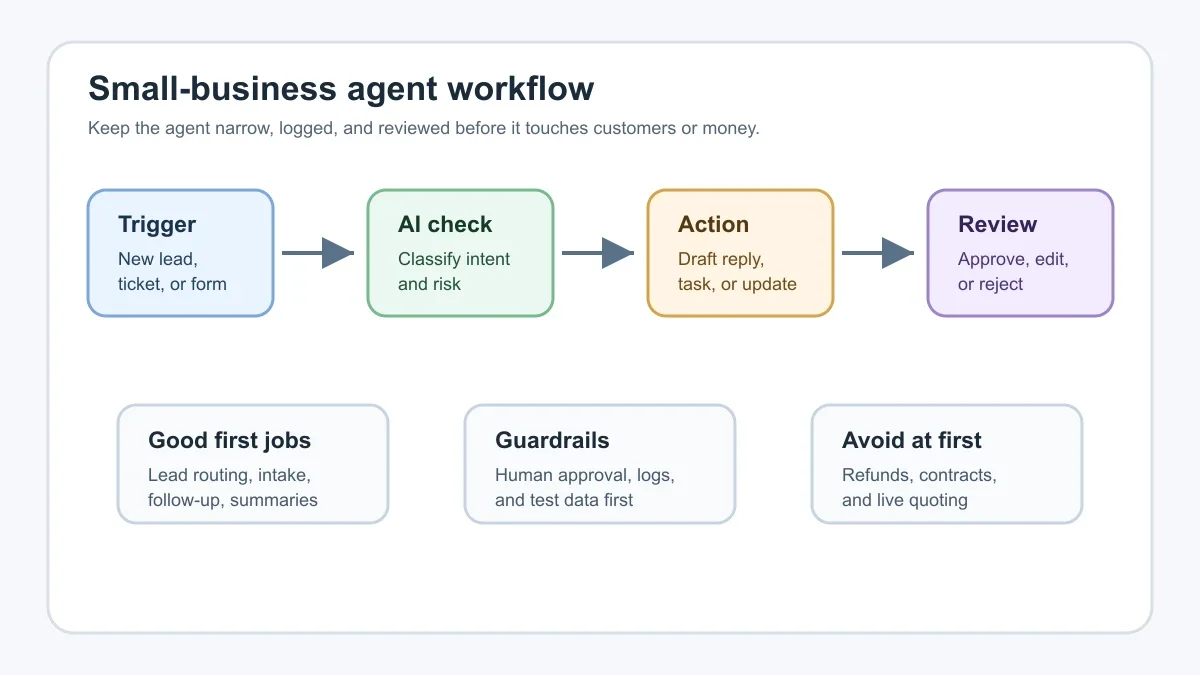
Small teams often fail by asking one agent to handle an entire department. A better version asks the agent to make one narrow decision. For example, "Is this inquiry a sales lead, a support question, or spam?" is much safer than "Handle my inbox."
Once that decision is reliable, add one action. The agent might create a task, draft a message, update a spreadsheet, or send a Slack alert. Keep each step visible so you can tell whether the issue came from the trigger, the agent instruction, the app connection, or the approval process.
If you have not mapped your process yet, run an AI workflow audit before building. It will expose the places where your current process is too vague for an agent to follow.
Use Zapier when connections matter more than custom code
Zapier is useful for small businesses because the platform connects to thousands of apps and gives non-developers a way to wire triggers, AI steps, filters, and actions together. That matters if your current work moves across Gmail, forms, calendars, CRMs, spreadsheets, help desks, accounting tools, and messaging apps.
Custom agent frameworks can be more flexible, and open workflow tools can be cheaper at scale. But they also ask for more setup, hosting, and debugging discipline. If you are comparing platforms, the practical question is not which one sounds more advanced. It is whether your team can maintain it next month. Our n8n vs Zapier small-business comparison is a good next read for that choice.
For CRM-heavy teams, look at whether your CRM can already handle the first layer of automation. Sometimes a dedicated CRM workflow is cleaner than routing every decision through a general automation hub. A quick review of CRM automation tools for small teams can prevent duplicate systems.
Guardrails that prevent expensive mistakes
Approval is the first guardrail. Let the agent draft, classify, summarize, and recommend, then have a person approve customer-facing messages until the pattern is boringly reliable.
Logging is the second. Every agent action should leave a trail: the trigger, the input it used, the decision it made, the app it updated, and the person who approved or overrode it. Without that, you cannot improve the workflow or explain what happened when a customer asks.
Scope control is the third. Give the agent only the app access it needs. A lead-routing agent probably does not need accounting permissions. A support triage agent probably does not need to edit product pages.
Honestly, most bad AI automation starts as a permissions problem disguised as ambition. Before you build more, read through common AI automation mistakes and check whether your first workflow is trying to skip basic controls.
What to automate by business type
Local service companies can use agents to separate booking requests from quote requests, summarize job details, and draft follow-up. A home services team may pair this with home service business automation, while a cleaning company may need routing and recurring-job reminders from a cleaning business automation workflow.
Contractors should focus on estimate intake before proposal writing. Let the agent check whether required job details are present, then create a task for a person to price the work. If estimating is your bottleneck, connect the agent to a safer contractor estimate automation process.
Real estate teams can use agents for lead routing, showing follow-up, listing task reminders, and inbox triage. Keep compliance-sensitive language under review. A better starting point is a controlled real estate AI automation workflow rather than a fully autonomous lead closer.
Phone-heavy businesses should treat AI agents as part of the front desk system. If missed calls are the main leak, start with missed-call text-back automation or compare it with an AI phone answering service before adding more complex agent behavior.
How to pilot without overwhelming your team
Pick one workflow that happens every week, has clear inputs, and wastes visible time. Do not start with your hardest edge case. Start with the task your team already understands and repeats constantly.
Run the agent in draft mode for two weeks. Track how many drafts were usable, how many needed small edits, and how many were wrong enough to worry you. If the agent cannot pass that test, the issue may be your instructions, your source data, or the task itself.
Measure the result in plain business terms. Count faster response time, fewer missed leads, cleaner CRM notes, fewer manual handoffs, or fewer late invoices. If you need a buying case, compare saved time against tool costs with an AI workflow ROI calculator.
Need a broader role than one workflow? A controlled AI operations assistant can make sense after you already have two or three narrow automations working.
Related playbooks worth pairing with this setup
Some workflows support agent work even if they are not the main project. Inbox-heavy teams should review AI email triage before connecting agents to customer messages. Meeting-heavy teams can clean up action items with AI meeting notes automation. Finance-heavy teams may want AI bookkeeping automation to keep records cleaner before agents start creating tasks from financial messages.
Front desk decisions also matter. If your biggest question is whether to automate calls or hire help, compare an AI receptionist with a virtual assistant before building agent workflows around the wrong operating model.
Quick Checklist
- Choose one repetitive workflow with clear inputs and a visible business cost.
- Write the agent instructions as short rules with examples and fallback cases.
- Limit app permissions to the exact tools needed for the first workflow.
- Use draft or approval mode before customer-facing messages go out automatically.
- Log each trigger, decision, action, approval, and override.
- Review results weekly and remove steps that create more checking than savings.
- Expand only after the first workflow is reliable under normal workload.
Frequently Asked Questions
can Zapier build AI agents?
Yes. Zapier provides AI agent and automation features that can connect with many business apps. For a small business, the safer path is to start with a narrow agent that drafts, routes, or summarizes work before it takes final action.
are Zapier AI agents good for small business?
They can be, especially when your team already uses several apps and needs faster handoffs. They are less useful if your process is undocumented, your data is messy, or you want the agent to make high-risk decisions without review.
what should a small business automate first with AI agents?
Start with lead routing, support triage, meeting summaries, intake forms, or CRM updates. Those tasks are repetitive, easy to review, and valuable enough to prove whether the agent is saving real time.
do Zapier AI agents replace employees?
No. Treat them as workflow helpers. They can reduce repetitive admin work, but people still need to approve sensitive actions, handle exceptions, talk to customers, and improve the process.
how much control should I give an AI agent?
Give it the minimum control needed for the first workflow. Drafting a message, tagging a ticket, or creating a task is a good start. Sending final replies, issuing refunds, or changing contracts should wait until the system has been tested and reviewed.
Used well, Zapier AI agents can take low-value coordination work off a small team without hiding what happened. Keep the first workflow boring, measurable, and reviewable. That is how the automation earns more responsibility.
Official sources: Zapier: Automate AI Workflows, Agents, and Apps · AI agents for business automation. Check current program pages before applying.