Workflow Agents
How to Choose an AI Operations Assistant for a Small Business
Choose an ai operations assistant for small business workflows with clear use cases, guardrails, pilot steps, and buying criteria.
An ai operations assistant for small business is not a chatbot you keep open for random questions. For a lean team, it should watch the recurring work, draft the next action, and hand a person a clear decision when judgment matters.
Small businesses usually need this because the owner, manager, or dispatcher is doing three jobs at once: answering customers, updating records, chasing payments, and remembering follow-up. A good assistant reduces that load without quietly taking over decisions it should not make.
| What you see | Likely cause | First move |
|---|---|---|
| Customer replies sit unanswered for hours | No shared triage rules | Route urgent messages first, then draft replies |
| Quotes go out late or incomplete | Scope notes are scattered across calls, forms, and email | Create one intake checklist before drafting estimates |
| Invoices need manual chasing | Payment reminders depend on memory | Trigger reminders from due dates and payment status |
| Managers repeat the same handoff updates | Tasks are not tied to a single operating record | Connect CRM, calendar, inbox, and job notes |
What an AI Operations Assistant for Small Business Should Do
Start with the job, not the tool category. The assistant should turn routine signals into prepared work: draft a customer reply, summarize a meeting, flag a missing intake field, create a follow-up task, or remind a customer about an unpaid invoice.
That sounds simple, but the difference is important. A general AI assistant waits for a prompt. An operations assistant watches a defined workflow and asks for approval at the right point.
Pick the First Workflow by Cost of Delay
Choose one messy handoff where delays hurt revenue or customer trust. For many teams, that means lead response, estimate follow-up, appointment scheduling, invoice reminders, meeting notes, or customer intake.
A quick AI workflow audit checklist helps you separate busywork from work that actually blocks cash, bookings, or customer service. If the task is annoying but low stakes, it can wait.
For front-desk pressure, compare AI receptionist versus virtual assistant workflows before buying a broad operations platform. Phone coverage, web chat, and back-office task routing are related, but they are not the same problem.
Where It Fits in a Small-Business Stack
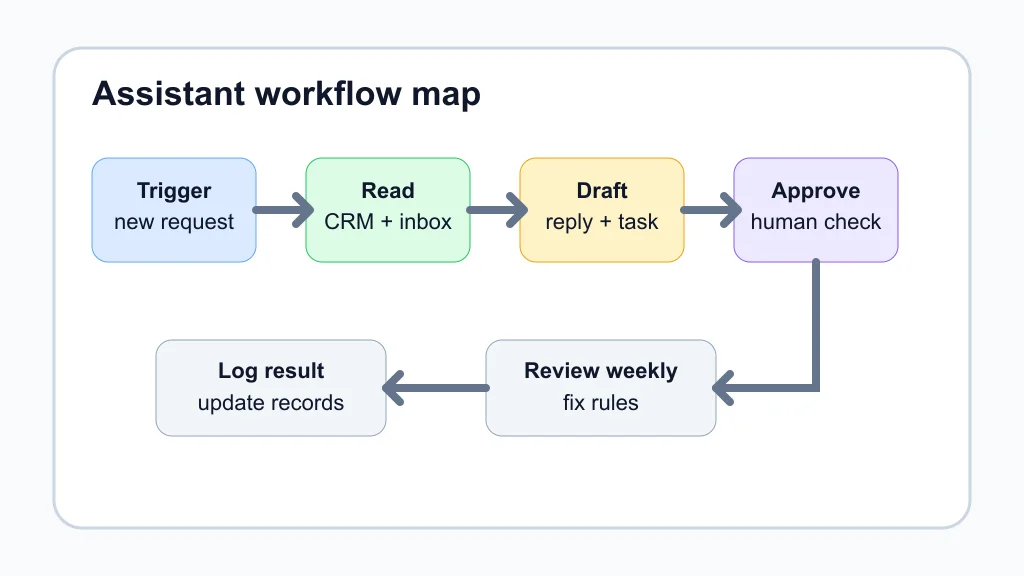
Most teams do not need a brand-new operating system. They need an assistant that can read the systems they already trust, then write back only when the rule is clear.
That can mean a CRM, help desk, shared inbox, booking calendar, forms, accounting software, project board, or document folder. If customer history lives in a CRM, review CRM automation tools for small teams before wiring an assistant around a spreadsheet.
Use workflow-specific examples as patterns. A service team might pair AI phone answering for small business with missed-call text-back automation. A contractor might add AI estimate automation for contractors and AI proposal automation for contractors after intake is clean.
Build Guardrails Before You Automate
Guardrails are the operating rules that keep the assistant useful. Define what it can read, what it can draft, what it can update, and what always needs a human click.
Good guardrails are plain. Use approved tone, required fields, escalation triggers, refund limits, data-retention rules, and a short list of phrases the assistant should never promise.
OpenAI's tools documentation describes function calling and external tools as ways for a model to access defined capabilities, such as custom functions or retrieval. In business terms, that means you can constrain the assistant to specific actions instead of letting it improvise across your whole operation.
Use Cases That Usually Pay Back First
Lead response is often the easiest win because speed matters. A quote request can be classified, checked for missing details, logged in the CRM, and assigned to a person with a drafted response. For a deeper build, use quote follow-up automation as the next layer.
Cash collection is another strong candidate. An AI invoice reminder workflow can check due dates, send polite drafts, and escalate overdue accounts without turning your admin day into a manual chase.
Inbox and meeting work are good support workflows. An AI email triage system can sort messages by urgency, while AI meeting notes automation can capture decisions, owners, and follow-up dates.
Industry examples help when the first workflow feels abstract. Compare patterns for AI automation for home service businesses, cleaning business automation workflows, AI automation for real estate agents, and AI workflow automation for contractors.
How to Pilot Without Creating More Work
Run the pilot for one workflow, one team, and one success metric. Measure hours saved, faster response time, fewer missed handoffs, higher quote follow-up rate, or fewer overdue invoices.
Connect only the systems required for that workflow. A pilot for AI customer intake form automation may need a form, CRM, and email. It does not need access to every file in the company.
Before signing a yearly contract, use an AI workflow automation ROI calculator to compare software cost, setup time, review time, and the actual work removed. Honestly, this is where many teams get fooled by a slick demo.
Buying Criteria That Matter
Look for connectors, audit logs, permission controls, approval steps, easy rollback, and clear pricing. Fancy agent language is less useful than knowing who changed a record, why the assistant suggested it, and how quickly your team can fix a mistake.
Ask vendors how the assistant handles stale records, duplicate customers, missing fields, and conflicting instructions. If the answer is mostly confidence and not process, keep looking.
For appointment-heavy businesses, AI appointment scheduling for salons shows why booking rules, cancellation windows, and staff calendars matter as much as the AI model. For paperwork-heavy teams, AI document automation for small business is a better starting point.
Quick Checklist
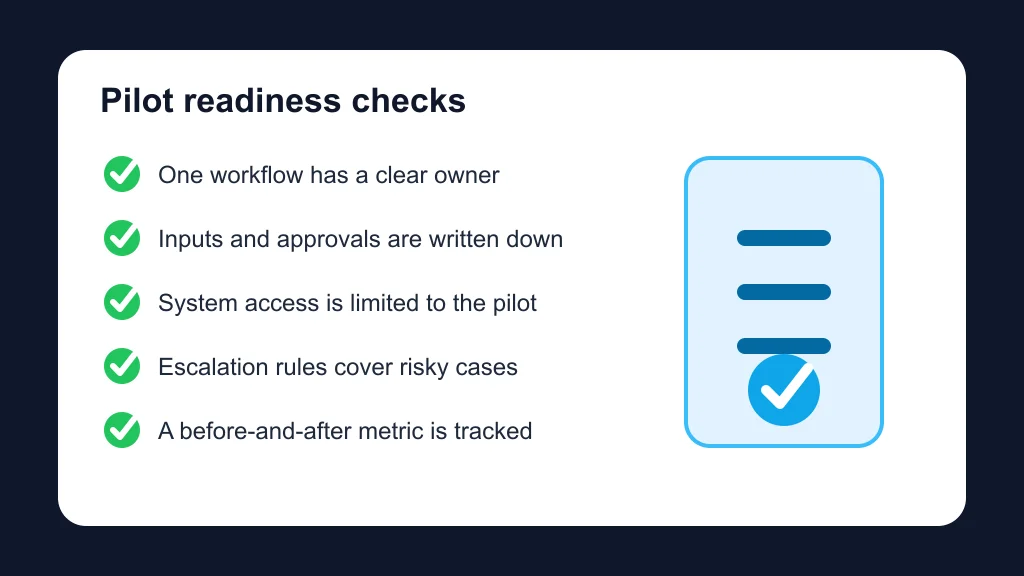
- Choose one workflow with visible delay, rework, or lost revenue.
- Write the trigger, required inputs, assistant action, and approval step.
- Limit system access to only the records needed for the pilot.
- Create fallback rules for missing data, angry customers, refunds, and urgent requests.
- Track one metric before and after launch.
- Review assistant drafts weekly until the rules are stable.
- Expand only after the first workflow saves real time.
Frequently Asked Questions
What is an AI operations assistant for small business?
It is an AI-supported workflow helper that handles repeatable operations tasks such as triage, drafting, reminders, summaries, and task creation while leaving judgment calls to a person.
Is an AI operations assistant the same as a virtual assistant?
No. A virtual assistant may be a person, a general AI chat tool, or a front-desk product. An operations assistant is tied to specific business workflows and systems.
What should a small business automate first with AI?
Start where delay costs money or trust: lead response, quote follow-up, intake, scheduling, invoice reminders, or customer support triage.
How much setup does an AI operations assistant need?
Expect setup time for rules, integrations, approvals, and testing. The smaller the first workflow, the easier it is to launch without disrupting the team.
Can AI make decisions for my business operations?
It can recommend or draft decisions, but sensitive actions should stay under human approval. Keep people in control of pricing, refunds, hiring, legal language, and customer escalations.
Bottom Line
The best assistant is not the one with the longest feature list. It is the one that removes a real bottleneck, follows your rules, keeps humans in the loop, and proves its value in one workflow before it spreads across the business.
Official sources: OpenAI tools documentation · Microsoft 365 AI virtual assistants for small business.