Tool Comparisons
n8n or Zapier: The Small-Business Automation Choice That Depends on Your Workflow
n8n vs zapier for small business, compared by setup speed, workflow depth, app coverage, pricing model, and maintenance risk.

n8n vs zapier for small business is not a simple winner-takes-all comparison. The better choice depends on whether you need quick no-code app connections, deeper workflow control, predictable usage math, or a self-hosted setup your team can actually maintain.
Use this guide as a practical buying filter. By the end, you should know which tool to test first, what to measure during that test, and where each platform can become expensive or fragile for a small team.
| What you see | Likely cause | First move |
|---|---|---|
| You need a lead alert or simple handoff this week | The workflow is mostly app-to-app plumbing | Test Zapier first and count the actions it completes |
| You need branching, custom API calls, or data cleanup | The workflow has logic that simple recipes may hide | Prototype in n8n and document who will maintain it |
| Monthly usage is hard to forecast | Task or execution volume may change as the business grows | Estimate triggers, actions, retries, and failed runs before buying |
| Your team has no technical owner | Automation maintenance will fall back on the business owner | Choose the tool your least technical operator can safely edit |
Quick Answer for Small Teams
Zapier is usually the easier first test when a small business wants common apps connected quickly and does not have someone technical owning automation. Its strength is breadth: Zapier says it connects to more than 9,000 apps, and the setup language is built around triggers, actions, and tasks.
n8n is usually the stronger test when the workflow needs custom logic, API calls, self-hosting options, or a technical person wants to see and shape the flow directly. It can be a better fit for operations-heavy businesses that expect automations to become part of their internal systems, not just one-off shortcuts.
Plain-English Buying Rule
Start with the work that hurts today. Pick one task. Keep it small. Build it once. Let the real owner try it. If they can fix a bad run, the tool may fit. If they feel lost, choose the simpler path.
Do not buy for a dream setup. Buy for the next five jobs your team will run every week. That test keeps the choice honest.
What Changes the Decision
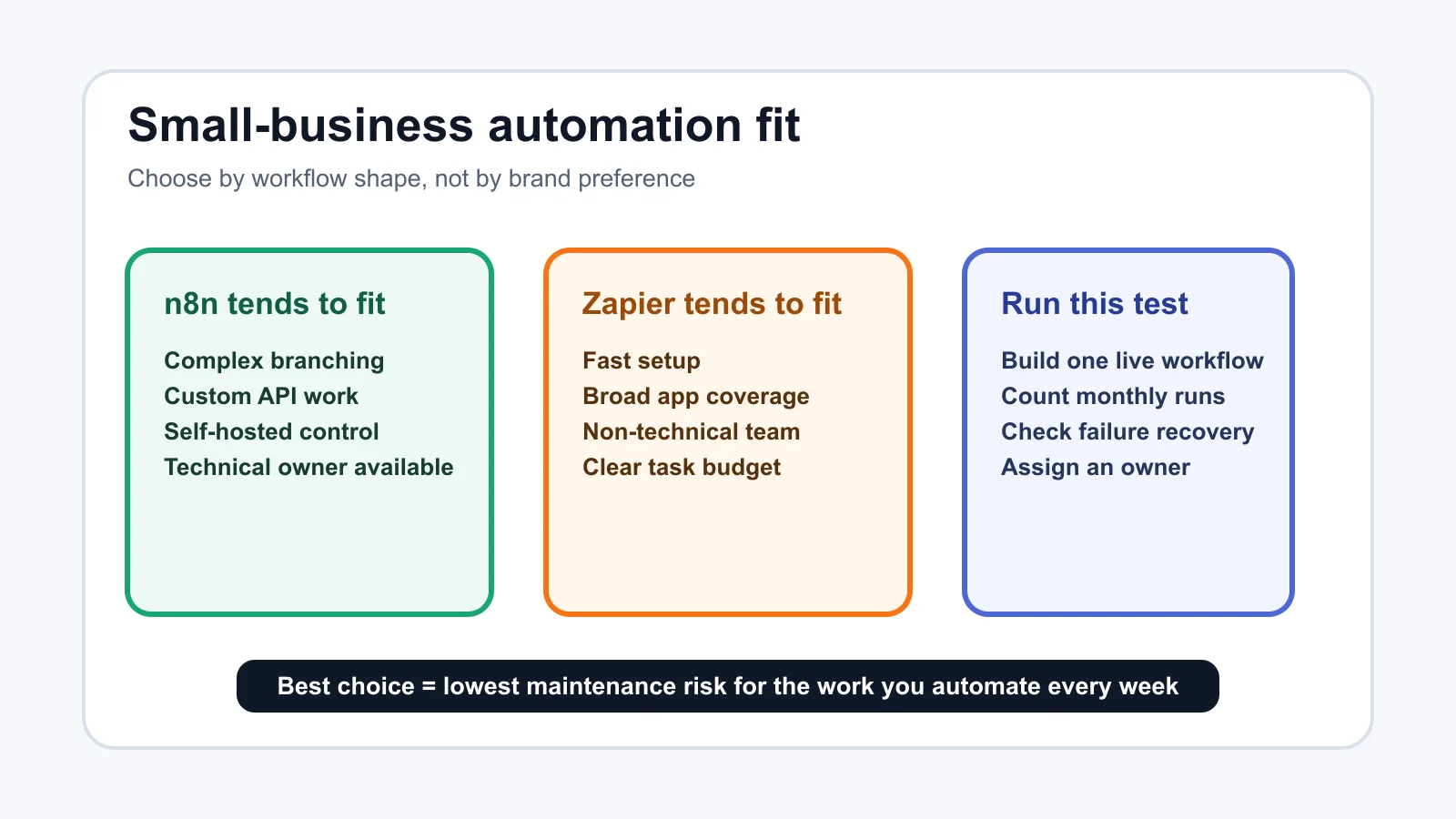
Start with the job, not the feature grid. A salon confirmation text, a contractor estimate follow-up, and a support-ticket triage workflow all look like automation, but they behave differently once real customers, messy data, and missed steps enter the picture.
Five questions usually settle the first round. Which apps must connect? How many times will the workflow run each month? Does a failed run create customer pain or only admin cleanup? Who fixes it on Friday afternoon? How much control do you need over data handling, logs, and deployment?
Zapier tends to feel calmer for owners who want a guided builder and a large app directory. n8n tends to feel better for operators who are comfortable thinking in nodes, webhooks, expressions, credentials, and runtime behavior.
n8n vs zapier for small business: Cost and Workflow Fit
Cost is where the comparison gets practical. n8n's public pricing describes plans around workflow executions, meaning a full workflow run is the unit to watch. Zapier's pricing explains tasks, where successful action steps are the unit that consumes plan usage.
That difference matters when one trigger creates many actions. A simple workflow that adds a lead to a CRM and sends one Slack message may be easy to price in either tool. A deeper workflow that enriches the lead, checks a table, branches by deal size, writes a note, creates a task, and sends two messages needs closer math.
Do not compare only the entry plan price. Compare the monthly shape of your real workflow: trigger count, action count, branches, retries, AI steps, data storage, support needs, and whether the workflow can pause safely when a quota is reached.
Where n8n Makes More Sense
Choose n8n first when your business has a technical owner and the workflow is becoming part of operations infrastructure. Examples include custom intake routing, internal approval flows, AI enrichment with review steps, webhook-heavy systems, and automations that need versioning or deeper debugging.
Self-hosting can also be a reason to consider n8n, but only when someone is ready to manage the server, updates, backups, credentials, and security. A self-hosted tool is not automatically cheaper if it creates downtime or hidden maintenance work.
n8n can also be attractive when one workflow has many steps. Because the platform frames cloud usage around executions instead of charging each step as a separate task, complex workflows deserve a careful side-by-side estimate.
Where Zapier Makes More Sense
Choose Zapier first when speed, app coverage, and non-technical maintainability matter more than deep control. Many small businesses just need reliable connections between the tools they already use: forms, calendars, CRMs, email, spreadsheets, invoicing apps, messaging tools, and lead sources.
Zapier is also easier to hand off when the workflow owner is not technical. A manager can often inspect a Zap, understand the trigger, see the actions, and adjust a field mapping without thinking about hosting, server logs, or custom deployment choices.
The tradeoff is usage discipline. If one customer event creates several successful actions, task use can rise faster than a team expects. Zapier documents pay-per-task behavior and task limits, so check whether you want workflows to continue with extra usage or pause at the plan limit.
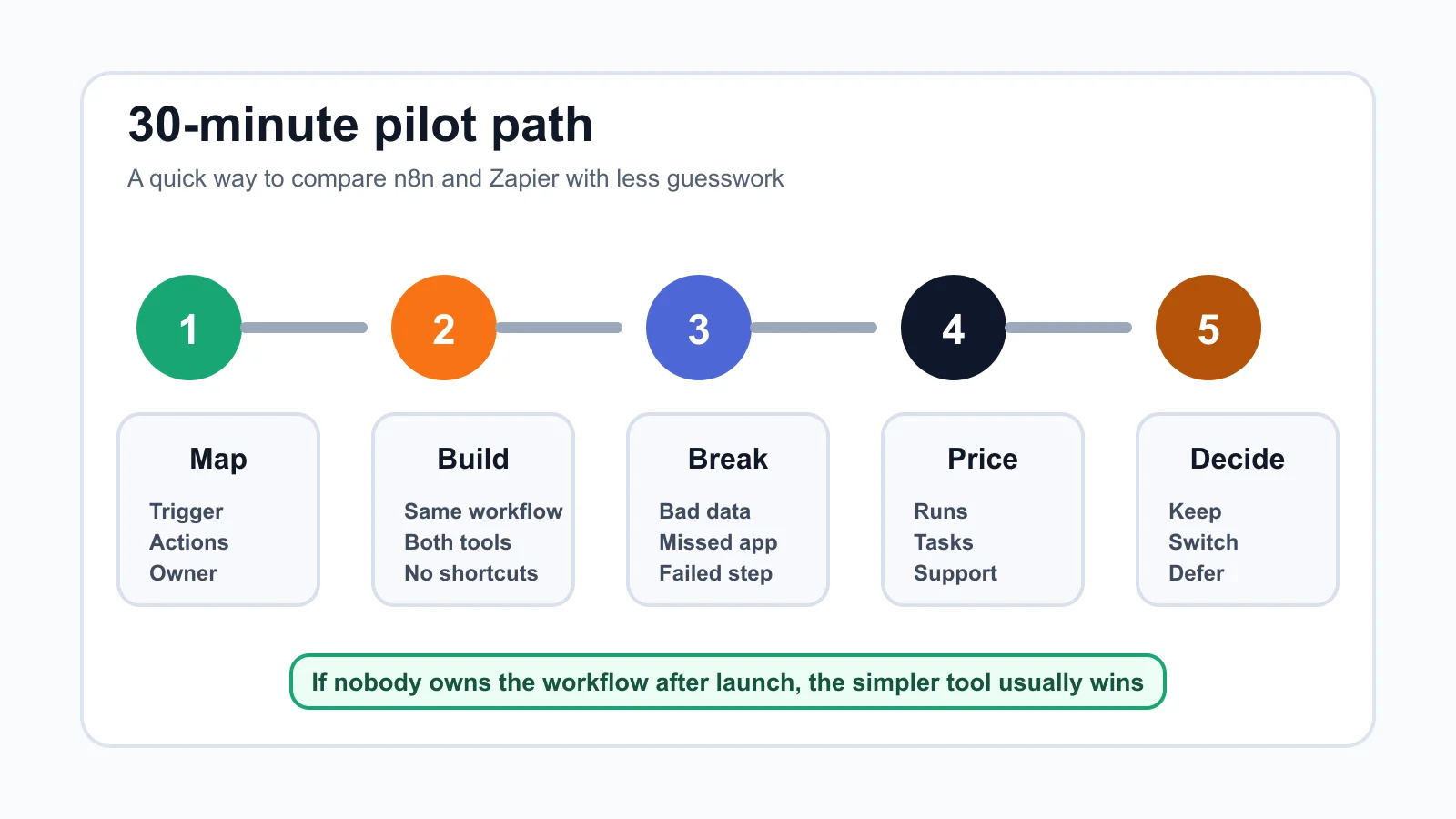
A 30-Minute Test Before You Commit
Pick one workflow that matters but will not hurt the business if the test fails. A good pilot is narrow enough to build fast and real enough to expose the difference between a demo and a working system.
- Map the workflow: Write the trigger, every action, the apps involved, and the person who owns errors.
- Build the same version twice: Use n8n and Zapier with the same inputs, same edge cases, and the same desired output.
- Break it on purpose: Use missing data, a duplicate record, a failed API response, or a bad email address.
- Price the real volume: Estimate monthly executions or tasks after you know how many steps actually run.
- Hand it to the owner: Ask the person who will maintain it to explain how they would change one field or fix one failed run.
A tool that wins the demo but loses the handoff is not the better small-business choice. Automation only saves time when the team can keep it alive after launch.
Practical Decision Table
| Business need | Lean toward n8n | Lean toward Zapier |
|---|---|---|
| Fast app connection | Only if the team already knows n8n | Strong fit for common SaaS handoffs |
| Complex branching | Strong fit when logic is central | Works, but price and readability need checking |
| Self-hosting or tighter control | Strong fit with a technical owner | Not the main reason to choose it |
| Non-technical maintenance | Possible, but training matters | Usually easier to hand off |
| Heavy AI or agent workflows | Good for custom orchestration | Good when app coverage and managed tools matter |
Related Workflow Guides
Use these next when the platform choice depends on the workflow you plan to automate:
- CRM lead scoring
- bookkeeping automation
- automation mistakes to avoid
- AI operations assistant
- workflow audit checklist
- CRM automation tools
- front-desk automation choice
- quote follow-up automation
- AI phone answering
- invoice reminder automation
- automation ROI calculator
- estimate automation for contractors
- missed-call text-back automation
- email triage workflow
- meeting notes automation
- home-service automation
- cleaning-business automation
- real-estate automation
- proposal automation
- customer intake automation
Quick Checklist
- List the exact apps, accounts, and fields your workflow must touch.
- Estimate monthly trigger events before comparing plan prices.
- Count successful actions in Zapier and full workflow runs in n8n.
- Test one ugly real workflow, not a polished template.
- Check who owns failures, credential updates, and broken field mappings.
- Decide whether self-hosting is a real requirement or just an appealing idea.
- Recheck official pricing pages before buying an annual plan.
Bottom line: choose Zapier if your priority is fast, familiar app automation that a non-technical team can maintain. Choose n8n if your priority is deeper workflow control and you have someone who can own the technical side without turning every small change into a project.
Official sources: n8n plans and pricing · Zapier plans and pricing. Check current plan pages before buying.
Frequently Asked Questions
is n8n better than zapier for small business?
n8n can be better when the workflow is complex, custom, or owned by someone technical. Zapier can be better when the business needs fast setup, broad app coverage, and easier handoff to non-technical staff.
is n8n cheaper than zapier?
It depends on workflow shape. n8n pricing focuses on workflow executions, while Zapier pricing focuses on tasks completed by action steps. A multi-step workflow can price very differently from a simple two-step handoff.
should a small business self host n8n?
Only self-host n8n if someone can manage servers, updates, backups, security, and downtime. If that sounds like a burden, n8n Cloud or Zapier may be safer than a self-hosted setup nobody wants to maintain.
what is easier for beginners n8n or zapier?
Zapier is usually easier for beginners because the builder is designed around common app connections and guided setup. n8n is still approachable, but it rewards people who are comfortable with workflow logic and technical troubleshooting.
can n8n and zapier both use AI?
Yes. Both platforms can support AI-powered workflows. The better choice depends on whether you need managed app orchestration, custom AI workflow control, data handling, or a specific integration your business already relies on.